Introduction
Approval emails are sent dozens of times a week in most organizations—yet they're still routinely written in ways that cause delays, create confusion, and frustrate the people on both ends of the thread.
A project manager sends "Can you take a look at this?" with no deadline. A stakeholder replies "Looks good!" without specifying what they approved. The campaign misses its send window. The launch slips.
According to Filestage's survey of 366 marketers and creatives, the average creative review cycle takes 8 days and more than 3 versions—and waiting for feedback slows down over 90% of account managers. At that pace, slow approvals don't just create frustration—they eat directly into revenue.
This post gives you five ready-to-use approval email templates for the most common scenarios—campaign sign-off, design review, budget approval, deadline extensions, and follow-up reminders—plus the structural elements and best practices that turn slow, vague approval threads into fast, clear decisions.
Key Takeaways
- Approval emails fall into two types: requests (asking for a decision) and confirmations (communicating one).
- Every effective approval email needs a clear subject line, brief context, a single ask, and a deadline with a stated consequence.
- Tailor your template to the scenario—campaign review, budget sign-off, or creative deliverable.
- The best follow-up lands 24–48 hours before the deadline—not the day it's due.
- Vague subject lines and missing deadlines are the two most common reasons approvals stall.
What Is an Approval Email (and Why It Matters)?
An approval email is any professional email where one party either requests a decision or communicates that a decision has been made. Both directions matter: poorly written requests stall projects, and vague confirmations send teams back to square one.
The business cost of getting this wrong is real. The Grammarly and Harris Poll State of Business Communication report found that 39% of business leaders associate ineffective communication with missed deadlines, and 45% link it to increased project costs. For DTC brands managing weekly campaign sends, a single stalled approval can mean a missed promotional window and lost revenue.
Most approval bottlenecks come down to three fixable gaps:
- Unclear subject lines that don't signal urgency or context
- Missing deadlines that let requests sit unanswered
- Multi-action asks that create decision fatigue instead of a clear yes/no
Get these right, and most delays disappear before they start.
Types of Approval Emails
Approval Request Emails
Sent when someone needs a decision-maker to review and greenlight something—a budget, a campaign draft, a design, a policy document. The goal is to make saying yes (or no) as fast and effortless as possible.
Approval Confirmation Emails
The decision-maker's response formally communicating their decision. Vague responses like "Looks fine to me!" create problems down the line—especially when an approver claims they didn't notice a specific element that ended up causing issues. Spell out exactly what was approved and under what conditions.
When confirmation doesn't arrive, a follow-up becomes necessary before the window closes.
Follow-Up and Reminder Emails
A distinct type of email for when an approval is pending and a deadline is approaching. These have their own tone and structure—polite, direct, and deadline-anchored—and should go out 24–48 hours before the deadline, not the morning it's due.
Each type serves a different moment in the approval workflow:
- Approval Request — initiates the review and frames the decision
- Approval Confirmation — closes the loop with a documented, specific response
- Follow-Up/Reminder — re-engages a pending decision before the window closes
Key Elements Every Approval Email Should Include
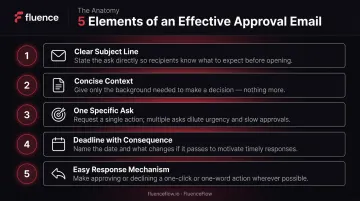
Every approval email that gets a fast response shares the same structure. These five elements are what separate the emails that move projects forward from the ones that stall in someone's inbox:
- Clear, descriptive subject line — State the action needed and the item. "Approval Needed: Q3 Email Campaign – Due Friday" gets acted on. "Quick Question" gets buried.
- Concise context — The approver shouldn't need to dig through prior threads. One to two sentences: what it is, why it matters, and a direct link to the item.
- One specific ask — Approve, reject, or give specific feedback by a set date. Multiple asks split focus. One ask gets answered.
- Deadline with a stated consequence — "We need sign-off by Thursday to hit our Tuesday send" gives both a date and a reason to act. Open-ended requests invite indefinite delays.
- Easy response mechanism — Offer a one-word reply, a direct link to a review tool, or clearly labeled options like "Reply APPROVED or reply with edits." Simpler paths get faster answers.
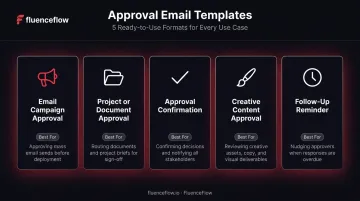
5 Approval Email Templates You Can Use Right Now
Each template below is ready to copy, customize, and send. Swap the bracketed placeholders for your specifics, and you're done.
Template 1: Email Campaign Approval Request
Best for: Marketing managers, DTC brand owners, anyone managing regular email sends.
Subject: Approval Needed: [Campaign Name] – Please Review by [Day, Date]
Hi [Name],
I'm sending over our [Campaign Name] email for your review and approval. This campaign targets [audience segment] and is scheduled to send on [send date] to support [goal—e.g., our summer sale / product launch / reengagement push].
Please review: [Link to email draft or attach file]
When reviewing, here's what to check:
- Subject line and preview text (does it match the offer?)
- Offer clarity (is the discount/CTA clear and accurate?)
- Call-to-action button (correct link and copy?)
To approve: Reply with "Approved" or flag any edits by [specific date/time].
We need your sign-off by [deadline] to hit our [send date] schedule. If we miss that window, we'll need to push the campaign to [next available date].
Thanks, [Your Name]
Template 2: General Project or Document Approval Request
Best for: Project managers, operations leads, anyone requesting sign-off on a business deliverable.
Subject: [APPROVAL NEEDED] [Document/Project Name] – Response Requested by [Date]
Hi [Name],
Attached is the [document name—e.g., Q4 budget proposal / updated return policy / vendor contract] for your review and approval.
Context: [One sentence on what this is and why it's ready for approval now.]
Please review: [Attached / Link here]
What I need from you: Approve as-is, or reply with specific changes by [date].
If I don't hear back by [date], I'll [state default action—e.g., assume we're proceeding / flag for escalation].
Thanks, [Your Name]
Template 3: Approval Confirmation Email (Granting Approval)
Best for: Decision-makers responding to an approval request.
Subject: Approved: [Item Name]
Hi [Name],
I've reviewed [item name] and it's approved to proceed.
Notes / conditions (if any):
- [Condition 1, if applicable—e.g., "Please update the CTA copy to read X before sending."]
- [Or: "No changes needed—proceed as submitted."]
Next steps: [State what should happen now—e.g., "You're clear to schedule the send" / "Please submit the final version to [person] for publishing."]
Let me know if you have questions.
[Your Name]
Template 4: Deliverable or Creative Content Approval Request
Best for: Agencies, designers, copywriters requesting client approval on creative work.
Subject: [Client Name] – [Deliverable Name] Ready for Review – Feedback Needed by [Date]
Hi [Name],
Your [deliverable—e.g., homepage banner / email sequence / video script] is ready for review. This was built to [e.g., "drive clicks to your new product launch page" / "re-engage lapsed subscribers"].
Review here: [Link to shared file, design tool, or preview]
When you review, please focus on:
- Does this match your brand voice and visual identity?
- Is the main message clear to someone unfamiliar with the product?
- Is there anything factually inaccurate or legally sensitive?
To approve: Reply "Approved" or share your edits by [date].
If we don't receive feedback by [date], we'll need to push [next milestone—e.g., the launch date / the print deadline] by [X days].
Thanks for your time, [Your Name]
Template 5: Follow-Up on Pending Approval
Best for: Anyone following up on an approval that hasn't been received.
Subject: Following Up: Approval Needed for [Item Name] – [Deadline] Approaching
Hi [Name],
I wanted to follow up on the approval request I sent on [original date] for [item name].
We're approaching our [deadline], and we need your sign-off to keep [project/campaign/launch] on schedule. If we don't receive approval by [specific date/time], we'll need to [state the consequence—e.g., delay the send / push the launch / escalate to [person]].
To approve: Reply "Approved"—or let me know what's needed before you can sign off.
If anything's unclear, I'm available to talk through it quickly.
Thanks, [Your Name]
Best Practices for Writing Effective Approval Emails
Write for the Approver, Not Yourself
The most common mistake is framing approval emails around the sender's need ("I need you to review…") rather than making the reviewer's job easy. Ask yourself: can this person read the email, understand what they're approving, and respond in under 60 seconds? If not, simplify.
One Email, One Approval
Bundling multiple approvals into a single thread creates confusion and makes follow-up nearly impossible. Each approval item gets its own email thread—trackable, resolvable, and easy to reference independently.
Set the Default to "Yes"
Structure your approval emails so that agreeing requires minimal effort. Options that work well:
- A one-word reply ("Reply APPROVED")
- A single-click approval tool
- A stated default action ("If I don't hear back by Friday, I'll proceed with Option A")
This matters most for recurring approvals. At FluenceFlow, the campaign approval workflow is structured so that DTC brand owners spend only 30–45 minutes per week reviewing campaigns—after an onboarding period where strategy, assets, and goals are locked in upfront. That's what a consistent, predictable approval rhythm looks like in practice.
Use Consistent Naming Conventions
A uniform subject line format—such as [APPROVAL NEEDED] [Item Name] – [Deadline Date]—makes it easy for approvers to filter, prioritize, and action requests in a busy inbox. Microsoft 365 telemetry found the average worker receives 117 emails daily, with most skimmed in under 60 seconds. Scannable subject lines are what get your request noticed first.
Follow Up Before It's Urgent
Send your reminder 24–48 hours before the deadline—not the morning it's due. This gives the approver time to act, signals that you're organized, and avoids the crisis-mode energy that makes stakeholders feel pressured rather than helpful.
Common Mistakes to Avoid
Most approval emails fail for the same predictable reasons:
- No deadline or consequence — "Can you review this?" with no due date is the single most common reason approvals stall. Include a specific deadline and what happens if it's missed.
- Context before the ask — If the approver has to read three paragraphs before understanding what you need, they'll defer the email. Lead with the request, then support it.
- Undefined approval response — An ambiguous "Looks fine to me!" can cause disputes if the approver missed a key detail. Specify what a valid approval looks like: a specific word, a checkbox, or a timestamped reply.
Frequently Asked Questions
How do I write a professional approval request email?
Use a subject line that identifies the item and deadline, open with a one-to-two sentence context summary, attach or link what's being reviewed, state one specific ask, and include a deadline with a reason. The entire email should be readable and actionable in under 30 seconds.
How do I write an email approving a request?
State clearly what you're approving, include any conditions or changes required before proceeding, and outline the immediate next steps so the recipient knows exactly what to do. Avoid vague language like "looks good"—be specific about what was reviewed and what's now cleared.
What should be included in an approval email?
Every approval email needs five things: a descriptive subject line, brief context, a single clear ask, a specific deadline with its consequence, and an easy response mechanism. Leave out any of these and you introduce friction that slows decisions.
How do you politely follow up on a pending approval?
Reference the original request and date, restate the deadline and what's at stake if it's missed, and offer a one-word reply option to make responding as easy as possible. Invite any questions that might be blocking the decision—and keep the tone professional, not accusatory.
What's the difference between an approval request email and an approval confirmation email?
A request is sent by the person seeking a decision; a confirmation is the response from the decision-maker. Both require clarity and defined next steps—the confirmation is where ambiguity most often creates downstream problems.
How do you write a short approval email?
Strip everything that isn't the ask: no pleasantries, no background unless essential, no multi-part questions. One subject line, one sentence of context if needed, one request, one deadline. When in doubt, cut the line—if the reviewer needs more detail, they'll ask.