Introduction
SMS is one of the highest-ROI channels available to DTC brands — but there's a technical constraint that inflates campaign costs for brands that overlook it: the 160-character limit.
Miss it by 20 characters, and you're not sending a slightly longer message. You're sending two billable segments. Multiply that across 10,000 subscribers and 52 weekly sends, and you've created a budget leak with zero upside in deliverability or engagement.
This guide covers everything you need to know:
- What the character limit is and why it exists
- How GSM-7 vs. UCS-2 encoding changes your limit (sometimes by half)
- What happens when you go over — and what it costs at scale
- Practical tips to write within limits without sacrificing impact
Key Takeaways
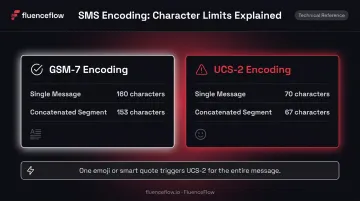
- Standard SMS allows 160 characters under GSM-7 encoding; non-standard characters (emojis, smart quotes) drop that to 70 characters under UCS-2
- Messages over the limit split into segments of 153 characters (GSM-7) or 67 characters (UCS-2) — and you're billed per segment
- One extra segment sent weekly to 10,000 subscribers creates 520,000 additional billable units annually
- Characters like
^ { } [ ] ~ | \and€count as two characters each in GSM-7 - Plain text drafting and a URL shortener are the two fastest fixes
What Is the SMS Character Limit and Why Does It Exist?
The 160-character limit isn't arbitrary. It's a direct product of how SMS was built.
ETSI's GSM 03.40 specification defines the SMS user-data payload as 140 octets (1,120 bits). The GSM-7 alphabet encodes each character at 7 bits — so 1,120 ÷ 7 = exactly 160 characters per message. That math has stayed fixed since the early days of GSM standardization, which began in Europe in the 1980s and produced the first SMS in 1992.
Network infrastructure has advanced considerably since then. The character limit hasn't moved. SMS still routes through protocols built on those 140-octet payloads, which is part of what makes it universally compatible across carriers and devices.
For DTC brands, that universality is the point. SMS reaches customers without app installs, internet connections, or platform algorithms. The channel's reach stays consistent whether a subscriber is on a flagship smartphone or a decade-old flip phone — which is why it remains a reliable revenue driver for retention-focused brands.
Route-specific thresholds: While 160/70 characters are the standard planning rules, some US routes (particularly toll-free numbers) use slightly different segmentation thresholds. Always rely on your SMS platform's route-aware segment counter for final cost forecasting, not just a character count in your head.
SMS Character Encoding: GSM-7 vs. UCS-2
Understanding encoding is non-negotiable if you're managing SMS at scale. Two encoding types govern how many characters you get per message — and they produce very different results.
GSM-7: Your Default 160-Character Allowance
GSM-7 covers 128 characters: standard Latin letters (A–Z, a–z), digits (0–9), common punctuation, and a selection of accented characters. When every character in your message falls within this set, you get the full 160-character single-message allowance.
Watch out for GSM-7's extended characters — these eight symbols each consume two character positions because they require an escape sequence:
^ { } \ [ ] ~ |
A message with four curly braces loses 4 extra characters without ever triggering UCS-2. Most marketers never notice until the segment count jumps.
UCS-2: When One Character Costs You Half Your Limit
Any character outside the GSM-7 set — emojis, smart/curly quotes, em dashes, non-Latin scripts, or accented letters not in the GSM-7 table — forces the entire message into UCS-2 encoding. UCS-2 uses 16 bits per character, which cuts the 140-byte payload to 70 characters.
One out-of-set character drops your entire message limit by more than half.
The Copy-Paste Trap
Drafting in Google Docs, Microsoft Word, or email clients introduces UCS-2 characters automatically:
- Straight apostrophes
'become curly apostrophes' - Straight quotes
"become smart quotes" " - Hyphens become em dashes
—
None of these are in GSM-7. Paste that copy into your SMS composer and you've just cut your character limit from 160 to 70 without realizing it. Always draft in a plain-text editor.
The table below summarizes how each encoding type affects your limits — both for single messages and multi-segment sends.
Quick Reference: Encoding at a Glance
| Scenario | Single Message | Concatenated Segment |
|---|---|---|
| GSM-7 | 160 characters | 153 characters |
| UCS-2 | 70 characters | 67 characters |
What Happens When You Exceed the SMS Character Limit?
How Concatenation Works
When a message exceeds 160 characters (GSM-7) or 70 characters (UCS-2), it's automatically split into multiple segments. Each segment includes a User Data Header (UDH) — 6 octets of metadata that tells the receiving device how to reassemble the parts in the correct order. That header consumes space, leaving:
- 153 usable characters per GSM-7 segment
- 67 usable characters per UCS-2 segment
A concrete example: a GSM-7 message with 180 characters sends as two segments — one with 153 characters, one with 27. On most modern phones and major US carriers, the recipient sees a single continuous message. Your platform bills you for two segments.
Those segments can stack — up to a point. Twilio caps concatenated message length at 1,600 characters for GSM-7 and 700 characters for UCS-2. Exceed those limits and Twilio returns error 21617: the message fails entirely and the customer receives nothing. These are provider-level caps, not universal protocol limits, so check your platform's documentation for its specific maximums.
When Reassembly Fails
Most major carriers and modern devices reassemble segmented messages into a single thread. Some older devices or smaller carriers may not — and customers see separate, numbered fragments (1/3, 2/3, etc.). If your audience skews toward budget carriers or older handsets, keep messages under a single segment whenever possible to guarantee a clean experience.
How SMS Character Limits Impact Your Marketing Costs at Scale
The Billing Mechanism
SMS platforms bill per segment sent, not per recipient message. A campaign where every message runs 170 GSM-7 characters costs double what a 155-character version would — despite delivering the same offer.
The Numbers at Scale
Sending one extra segment to 10,000 subscribers weekly generates 520,000 additional billable segments per year. Based on current A2P SMS pricing, that translates to real money:
| Provider | Price Per Segment | Annual Cost of 1 Extra Weekly Segment (10K subscribers) |
|---|---|---|
| Bandwidth (10DLC, base) | $0.0040 | $2,080 |
| Sinch (10DLC, base) | $0.0078 | $4,056 |
| Twilio (base) | $0.0083 | $4,316 |
| Twilio + AT&T carrier fee | $0.0118 | $6,136 |
| Twilio + T-Mobile/Verizon fee | $0.0128 | $6,656 |
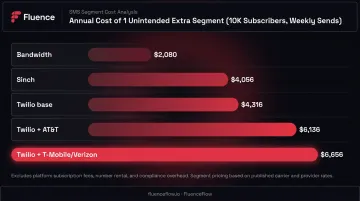
Note: Excludes number rental, 10DLC registration fees, and volume discounts. Actual costs depend on sender type, carrier mix, and provider.
The UCS-2 Compounding Effect
A 130-character message with a single emoji doesn't stay at one segment:
- UCS-2 limit per segment: 67 characters
- 130 ÷ 67 = 2 segments
That emoji doubled your send cost. Across 10,000 subscribers and 52 weekly sends, one decorative character adds over half a million billable segments annually.
What This Means for SMS Profitability
At FluenceFlow, message construction is treated as a cost variable, not a creative afterthought — because the math demands it. Postscript's 2026 benchmark report covering more than 17,000 Shopify stores shows campaign revenue per message ranging from $0.11 to $0.55 between the 25th and 75th percentiles. When your per-segment cost is $0.0083–$0.0128 and your revenue per message is $0.11–$0.55, a second unintended segment meaningfully compresses margins — especially for mid-AOV brands where SMS profitability is already tighter.
6 Tips to Keep SMS Messages Within Character Limits
1. Stick to GSM-7 Characters Only
Avoid emojis, curly quotes, em dashes, and non-Latin characters. Draft messages in a plain-text editor (Notepad, TextEdit in plain-text mode, or directly in your SMS platform composer) rather than Word or Google Docs. If your platform shows an encoding indicator, check it before every send.
2. Shorten URLs
A raw product link can run 60–80 characters and sometimes contains special characters that trigger UCS-2. Use your platform's built-in shortener to bring it under 25 characters. Klaviyo's SMS composer includes a native link shortener and recommends staying near 155 characters when dynamic content may expand the message at send time.
3. Use the Composer's Segment Counter, Not Manual Counting
Visible character count and encoded segment count are not the same thing. Here's why the difference matters:
- Composer counter: accounts for GSM-7 escape characters and UCS-2 triggers — shows true segment count
- Manual counting: counts visible characters only — misses encoding overhead entirely
A message that looks like 155 characters can quietly register as 2 segments if a single UCS-2 trigger slips in.
4. Pre-Build Compliant Templates
Templates reviewed for character count, encoding, and compliance before campaign season eliminate per-send guesswork. Klaviyo allows teams to save message templates, which reduces review time and prevents encoding errors from last-minute edits.
5. Watch Dynamic Variables
Personalization tokens like {{first_name}} or {{product_title}} expand to actual values at send time. A customer named "Jo" adds 2 characters; a customer named "Bartholomew" adds 11. If you're writing close to the segment boundary, leave a buffer of at least 10–15 characters for variable expansion.
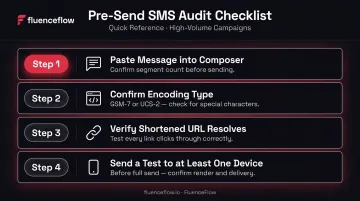
6. Audit Before Major Campaigns
Before a high-volume send — Black Friday, product launches, reactivation pushes — run a final check:
- Paste the message into your platform's composer and confirm the segment count
- Confirm encoding type (GSM-7 vs. UCS-2)
- Check that any shortened URL resolves correctly
- Send a test to at least one device before the full send
Frequently Asked Questions
Is there a character limit on SMS?
Yes. A standard SMS is limited to 160 characters under GSM-7 encoding (standard Latin characters) and 70 characters under UCS-2 encoding, which is triggered by emojis, smart quotes, or non-Latin characters. Spaces, punctuation, and line breaks all count toward the limit.
How do you send an SMS longer than 160 characters?
Messages over 160 characters are automatically split into concatenated segments of 153 characters each (GSM-7) or 67 characters each (UCS-2). Most platforms and devices reassemble these into a single message for the recipient, but each segment is billed separately by your SMS platform.
Does the SMS character limit include spaces?
Yes. Every space, line break, and punctuation mark counts as a character under both GSM-7 and UCS-2. The limit applies to the total encoded character count, not just letters and numbers.
What characters trigger UCS-2 encoding?
Any character outside the GSM-7 set triggers UCS-2, including emojis, curly/smart quotes, em dashes, accented letters, non-Latin scripts, and the euro sign in most contexts. One non-GSM character switches the entire message to UCS-2 encoding.
What is the maximum length of a concatenated SMS?
On Twilio's platform, the maximum is 1,600 characters for GSM-7 and 700 characters for UCS-2. Messages exceeding these limits fail to deliver and return an error — and limits vary by provider, so check your platform's documentation.
Do extension characters like { and } trigger UCS-2?
No, but they do cost two character positions each. The characters ^ { } \\ [ ] ~ | € are within GSM-7 but use an escape sequence, consuming two septets rather than one. They won't force UCS-2 encoding, but they will push your message toward the next segment boundary sooner than the character count suggests.