Introduction
The average full-time worker receives 120 emails daily and spends 2.6 hours managing them, according to Harvard Business Review. For teams handling shared inboxes — support@, sales@, info@ — that number multiplies fast. A missed reply or duplicate response doesn't just frustrate customers; 73% will leave a company after one bad experience, and 67% expect resolution within three hours.
Personal email clients weren't built for this. Gmail and Outlook work fine for one person managing their own inbox. The moment two or more people need to coordinate on the same thread, things break down — duplicate replies, missed handoffs, and zero visibility into who's handling what.
Team email management software solves this with shared inboxes, assignment workflows, internal notes, automation, and collision detection that stops duplicate replies before they go out.
This article covers the 9 best team email management tools for 2026, what features actually matter, and how to match the right tool to your team's size and workflow.
Key Takeaways
- Team email tools replace forwarding chains with shared inboxes, ownership assignments, and internal notes that the whole team can see and act on.
- The 9 best tools span from AI-powered filtering (SaneBox) to CRM-integrated platforms (HubSpot Service Hub) to Gmail-native solutions (Hiver).
- Choosing the right tool comes down to team size, your existing tech stack, how much collaboration you need, and per-user cost as you grow.
- For DTC and e-commerce brands, your customer service inbox and your Klaviyo marketing stack serve different purposes — pick tools that handle each job without overlap.
What Is Team Email Management Software?
Team email management software lets multiple people access, respond to, assign, and track emails from shared addresses — like support@, sales@, or info@. Unlike personal email clients designed for a single user, these tools are built for coordination.
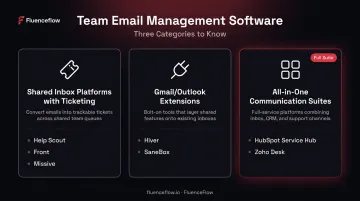
There are three main categories:
- Shared inbox platforms with ticketing (Help Scout, Front, Missive)
- Gmail/Outlook extensions that add team features (Hiver, SaneBox)
- All-in-one communication suites (HubSpot Service Hub, Zoho Desk)
For DTC brands on Shopify, one distinction matters before you go further: team email management tools handle inbound customer service email, while a dedicated platform like Klaviyo handles outbound retention marketing. The two serve different functions. High-performing brands manage both deliberately — not as an afterthought.
9 Best Team Email Management Software for 2026
Each tool below was evaluated across six criteria:
- Shared inbox capability and collaboration features
- Automation depth and AI functionality
- Integration breadth with CRMs, project tools, and chat platforms
- G2/Capterra ratings and review volume
- Pricing transparency and value for team size
- Fit for lean startups through growing e-commerce operations
Missive
Missive is a team-first email client that combines shared inboxes, internal chat, and multi-channel support — email, SMS, WhatsApp, Instagram, and live chat — in one workspace. It's built for small-to-medium teams that collaborate heavily on email without wanting to juggle multiple tools.
What sets it apart: real-time collaborative drafting inside email threads (no forwarding needed), and AI Rules launched in March 2025 that analyze email content — not just headers — to auto-route, generate draft replies, detect sentiment, and identify action items. That puts it well ahead of tools that only filter by sender or subject line.
| Feature | Details |
|---|---|
| G2 Rating | 4.7/5 (845 reviews) |
| Key Features | Shared inboxes, internal chat per thread, AI-powered rules, multi-channel support, canned responses, snooze |
| Pricing | Free up to 3 users; from $14/user/month (annual) |
| Best For | Small-to-medium teams needing deep collaboration across support, sales, and operations |
Help Scout
Help Scout is a customer-focused shared inbox and help desk platform that unifies email, chat, and a self-service knowledge base — without the complexity of traditional ticketing systems. It's widely used by support teams at growing companies who want polished tooling without a steep learning curve.
The interface feels like email, not a help desk. AI features cover reply drafting, tone adjustment, summarization, and translation. The built-in knowledge base deflects repetitive questions before they hit the inbox, and reporting covers both team performance and customer satisfaction metrics.
| Feature | Details |
|---|---|
| G2 Rating | 4.4/5 (428 reviews) |
| Key Features | Shared inbox, knowledge base integration, AI reply assistance, SLA tracking, custom fields, performance reports |
| Pricing | From $25/user/month (Standard, annual) |
| Best For | Customer support teams that want a clean help desk without heavy ticketing overhead |
Front
Front transforms shared inboxes into collaborative workspaces, with deep integrations across CRMs, project tools, and business apps. It's the go-to for customer-facing teams at mid-market companies managing complex routing across multiple channels.
Native integrations with Salesforce, HubSpot, Shopify, Slack, and Asana make it a strong fit for teams with established tech stacks. @mentions and internal comments work on any message thread. It also carries the highest price tag on this list — by a notable margin — so budget-conscious teams should weigh the integration value carefully.
| Feature | Details |
|---|---|
| G2 Rating | 4.7/5 (2,495 reviews) |
| Key Features | Shared inbox, email automation, @mentions, conversation history, CRM integrations, calendar scheduling |
| Pricing | From $25/seat/month (Starter, annual); Professional at $65/seat |
| Best For | Mid-market teams with complex routing needs and existing CRM/project management stacks |
Hiver
Hiver layers shared inbox and help desk features directly into Google Workspace — so teams that already live in Gmail don't need to learn a new interface. Email assignment, shared notes, and performance tracking all happen inside the familiar Gmail environment.
Two things worth knowing before signing up: the Gmail version is a Chrome extension that requires an active Google Workspace account (personal Gmail is unsupported), and Hiver offers a separate browser-based product — Hiver Omni — for teams that need omnichannel support beyond Gmail.
| Feature | Details |
|---|---|
| G2 Rating | 4.6/5 (1,283 reviews) |
| Key Features | Gmail-native shared inbox, email delegation, shared notes, Slack/Asana integrations, performance analytics |
| Pricing | From $19/user/month (Lite, annual) |
| Best For | Teams fully committed to Google Workspace who want help desk features without switching platforms |
HubSpot Service Hub
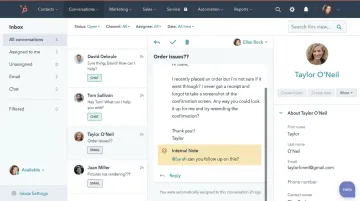
HubSpot Service Hub integrates shared inbox and email ticketing directly with HubSpot's CRM — giving support and sales teams a complete view of every customer interaction without switching between platforms. Every email reply is automatically logged against the contact record.
Professional and Enterprise plans include NPS and CSAT survey tools, plus marketing automation that can trigger email sequences based on support interactions. For teams already using HubSpot for sales and marketing, this is the path of least resistance.
| Feature | Details |
|---|---|
| G2 Rating | 4.4/5 (2,898 reviews) |
| Key Features | CRM-integrated inbox, NPS/CSAT surveys, marketing automation, ticket pipeline, email scheduling |
| Pricing | Free (2 users); Starter from $9/seat; Professional from $90/seat (annual) |
| Best For | Teams already on HubSpot that want customer service and CRM data in a single workflow |
Helpwise
Helpwise is a lightweight shared inbox tool that centralizes email, SMS, social media, and voice — designed for small teams that need multi-channel management without the complexity of a full help desk.
Shared drafts let multiple team members collaborate on a reply before it goes out, and collision detection prevents duplicate responses. The integration directory includes Slack, Asana, and ClickUp, making it practical for teams already using those tools day-to-day.
| Feature | Details |
|---|---|
| G2 Rating | 4.6/5 (181 reviews) |
| Key Features | Shared inbox, shared drafts, collision detection, multi-channel support, Slack/Asana/ClickUp integrations |
| Pricing | From $12/user/month (Standard, annual) |
| Best For | Small teams wanting affordable multi-channel shared inbox with strong third-party integrations |
Zoho Mail
Zoho Mail is a business email platform built for organizations already using the Zoho ecosystem. It offers ad-free email hosting, enterprise-grade security, and team collaboration features at one of the lowest price points in this category.
S/MIME encryption is available on Mail Premium and Workplace Professional plans (not the base tier). The Streams feature enables social-style team discussions alongside email. G2 categorizes Zoho Mail as email software rather than a shared inbox platform, so it's adjacent to the other tools here — not a direct replacement for collaborative inbox tools like Missive or Front.
| Feature | Details |
|---|---|
| G2 Rating | 4.4/5 (716 reviews) |
| Key Features | Ad-free email, S/MIME encryption (Premium plans), Zoho ecosystem integration, Streams collaboration, two-factor authentication |
| Pricing | From $1/user/month (Mail Lite, annual) |
| Best For | Budget-conscious teams already in the Zoho ecosystem who prioritize security and privacy |
SaneBox
SaneBox is an AI-powered email management layer that sits on top of any existing email provider — Gmail, Outlook, Exchange, or IMAP-based services. It learns individual email habits over time and automatically routes low-priority messages to separate folders like SaneLater and SaneNews, keeping the main inbox focused.
SaneBox is a server-side filtering overlay, not a collaborative platform — so it won't replace a shared inbox tool. It's best suited to individuals or small teams who want smarter prioritization without abandoning their current email client.
| Feature | Details |
|---|---|
| G2 Rating | 4.8/5 (227 reviews) |
| Key Features | AI email filtering, SaneLater/SaneNews folders, attachment cloud organization, scheduled focus time, automated away messages |
| Pricing | From $4.54/month (billed every two years) |
| Best For | Individuals and small teams who want smarter filtering without changing their existing email client |
Shared Inbox by Canary
Shared Inbox by Canary is an email-first team collaboration tool combining smart ticketing, AI-assisted reply suggestions, and internal notes in a clean, minimal interface. It launched in late 2025 and is positioned for lean teams that want AI-powered triage without multichannel complexity.
AI auto-routing and reply suggestions reduce manual sorting time. Collision detection prevents duplicate responses. Canary Mail's privacy page claims HIPAA and GDPR compliance, though this hasn't been separately verified specifically for the Shared Inbox product. Review volume is still small — worth monitoring as the product matures.
| Feature | Details |
|---|---|
| G2 Rating | 4.7/5 (16 reviews — small sample) |
| Key Features | AI reply suggestions, auto-routing, shared inbox + smart ticketing, assignment, internal notes, analytics dashboard |
| Pricing | From $10/user/month |
| Best For | Lean teams that want AI-assisted email collaboration without multichannel overhead |
Key Features to Look for in Team Email Management Software
Shared Inbox and Assignment
Any tool worth considering must let multiple users view and respond from a shared address — with clear ownership assignment and collision detection to prevent duplicate replies. This is the baseline feature that separates team tools from personal email clients. Without it, you're just forwarding emails and hoping for the best.
Automation and AI-Powered Triage
Rules that auto-route or label based on email content — not just subject line or sender — cut sorting time significantly at scale. According to Capterra's help desk data, 90% of reviewers consider ticket management critical or highly important.
Look for tools that offer:
- Content-based routing that reads message body, not just metadata
- AI reply suggestions to speed up responses without removing human judgment
- Smart prioritization that surfaces urgent tickets before they go cold
- Clear escalation paths so automation doesn't strand complex issues
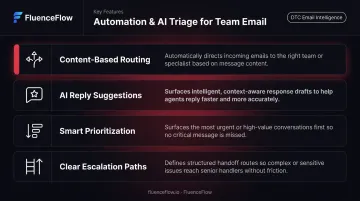
Forrester cautions that poorly deployed automation frustrates customers, so escalation handling isn't optional — it's a requirement.
Integrations with CRM and Business Tools
For e-commerce and DTC teams, integration with Shopify, Klaviyo, HubSpot, or Slack determines whether the tool fits your existing stack or creates another silo. Front offers native Shopify integration; Missive and Helpwise cover most others via Zapier. Always verify the specific integration — not just whether it exists, but how deeply it syncs.
How We Chose the Best Team Email Management Software
Tools on this list were assessed across six criteria:
- User reviews and ratings from G2 and Capterra
- Core feature depth — shared inbox, automation, collaboration
- Ease of use and onboarding time
- Customer support quality
- Value for money across different team sizes
- Fit for e-commerce and customer-facing support workflows
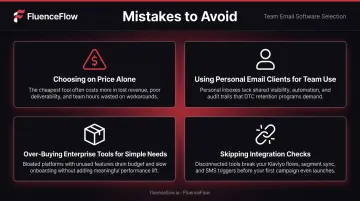
Common Buyer Mistakes to Avoid
- Choosing based on price alone without checking per-user cost at scale (a $12/user tool gets expensive at 20+ users)
- Selecting a personal email client instead of a true team platform
- Buying a full enterprise help desk when a lightweight shared inbox covers 90% of actual needs
- Skipping integration checks with existing tools before committing
Pick the tool that fits your team today. Overbuilding for a future state you may never reach adds cost and complexity without return.
Conclusion
The right team email management software does more than organize inboxes. It directly shapes response times, customer satisfaction, and how well your team scales. Choosing a tool that matches how your team actually works — collaboration style, existing stack, email volume — matters far more than picking the most feature-rich option on paper.
Run a two-week trial with real use cases. Measure concrete outcomes: response time, missed emails, team feedback. Revisit the choice as your team grows, because what works at five people often breaks down at twenty.
For DTC and Shopify brands, team email management covers the support side of the inbox well. Driving repeat purchases and building customer lifetime value through email and SMS is a separate challenge. FluenceFlow builds custom retention marketing systems on Klaviyo for brands doing $50K+/month, with performance guarantees and no long-term contracts.
Frequently Asked Questions
What is the best email management tool?
For team use, Missive and Help Scout consistently rank highest for collaboration. Gmail and Outlook remain strong for individual users. The right choice ultimately depends on whether you need personal or team-based tooling, your existing tech stack, and the features your workflow actually requires.
How do I manage 100 emails a day?
Use AI-powered triage (SaneBox or Missive's AI Rules) to auto-sort low-priority messages. Combine that with canned responses for recurring questions, scheduled email-processing blocks, and snooze features so nothing falls through the cracks.
What is the difference between personal email clients and team email management software?
Personal clients like Gmail and Outlook are designed for one user managing their own inbox. Team email management software enables multiple users to collaborate on shared addresses, assign ownership, leave internal notes, and track response metrics — none of which personal clients support natively.
What features should I look for in team email management software?
The core must-haves: shared inbox with assignment and collision detection, automation rules for routing and labeling, internal notes for team collaboration, response time reporting, and integrations with your CRM and existing tools. Everything else is secondary.
How does team email management software improve team productivity?
It eliminates forwarding chains and CC chaos, automates repetitive sorting, and gives everyone clear visibility into what's handled versus pending. The result: faster response times, fewer dropped conversations, and data that surfaces bottlenecks before they become problems.
Can team email management software integrate with CRM tools?
Yes, most modern platforms do. HubSpot Service Hub integrates natively with its own CRM, while tools like Help Scout, Front, and Missive connect with Salesforce and hundreds of other apps via native or Zapier-based integrations. Always verify integration depth before purchasing.