It's not that your customers don't care — it's that life got in the way. A post-purchase survey sitting unopened in an inbox isn't a rejection; it's a missed timing problem. And a single well-placed reminder email is often all it takes to recover a meaningful chunk of those non-responses.
Most DTC brands skip this step entirely, which makes it one of the lowest-effort, highest-leverage tactics available for collecting the feedback that actually improves retention and repeat revenue.
Typeform reports customer survey response rates between 10% and 30% — meaning a large share of useful feedback goes uncollected after a single send. This guide covers why reminders work, when to send them, what to write, and four ready-to-use templates for the most common e-commerce scenarios.
Key Takeaways
- Most non-responses are forgetfulness, not refusal — a well-timed nudge brings people back
- Send the first reminder 48–72 hours after the initial invite; cap the sequence at 2–3 total reminders
- High-converting reminders are short, product-specific, and built around one clear CTA
- Adapt templates by scenario — unopened, opened-not-clicked, loyal customer, or final deadline
- Klaviyo automations trigger reminders based on behavior, reaching only non-responders automatically
Why Survey Reminder Emails Matter for DTC Brands
Post-purchase surveys do more than collect opinions. For DTC brands, survey responses directly shape product decisions, email personalization, and repeat purchase strategies. Each additional response compounds — informing decisions that affect revenue across every future send.
There's a subtler benefit too. Sending a reminder signals that your brand cares about the customer's experience — not just their order. A 2017 Journal of Marketing Research field experiment found that customers who completed a survey starting with a positive open-ended prompt spent 8.25% more over the following year than those who didn't. The data is clear: survey engagement and repeat purchase behavior move together.
Done well, a post-purchase survey flow can surface:
- Which products drive the highest satisfaction (and which quietly disappoint)
- What messaging resonates with buyers at different stages
- Where customers drop off before a second purchase
- What your most loyal segment has in common
For Shopify brands running Klaviyo, the reminder email is what closes that loop — turning passive buyers into active data points you can actually use.
When to Send Survey Reminders and How Many
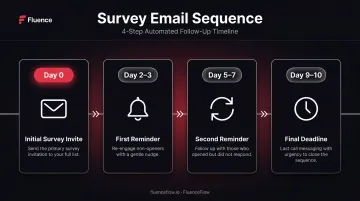
Recommended Timing Sequence
Alchemer's 2024 guidance recommends sending the first reminder 48 hours after the initial invitation. Too soon feels pushy; too late and the survey loses relevance entirely.
A simple sequence that works for most DTC brands:
| Day | Purpose | |
|---|---|---|
| Day 0 | Initial survey invite | Trigger after delivery confirmation |
| Day 2–3 | First reminder | Gentle nudge, conversational tone |
| Day 5–7 | Second reminder (optional) | New angle, value-driven framing |
| Day 9–10 | Final deadline (if needed) | Light urgency, no pressure language |
How Many Reminders to Send
Once your timing is mapped out, the next question is volume. For most e-commerce contexts, 1–2 reminders beyond the initial email is the right number — and that first reminder does the heavy lifting, driving the bulk of any incremental responses.
Alchemer recommends no more than four total emails (initial + three follow-ups). Beyond that, you risk:
- Increased unsubscribes, especially from high-frequency buyers
- Training customers to ignore follow-ups
- Brand friction that outweighs the value of any additional responses
What Makes a High-Converting Survey Reminder Email
Subject Lines That Get Opened
The subject line determines whether the reminder gets read at all. Subject lines that include the words "survey" or "reminder" tend to underperform — they either feel impersonal or trigger spam filters before the email reaches the inbox.
Better subject lines feel like a message from a real person, not a platform notification:
- "Quick question about your recent order"
- "Did we get it right, [First Name]?"
- "We'd still love your thoughts"
- "You tried [Product] — how's it going?"
- "Your take on your order matters to us"
- "One question, [First Name] — takes 90 seconds"
Curiosity and specificity are the two levers worth pulling. Generic prompts get ignored; specific ones get clicks.
Personalization Beyond the First Name
Effective personalization references the specific product purchased or the customer's recent experience — not just a name merge tag. Klaviyo's event variables make this straightforward: product names, images, quantities, and order totals can all be pulled dynamically into flow emails using order event data.
A simple example that works:
"Hi [First Name], you recently picked up [Product Name] — we'd love to know how it's treating you."
That one sentence does more than a generic survey intro paragraph. It shows the customer you know who they are and what they bought. For brands with multiple SKUs, this specificity also improves completion rates because the survey feels relevant to the customer's experience.
Brevity, CTA, and Incentives
Keep the body copy to 3–5 sentences. State the purpose, acknowledge their time, mention the survey takes under 2 minutes, and include one prominent CTA button. Don't re-explain the original survey invitation.
For incentives: a small discount, giveaway entry, or early product access can meaningfully lift completion rates on longer or lower-urgency surveys. Match the incentive to the brand:
- Coffee brands: a free bag sample with next purchase
- DTC apparel brands: a discount on the next order
- Consumables brands: loyalty points added automatically
Generic gift cards feel disconnected. Brand-relevant incentives feel like a thank-you.
Survey Reminder Email Templates You Can Use Today
Each template below should be adapted to match your brand voice and the specific survey context. All are written to be short, human-sounding, and mobile-friendly.
Each template below should be adapted to match your brand voice and the specific survey context. All are written to be short, human-sounding, and mobile-friendly.
The four scenarios covered:
- Unopened initial email (cold re-engagement)
- Opened but not clicked (warm nudge)
- Loyal or high-value customers (relationship-based ask)
- Final reminder before survey closes (urgency close)
Template 1 — When the Initial Email Was Unopened
Subject line options:
- "We'd love your thoughts on [Product Name]"
- "Still time to share your feedback"
- "Quick question, [First Name]"
Hi [First Name],
You recently picked up [Product Name], and we'd love to hear how it's going. It takes less than 2 minutes, and your feedback directly shapes what we improve next.
[Share Your Thoughts →]
Your honest take matters more than a polished review.
[Your Name] at [Brand]
P.S. Complete the survey and we'll send you [incentive — optional].
Template 2 — When the Email Was Opened But Not Clicked
Subject line options:
- "Still thinking it over? Here's the link"
- "Your feedback could shape what we build next"
- "One more nudge, [First Name]"
Hi [First Name],
We know inboxes get busy. We're still collecting feedback on [Product Name], and your specific experience as a customer is exactly what helps us get better.
[The survey closes on [Date] — it takes under 2 minutes.]
[Take the Survey →]
Thanks for your time.
[Your Name] at [Brand]
Template 3 — For Loyal or High-Value Customers
Subject line options:
- "You've been with us a while — we'd love your honest take"
- "As one of our regulars, your opinion matters"
- "[First Name], your perspective is different from most"
Hi [First Name],
You've ordered from us [X times / since Year]. That kind of history means you've seen what we do well and where we still have room to grow.
We're collecting feedback on [Product / recent experience], and we'd love to hear from you. Your answers directly influence what we stock, how we ship, and what we build next.
[Share Your Honest Thoughts →]
Thanks for sticking with us.
[Specific Team Member Name] [Brand]
Template 4 — Final Reminder / Last Chance
Subject line options:
- "Closing soon — last chance to share your thoughts"
- "Survey closes [Day], [First Name]"
- "This is the last one, we promise"
Hi [First Name],
We're wrapping up our feedback collection on [Date/Time], and we'd love to include your voice before we close it out.
It takes under 2 minutes, and there's no catch.
[Take the Survey →]
Thank you either way.
[Your Name] at [Brand]
Common Mistakes That Kill Survey Response Rates
Most brands don't fail at sending surveys — they fail at how they follow up.
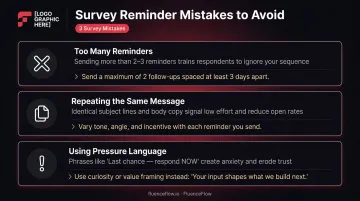
Three mistakes that consistently hurt response rates:
Sending too many reminders. More than 3 total emails increases unsubscribes and trains customers to tune out future follow-ups. The diminishing returns kick in fast.
Repeating the exact same message. Each reminder should vary in angle, tone, or framing. A copy-paste follow-up signals automation, not authenticity. Varying the angle prevents pattern fatigue and keeps each touchpoint feeling intentional.
Using pressure language. Words like "last notice," "you must respond," or excessive urgency cues create friction and erode goodwill. Keep the tone light, especially on final reminders.
Not explaining the "why" behind the survey: not telling customers what you'll do with their feedback. People respond more when they understand the impact. "Your answers help us decide what we stock next" is more compelling than "Please complete our survey."
Using no-reply sender addresses: Litmus advises against no-reply email addresses — they discourage responses, remove a feedback loop, and create a poor experience. Reminders sent from a recognizable human name ("Mike at [Brand]") feel more trustworthy than generic sender addresses. Fix the sender name before you fix the copy.
How to Automate Survey Reminders in Klaviyo
For Shopify brands using Klaviyo, survey reminder sequences run as automated flows triggered by post-purchase events, so timing is based on each individual customer's journey — not a batch send.
Basic Flow Logic
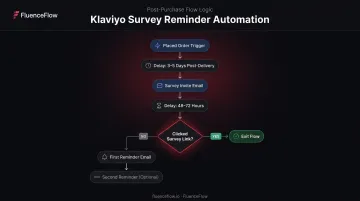
Here's how the flow works:
- Trigger: Use the Placed Order event to start the flow. Delay the initial survey invitation 3–5 days post-delivery to give the customer time to actually use the product.
- Conditional split: After the survey invite, add a time delay (48–72 hours) followed by a conditional split checking whether the subscriber clicked the survey link. Klaviyo's
update_property_linkfeature lets a button click set a custom profile property — which you can use to identify who engaged. - YES path: Subscribers who clicked exit the reminder sequence. No further survey emails.
- NO path: Subscribers who didn't click receive the first reminder. Add another split and delay for the second reminder if needed.
Important distinction: a survey link click is not the same as survey completion. For accurate completion tracking, connect your survey platform (such as Typeform) to Klaviyo to sync a submitted-form event or custom property — then use that as your suppression signal.
Why Behavior-Based Branching Matters
Sending reminders only to non-responders protects sender reputation, cuts unsubscribe risk, and makes each email feel timely rather than automated. It's a meaningful difference in how customers perceive the message.
FluenceFlow applies this logic when building post-purchase flows for DTC brands on Klaviyo — sequencing is shaped by each brand's unit economics and customer behavior, not a one-size-fits-all send schedule.
Practical Setup Tips
- Enable Smart Send Time if your list exceeds 12,000 recipients — Klaviyo uses it to identify the optimal send window per subscriber, which matters when reminder timing directly affects open rates.
- Use plain-text-style templates for reminders. Image-heavy designs with multiple links increase the chance of landing in Gmail's Promotions tab, and plain formatting keeps the message feeling one-to-one.
- Design mobile-first — most e-commerce emails are opened on phones. A single-column layout with a large CTA button outperforms structured marketing templates for this type of send.
Frequently Asked Questions
How many survey reminder emails should I send?
For most e-commerce brands, 1–2 reminders beyond the initial send is the right range. Cap the sequence at 3 total emails to avoid survey fatigue and list damage. High-frequency purchasers are more sensitive to over-messaging, so lean toward fewer for consumables and CPG brands.
What is the best time to send a survey reminder email?
Alchemer's guidance points to 48 hours after the initial send as the optimal first reminder window. Weekdays outperform weekends, with Monday, Tuesday, and Thursday showing the strongest results. Sending before 10 AM or in the late afternoon tends to beat midday.
What should I write in a survey reminder subject line?
Skip the words "survey" and "reminder" — they feel impersonal and can trigger spam filters. Use conversational subject lines that reference the specific product or experience instead: "Quick question about your [Product]" or "Did we get it right, [First Name]?" work far better than "Reminder: Complete your survey."
Should B2C and B2B survey reminder emails be written differently?
Yes. DTC/B2C reminders benefit from a warmer, more informal tone, shorter copy, and relevant incentives. B2B reminders work better with a professional tone that emphasizes the value of the respondent's specific expertise. What feels friendly in a consumer context can feel out of place in a business setting.
Can I automate survey reminders without sending them to people who already responded?
Yes. In Klaviyo, add a conditional split tied to a completion event synced from your survey platform, or a custom profile property set when a subscriber clicks the survey link. Profiles that don't meet the completion condition move forward to the reminder step; everyone else exits the flow.
How do I know when to stop sending survey reminders?
Stop when the response rate stops meaningfully increasing between sends, when unsubscribe rates spike after a reminder, or when the survey deadline has passed. Always honor opt-outs immediately, and don't extend a survey window just to send more emails — those extra responses won't justify the unsubscribes.