This guide clears up that confusion, explains what SMS forwarding actually is, and walks through every reliable method to set it up, manage it, and turn it off — across iPhone, Android, and carrier or third-party options.
Key Takeaways
- Codes like *72, *#21, *#62, and ##002# are call forwarding controls — they have no effect on SMS.
- iPhone users can forward texts natively, but only to Apple devices on the same Apple ID.
- Android has no built-in SMS forwarding — third-party apps are required.
- No major US carrier offers a verified consumer-facing SMS divert service.
- Businesses handling customer texts at scale need a purpose-built SMS platform — nothing else holds up.
What Is an SMS Forwarding Code?
SMS forwarding is the automatic redirection of incoming text messages to another phone number, email address, or messaging platform. Unlike manually tapping "Forward" on a single message, it's a persistent rule that runs in the background without any action required.
The Call Forwarding Code Confusion
The codes most people search for are call forwarding codes, not SMS forwarding codes. Here's what they actually do:
| Code | What It Does |
|---|---|
*72 |
Activates unconditional call forwarding (Verizon-documented for mobile) |
*#21# |
Checks the status of Call Forwarding Unconditional — doesn't activate it |
*#62# |
Interrogates Call Forwarding Not Reachable status |
##002# |
Erases all registered call forwarding settings |
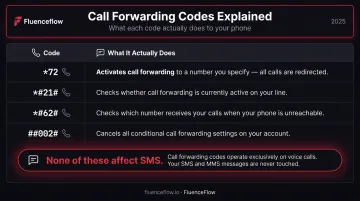
None of these touch text messages. They're voice-layer controls defined by ETSI/3GPP standards for call supplementary services. SMS runs on a separate system — a Short Message Service Centre (SMSC) — that handles delivery independently. That architectural separation is why 3GPP's technical standards for SMS define no equivalent dial code for diverting texts.
The Three Real Methods for SMS Forwarding
Since no universal dial code exists, SMS forwarding happens through one of three paths:
- Carrier-based settings — account portal or customer support request
- Device-native settings — iPhone only, within the Apple ecosystem
- Third-party apps — required on Android, optional on iPhone
How to Set Up SMS Forwarding
The right method depends on your device, carrier, and where you want messages to land. Here's how each option works.
Using Carrier-Based SMS Forwarding
Some carriers offer SMS forwarding through their account portals or via a customer support request. The typical process involves logging into your carrier's online dashboard and specifying a destination number (no dial-in code required).
That said, this option is inconsistent across US carriers. No current AT&T, Verizon, or T-Mobile support page confirms a consumer-facing automatic SMS divert service. Verizon's Message+ sync app was discontinued in December 2024, and T-Mobile DIGITS provides multi-device number access rather than true SMS divert.
Before attempting any setup, contact your carrier directly to confirm whether SMS forwarding is available on your account and how to configure it.
Setting Up SMS Forwarding on iPhone
Apple's built-in forwarding feature works reliably within its own ecosystem. The current path:
- Open Settings → Apps → Messages → Text Message Forwarding
- Toggle on the destination device (Mac, iPad, or Apple Vision Pro)
- Enter the 6-digit verification code shown on the destination device
Note: trusted devices with two-factor authentication active may enroll automatically without the verification step.
Key limitation: This only forwards to Apple devices signed into the same Apple Account. It does not support forwarding to a different phone number or any non-Apple device. Apple's support documentation also requires the iPhone to remain powered on and connected to Wi-Fi or cellular for forwarding to work.
Setting Up SMS Forwarding on Android
Stock Android, Pixel, and Samsung devices don't include automatic SMS forwarding in their first-party documentation. Samsung's official instructions cover manual forwarding of individual messages, not persistent automatic forwarding rules.
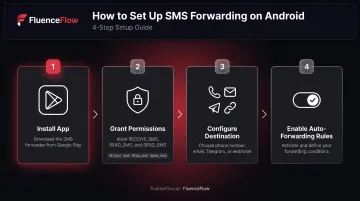
Android users need a third-party app. The general setup flow:
- Install an SMS forwarding app from Google Play
- Grant required permissions (
RECEIVE_SMS,READ_SMS, andSEND_SMS) - Configure your destination (phone number, email, Telegram, or webhook)
- Enable auto-forwarding rules within the app
Three well-maintained options on Google Play:
- SMS Forwarder by Zerogic — 1M+ downloads, forwards to number, email, Telegram, or webhook
- Forward SMS — 100K+ downloads, background forwarding to number, email, or Telegram
- Auto Forward SMS to PC/Phone — rule-based filtering with similar destination options
Google Play restricts SMS permission groups and requires apps to qualify as an allowed handler before requesting them — so check each app's data safety disclosure before installing.
Using a Third-Party App or Virtual Phone System
The apps above handle basic SMS forwarding. Virtual phone systems and VoIP platforms take it further, working on both iPhone and Android to route messages to phone numbers, email inboxes, Slack, CRM tools, and more.
When choosing a third-party solution, look for:
- Clearly discloses what SMS data it accesses and why
- Supports both your sending device and your destination platform
- Lets you filter by contact, keyword, or message type
- Runs reliably in the background without requiring constant manual restarts
Managing and Deactivating SMS Forwarding
Updating Active Forwarding Rules
Once forwarding is running, you can usually:
- Change the destination number or email in the app or carrier settings
- Add keyword or contact filters to narrow what gets forwarded
- Confirm changes worked by sending a test message from a second device
Always test the full forwarding chain before relying on it.
Turning Off SMS Forwarding
Steps vary depending on how you set forwarding up:
- iPhone: Settings → Apps → Messages → Text Message Forwarding → toggle off the device
- Android app: Open the forwarding app, disable auto-forwarding rules, or uninstall
- Carrier-based: Contact your carrier or access account settings to remove the forwarding rule
Security Audit Reminder
Periodically check your forwarding settings — especially after a phone reset, number transfer (port-out), or app reinstall. Number takeovers — the kind the FCC's SIM-swap and port-out protections (effective July 2024) were designed to address — can silently redirect both calls and texts. A forgotten forwarding rule gives attackers direct access to 2FA codes and private messages without touching your device.
Common SMS Forwarding Problems and Fixes
Three issues account for the majority of SMS forwarding failures — and each has a straightforward fix.
Forwarding Appears Active But Messages Aren't Arriving
Likely cause: The destination number or email was entered incorrectly, or the app is missing SMS read permissions on Android.
Fix: Verify destination details in the app, recheck SMS permissions in your phone's app settings, and send a test message.
Forwarded Messages Show Your Number, Not the Original Sender
Likely cause: This is expected behavior for manual forwarding and most native methods. The original sender's identity is not preserved — all messages arrive from your number.
Fix: This is a known limitation of the method, not a bug. If preserving sender identity matters, use a virtual phone platform that explicitly includes the original sender's details in the forwarded message body.
Forwarding Stops After a Phone Update or Restart
Likely cause: Android automatically resets permissions for apps that haven't been used in a few months (documented in Android 11 permission behavior changes). Battery optimization set to Restricted can also prevent background execution entirely.
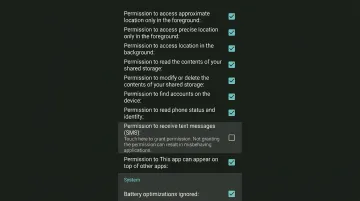
Fix: Reopen the forwarding app, re-grant SMS and background permissions, and check that battery usage is not set to Restricted in your phone's settings.
Pro Tips for SMS Forwarding
Test before you trust. After any setup, send a message from a second phone to confirm the full forwarding chain works end-to-end. Don't assume it's running because the toggle is on.
Audit forwarding rules when switching devices. When porting a number, onboarding a new team member, or handing off a phone, outdated forwarding rules can send sensitive messages to the wrong destination. Remove stale rules as part of any transition checklist.
For DTC brands: forwarding is not a customer SMS strategy. Basic SMS forwarding routes messages from one place to another. It doesn't segment, automate, or track anything. For Shopify brands handling customer communications at volume, a proper SMS platform is a different category of tool entirely.
Agencies like FluenceFlow build SMS retention systems for DTC brands directly within Klaviyo, covering automated flows (welcome sequences, abandoned cart, post-purchase, replenishment), behavioral segmentation, and campaign coordination alongside email. Their clients average 41% of total store revenue from combined email and SMS.
That kind of output comes from structured automation, not forwarding rules. If your brand is doing $50K+/month and SMS is still handled manually, the gap between what you're doing and what's possible is likely costing real revenue.
Frequently Asked Questions
What is the SMS forward code, and what do codes like *#62, *#21, and *72 do?
These are call forwarding codes, not SMS forwarding codes. They control how voice calls are redirected — *72 activates unconditional call forwarding, *#21 checks its status, *#62 interrogates "not reachable" forwarding, and ##002# erases all call forwarding settings. None of them affect text messages.
Can I forward SMS messages without installing an app?
iPhone users can — through Settings → Apps → Messages → Text Message Forwarding — but only to other Apple devices on the same Apple Account. Some carriers may support it through account settings. Android users have no built-in option and need a third-party app.
Will the sender know their text was forwarded?
No notification is sent to the original sender. The process is silent on their end. However, the recipient of the forwarded message will typically see it as coming from you, not the original sender.
Does SMS forwarding work when my phone is turned off?
App-based and device-native forwarding both require the phone to be powered on and connected — Apple explicitly states this requirement. Carrier-level SMS divert could work independently of device power, but no major US carrier's consumer SMS divert service has been verified for this.
Is it legal to forward text messages?
Forwarding your own texts is generally permitted under US law (18 U.S.C. § 2511(2)(d) provides a party-consent exception). Forwarding someone else's messages without consent can violate federal wiretapping and stored communications statutes. Businesses routing customer texts to third-party platforms should have documented opt-in consent. This is not legal advice.
How do I know if my SMS is being forwarded without my knowledge?
Check your carrier account portal for active SMS divert rules. On Android, review which installed apps have SMS read permissions under Settings → Apps → Permissions. On iPhone, go to Settings → Apps → Messages → Text Message Forwarding and look for any listed devices you don't recognize.