Introduction
Most Shopify brands spend heavily on paid ads to drive traffic — then watch a significant portion of that revenue walk out the door. Not because the product is wrong or the price is off, but because there's no automated system following up with the right message at the right time. Marketing automation workflows close that gap.
This post breaks down 9 trigger-based email and SMS flows built specifically for DTC ecommerce brands. For each workflow, you'll get the trigger logic, recommended timing, channel guidance, and template structure — so you can see what needs to be built and why it works. The examples are built around Klaviyo and Shopify, but the underlying logic applies to any email/SMS stack.
Key Takeaways
- Automated emails drive 30% of all email revenue from just 2% of sends — SMS flows pull 45.2% of SMS revenue from 7.6% of sends
- The 9 flows below span every lifecycle stage: acquisition, conversion, retention, and reactivation
- Start with Welcome, Abandoned Cart, and Post-Purchase — they generate the fastest returns
- Each workflow runs automatically, recovering revenue from traffic you've already paid to acquire
What Are Marketing Automation Workflows?
A marketing automation workflow is a pre-built, trigger-based sequence — emails, SMS messages, or both — that fires automatically when a subscriber or customer meets a specific condition. Unlike one-off campaigns (manually scheduled blasts), flows run in the background continuously without any action from your team.
Every DTC workflow shares four core components:
| Component | Definition | Example |
|---|---|---|
| Trigger | The event that starts the sequence | Subscriber joins list |
| Conditions | Filters that control who enters | New subscribers only, not existing customers |
| Actions | The message or task that executes | Send Email 1 of welcome sequence |
| Timing | Delay between steps | Wait 48 hours, then send Email 2 |
A simple example: a subscriber joins your list → receives a 3-email welcome sequence over 7 days → makes their first purchase on Day 5. The table above shows how each component controls that outcome.
Why This Matters for DTC Brands
Paid acquisition costs keep climbing. Once a visitor lands on your store, whether they convert — and come back — comes down to your retention infrastructure.
Omnisend's 2026 analysis of 150,000 brands found automated emails generated $2.87 per send versus $0.18 for standard campaigns — roughly 16x the revenue per send. That gap exists because flows trigger based on real behavior — a cart left behind, a browse session, a purchase — not an arbitrary send date.
9 Marketing Automation Workflows for DTC Brands in 2026
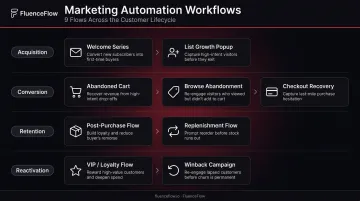
These nine flows cover every major stage of the DTC customer lifecycle — acquisition, conversion, retention, and reactivation. For any Shopify brand doing $50K+ per month, these are the baseline.
| Workflow | Lifecycle Stage | Primary Goal |
|---|---|---|
| 1. Welcome Series | Acquisition | Convert subscribers into first-time buyers |
| 2. Abandoned Cart | Conversion | Recover high-intent shoppers |
| 3. Browse Abandonment | Conversion | Re-engage warm browsers before they leave |
| 4. Post-Purchase Nurture | Retention | Reinforce the purchase, build toward repeat |
| 5. Win-Back / Re-Engagement | Reactivation | Recover lapsed customers, sunset the rest |
| 6. Upsell & Cross-Sell | Retention | Increase LTV through relevant product pairings |
| 7. Replenishment Reminder | Retention | Drive predictable repeat purchases |
| 8. VIP & Loyalty | Retention | Deepen loyalty with high-value customers |
| 9. Price Drop & Back-in-Stock | Conversion | Convert price- or availability-blocked shoppers |
Workflow 1: Welcome Series
Trigger: New subscriber opts in, typically via a popup
Goal: Introduce the brand, deliver the signup offer, and guide the subscriber toward a first purchase — not just confirm they're on the list.
According to Klaviyo's 2025 data, welcome flows average a 51.26% open rate and $2.35 revenue per recipient. Top-performing welcome emails hit nearly 10% placed-order rates. The sequence earns trust before you've established enough credibility to close a sale.
Template structure (3-4 emails over 7-10 days):
- Email 1 (Immediate): Deliver the offer + brand intro. This is the most opened email you'll ever send — make it count.
- Email 2 (Day 2-3): Brand story, social proof, bestsellers. Build trust before asking for anything.
- Email 3 (Day 5-7): Product education, FAQs, or content that reduces purchase hesitation.
- Email 4 (Day 9-10): Last-chance offer reminder if no purchase has occurred.
SMS can be added on Day 1 as a lighter delivery channel for the offer itself.
Best fit: Essential for all DTC brand types, but especially high-AOV / low-frequency brands where the first purchase decision takes longer and the sequence needs to build purchase confidence over a longer decision cycle.
Workflow 2: Abandoned Cart Flow
Trigger: Identified contact adds items to cart but doesn't complete checkout within 1-2 hours
Goal: Recover revenue from shoppers who showed clear purchase intent.
Baymard Institute's 2026 analysis of 50 studies puts the average cart abandonment rate at 70.22%. Klaviyo's benchmark across 143,000+ flows reports a 3.33% average placed-order rate and $3.65 revenue per recipient — with top performers hitting 7.69%.
Template structure (3-step sequence):
- Email 1 (1 hour post-abandonment): Cart reminder with contents and a direct link back. No discount yet.
- Email 2 (24 hours): Address hesitation — reviews, return policy, shipping details.
- Email 3 (48-72 hours): Small incentive (free shipping or percentage off) as a final push. Pair with an SMS for urgency.
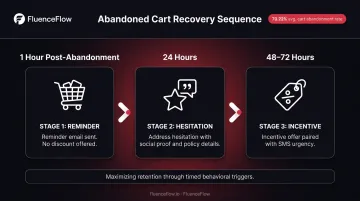
Critical note: Don't lead with a discount in Email 1. It trains customers to abandon intentionally to unlock the offer.
Best fit: Highest ROI flow for mid-AOV / mid-frequency brands with large catalogs; also strong for high-AOV brands where cart values are substantial.
Workflow 3: Browse Abandonment Flow
Trigger: Known contact views a product page (or category) multiple times without adding to cart
Goal: Re-engage warm browsers earlier in the funnel than cart abandonment — before they forget you exist.
Keep this flow lean:
- Email 1 (2-4 hours): "Still thinking about it?" — feature the viewed product, customer reviews, and a clear CTA.
- Email 2 (24 hours, optional): Recommend similar or complementary products to broaden consideration.
Set a frequency cap — no more than once per 30 days per contact — to prevent fatigue. This flow catches intent signals that cart abandonment misses entirely.
Workflow 4: Post-Purchase Nurture Flow
Trigger: Customer completes their first order
Goal: Reinforce the buying decision, reduce buyer's remorse, and lay groundwork for a second purchase — not immediately push another sale.
Template structure:
- Email 1 (Immediate): Warm thank-you with order confirmation and brand personality. Keep this separate from the transactional receipt.
- Email 2 (Day 7-10): Product usage tips, care instructions, or content that helps them get real value from what they bought.
- Email 3 (Day 21): Check-in plus a cross-sell recommendation based on the specific product purchased.
Lead with genuine value, not a discount. Customers who feel good about their purchase are far more likely to return without needing an incentive.
Workflow 5: Win-Back / Re-Engagement Flow
Trigger: Customer hasn't purchased within a window that matches your typical repurchase cycle (45 days for consumables, 90+ days for low-frequency brands)
Goal: Reactivate lapsed customers before they're gone permanently — and sunset truly unresponsive contacts to protect deliverability.
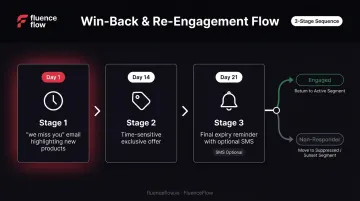
Template structure:
- Email 1 (Day 1 of lapse threshold): "We miss you" — highlight what's new since their last purchase.
- Email 2 (Day 14): Time-sensitive exclusive offer with a clear expiration.
- Email 3 (Day 21): Final expiry reminder, optionally paired with SMS.
If no engagement after all three steps, move the contact to a suppressed or low-cadence segment. Klaviyo explicitly recommends a sunset flow for chronically inactive profiles — continuing to email them hurts sender reputation and inbox placement.
Workflow 6: Upsell & Cross-Sell Flow
Trigger: 14-21 days after a specific product purchase
Goal: Increase customer lifetime value by recommending relevant complementary products — logic-based pairings, not a generic bestsellers list.
Template structure:
- Email 1 (Day 14-21): "Frequently bought together" recommendation with social proof from customers who made the same pairing.
- Optional SMS (3-5 days later): Short nudge with a direct link if no click on Email 1.
This flow performs when recommendation logic is powered by actual purchase history data. Upsells built on real purchase patterns convert; generic bestseller blasts don't.
Ideal for: Mid-AOV / mid-frequency brands with large catalogs where cross-category discovery drives meaningful revenue lift.
Workflow 7: Replenishment / Refill Reminder Flow
Trigger: Calculated number of days after purchasing a consumable product — timed to reach the customer just before they run out
Goal: Drive predictable repeat purchases and pitch subscribe-and-save options to elevate LTV.
Template structure:
- Email 1 (5-7 days before expected depletion): Friendly reminder with a one-click reorder link.
- SMS (1-2 days before): Short nudge with a direct reorder link and a subscription or bundle pitch.
Send too early and you lose the urgency; too late and they've already reordered from a competitor. Calibrate timing using actual purchase data, not product label recommendations or arbitrary intervals.
Balance Me reported an 83% increase in repeat purchases after implementing Klaviyo replenishment emails — a meaningful signal for any consumables brand not yet running this flow.
Best fit: The highest-impact flow for low-AOV / high-frequency brands (consumables, CPG, supplements, coffee). This is the engine of repeat revenue for that brand type.
Workflow 8: VIP & Loyalty Flow
Trigger: Customer crosses a spending threshold, hits a purchase count milestone, or achieves a loyalty tier
Goal: Recognize high-value customers, make them feel genuinely exclusive, and deepen long-term loyalty.
Template structure:
- Email 1 (Immediate on tier achievement): Announce VIP status with specific perks — early access to new releases, permanent free shipping, or an exclusive discount code.
- Ongoing cadence: Early access to sales, new product launches, and surprise offers available only to the VIP segment.
The critical detail: VIP perks must feel genuinely exclusive. If every customer sees the same offers at the same time, the tier loses all its value. Access that isn't actually restricted isn't a perk — it's just marketing.
Workflow 9: Price Drop & Back-in-Stock Alert Flow
Trigger: A product that a subscriber previously viewed, wishlisted, or added to cart drops in price or returns to inventory
Goal: Convert high-intent shoppers who were previously held back by price or availability.
Template structure:
- Email 1 (Immediate on trigger): Alert featuring the specific product with the updated price or "back in stock" badge, plus urgency messaging around limited inventory.
- Optional SMS (24 hours later): Short follow-up if no click on Email 1.
This flow requires proper Klaviyo integration with Shopify inventory and pricing data to trigger accurately. Without that connection, the flow can't fire at the right moment.
How to Build These Workflows Without Starting From Scratch
The Build vs. Hire Decision
Brands typically have three options:
- Build manually — configure every flow in Klaviyo using native tools. Requires copywriting, design, and strategic expertise. Time-intensive.
- Use generic templates — faster, but not customized to your unit economics, audience, or product type.
- Work with a specialized retention agency — flows built around your specific AOV, purchase frequency, catalog structure, and margin profile.
The right choice depends on your team's bandwidth and whether you want a proven system or a DIY project.
Implementation Priority Order
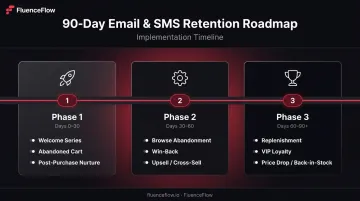
Don't try to build all 9 flows simultaneously. A phased approach works better:
Phase 1 (First 30 days): Welcome Series, Abandoned Cart, Post-Purchase Nurture
Phase 2 (Days 30-60): Browse Abandonment, Win-Back, Upsell/Cross-Sell
Phase 3 (Days 60-90+): Replenishment, VIP Loyalty, Price Drop/Back-in-Stock
Start where the revenue impact is highest and the setup complexity is manageable. Once foundational flows are performing, layer in the more data-dependent flows.
Where FluenceFlow Fits
That phased build is exactly what makes this time-consuming to execute well. For DTC brands doing $50K+ per month on Shopify, doing it in-house is rarely the best use of time.
FluenceFlow (a Klaviyo and Shopify Certified Partner) builds custom email and SMS systems organized around each brand's unit economics, not off-the-shelf playbooks. Flows go live within the first two weeks, core automation is complete by week four, and the first performance report lands at day 30.
FluenceFlow clients average 41% of total store revenue from email and SMS, with total store revenue increases ranging from 10% to 37% across the client portfolio. Every engagement includes a custom performance guarantee — if agreed-upon KPIs aren't hit, clients receive a refund — with no long-term contracts required.
Conclusion
Marketing automation workflows aren't a nice-to-have. For any Shopify brand scaling on paid traffic, they're the difference between extracting maximum value from traffic you've already paid for versus watching that spend go to waste on one-time buyers.
The 9 flows in this post represent the baseline every DTC brand should have running before increasing ad spend further. Get these in place first — then scale.
If building and optimizing these flows in-house isn't the best use of your time, FluenceFlow handles the full setup — flows, segmentation, and ongoing performance management — for DTC brands on Klaviyo.
Frequently Asked Questions
What are marketing workflows?
Marketing workflows are automated sequences of emails, SMS messages, or other actions that trigger based on a customer's behavior or a predefined condition. They're designed to deliver the right message at the right time without any manual effort from your team.
What is an example of a marketing automation workflow?
The abandoned cart flow is the clearest example: when a shopper adds items to their cart but doesn't check out, a 3-step sequence fires automatically — a reminder email at 1 hour, a hesitation-addressing email at 24 hours, and a final incentive email at 48-72 hours.
Which marketing automation workflow is most common?
The welcome series and abandoned cart flow are the most widely implemented. The welcome series triggers for every new subscriber, and the abandoned cart flow consistently delivers the highest ROI relative to setup effort for ecommerce brands.
How do I set up marketing automation workflows in Klaviyo?
Start in Klaviyo's Flows builder by selecting a trigger — for example, "Checkout Started" for an abandoned cart flow or "Subscribed to List" for a welcome series. From there, add time delays, conditional splits, and email or SMS steps. Most foundational DTC flows can be built using Klaviyo's native trigger library without any custom code.
How much revenue should email and SMS automation generate for a DTC brand?
Omnisend's 2026 data shows automated emails account for 30% of email-driven revenue despite making up just 2% of total sends. For DTC brands with a fully built-out system, welcome, abandoned cart, and post-purchase flows drive the bulk of that number.