Introduction
SMS marketing consistently outperforms most other direct channels on engagement — open rates are high, response windows are short, and the channel demands brevity that forces clarity. Mailchimp, best known as an email platform, now offers native SMS marketing as a paid add-on, letting brands manage text and email from a single dashboard.
Simple in concept. Complicated in practice.
Getting SMS live in Mailchimp involves a formal application process, carrier compliance requirements, credit-based billing, and country-specific approval timelines that routinely catch first-time users off guard. According to Klaviyo's 2026 SMS benchmark data, SMS flows represent just 7.6% of sends but generate 45.2% of SMS revenue — setup quality, not send volume, is what determines whether SMS becomes a revenue channel.
This guide walks through Mailchimp SMS from eligibility and application to sending your first campaign, with specific guidance for DTC e-commerce brands who want to capture that revenue — not leave it sitting in an unoptimized channel.
Key Takeaways
- Mailchimp SMS is a paid add-on on the Essentials plan or higher — free plans don't include access
- Credits are purchased monthly and do not roll over at billing cycle end
- SMS consent is legally separate from email consent — email subscribers cannot receive SMS without an independent opt-in
- Mailchimp supports automated SMS flows including abandoned cart and welcome sequences
- High-volume brands typically outgrow Mailchimp SMS — Klaviyo delivers more revenue per subscriber at scale
When Does Mailchimp SMS Marketing Make Sense for Your Store?
Mailchimp SMS is a reasonable choice in specific situations — and a poor one in others. Being clear on which side you're on saves time and money.
When It Works Well
Mailchimp SMS fits stores that:
- Already use Mailchimp for email and want a single platform for both channels
- Run moderate-volume campaigns — seasonal promotions, list announcements, flash sales
- Need basic automated flows like abandoned cart or welcome sequences without complex branching
- Are early in their SMS program and want to test the channel before committing to a dedicated platform
When It's a Mismatch
Consider a dedicated SMS platform if you:
- Need deep behavioral triggers tied to specific Shopify events (browse abandonment, product views, post-purchase sequences with conditional logic)
- Require multi-condition segmentation across purchase history, engagement, and lifecycle stage simultaneously
- Are sending high volume and find credit-based pricing becomes more expensive than a flat-rate platform
- Want sophisticated multi-channel automation sequencing across email and SMS with precise timing controls
Availability and Access
Mailchimp SMS currently supports 37 countries — including the US, Canada, UK, Australia, Belgium, and 32 European markets via Branded Sender ID. Access requires an Essentials plan or higher, and SMS credits are purchased on top of your base subscription. If your list is large enough that credits add up quickly, a dedicated flat-rate SMS platform will likely cost less.
What You Need Before Setting Up Mailchimp SMS
Don't start the application without these in place. Missing any one of them will either stall your approval or cause your messages to fail compliance checks later.
Prerequisites
- Essentials plan or higher — free plans don't include SMS access. You'll also need Owner, Admin, or Manager account permissions to configure the program.
- Registered business with verifiable information — carriers review your company name, brand name, use cases, privacy policy URL, and SMS terms before approving your sending number.
- Explicit SMS consent from contacts — email consent doesn't carry over to SMS under any jurisdiction. You need an SMS-specific opt-in form or documented proof that contacts have already agreed to receive SMS from your brand.
Timing Reality
Once those pieces are in place, approval timelines are the next variable to plan around. They vary by country:
| Country | Typical Approval Time |
|---|---|
| United States | 1–2 business days |
| Denmark, Norway | 2 business days |
| Sweden | 3 business days |
| Belgium | 5–6 business days |
| Italy | Up to 7 business days |
| Most other markets | Within 1 business day |
You cannot send during this window, so build the lead time into your planning calendar if you're working toward a campaign deadline.
How to Set Up SMS Marketing in Mailchimp
Mailchimp's SMS setup follows a structured sequence. Rushing through it is the most common reason applications get rejected or stuck pending.
Submitting Your SMS Application
The application starts with selecting the Mailchimp audience you want to connect to your SMS program. This cannot be changed later once the audience contains contacts, so choose carefully.
Next, select your sending country and sending number type:
- 10DLC (10-Digit Long Code): US and Canada. Supports two-way messaging; subscribers can reply STOP, HELP, and other compliance keywords to manage their subscription.
- VLN (Virtual Long Number): UK, Belgium, and Australia — also supports two-way messaging.
- Branded Sender ID — 32 European markets. One-way only. Recipients cannot reply, so every message requires a link-based unsubscribe mechanism.
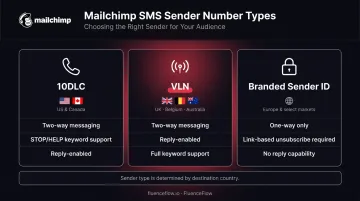
The sender type isn't a preference; it's determined by the country you're sending to. Once that's locked in, the next step is filling out your business details and legal documentation.
Completing Business Info, Use Cases, and Legal Pages
This section requires selecting which SMS use cases match your program (promotional campaigns, abandoned cart, order notifications) and providing links to your SMS-specific terms and privacy policy.
Common mistake: Copying your general email terms and submitting them as SMS terms.
If your SMS terms don't explicitly describe your program, message frequency, and opt-out instructions — and don't link to your privacy policy — your application can sit pending indefinitely. Mailchimp provides built-in template tools to generate compliant documents if you don't have them yet.
Setting Up Your SMS Credit Subscription
SMS credits are purchased as a monthly subscription add-on on top of your existing Mailchimp plan. Unused credits expire at the end of each billing cycle and do not roll over.
Credit consumption depends on message type, character count, and destination country:
| Message Type | Length | Credits (US) |
|---|---|---|
| Standard GSM SMS | Up to 160 characters | 1 credit |
| Multipart GSM SMS | 153 characters per segment | 1 credit per segment |
| Unicode SMS (emojis/special chars) | Up to 70 characters | 1 credit |
| Multipart Unicode SMS | 67 characters per segment | 1 credit per segment |
| MMS (US) | Up to 1,600 characters | 3 credits |
| MMS (Canada) | Up to 1,600 characters | 5 credits |
Other countries apply their own credit multipliers — 1 credit per segment is a US-specific rate, not a universal rule. For current pricing tiers (ranging from 1,000 to 450,000 credits/month), check Mailchimp's SMS pricing page directly, as rates are dynamic.
A scheduled SMS reserves credits from your current billing cycle, even if delivery occurs during a future cycle.
How to Create and Send Your First SMS Campaign in Mailchimp
Every SMS send in Mailchimp follows the same checklist: name your message, select recipients, write content, review credit requirements, then send or schedule. The steps that trip people up most are in the builder and the character counter.
Building Your Message in the SMS Builder
The SMS builder includes:
- Live character counter and message preview
- Merge tags for personalization (first name, purchase history variables)
- Emoji insertion
- Automatic link shortening and tracking toggle
- MMS media upload (US and Canada programs only, Standard plan required)
- Discount code inserter for connected stores — Shopify, WooCommerce, BigCommerce, Magento, PrestaShop, and Lightspeed are all supported
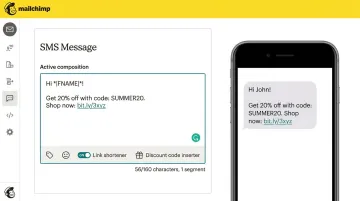
Character limits have real billing consequences. Run the math before you write, not after:
- Standard GSM messages allow 160 characters per SMS — exceed that by one and the message splits into multipart sends billed at 153 characters per segment
- Your brand name is pre-filled by default and counts toward the limit
- Opt-out instructions count too
- Emojis trigger Unicode encoding, dropping each segment to 70 characters instead of 160
Selecting Recipients and Segmenting Your Audience
By default, Mailchimp sends to all SMS subscribers. You can also:
- Target existing segments or create new ones
- Paste a specific list of phone numbers
- Exclude segments to suppress recent purchasers from promotional sends
Advanced segmentation with multi-condition logic requires the Standard plan or higher. Brands on Essentials can segment, but with more limited conditions. For behavioral flows like abandoned cart or win-back campaigns beyond basic list blasts, the Standard plan is required.
Sending, Scheduling, and Managing Rate Limits
Mailchimp enforces quiet hours by region. Messages sent during restricted windows are automatically queued for the next available send time — immediate and scheduled campaigns both follow this rule.
For US sending, throughput depends on your brand's vetting status:
- Auto-vetting is included with all eligible plans
- Standard vetting (increases send speed) is included at 5,000+ credits on Essentials or Standard, and included by default with Premium
With large lists, Mailchimp provides a send duration estimate and lets you customize the delivery window — up to 30 days — to control pacing through carrier rate limits.
Best Practices for Getting Results from Mailchimp SMS
Write for the Constraint
Every SMS should have one purpose and one CTA. The 160-character limit isn't a limitation — it's a filter. If your offer doesn't fit in one clean sentence with a link, the message isn't clear yet. Cut the context, lead with the value.
Segment by Behavior, Not Demographics
A subscriber who bought last week needs a different message than someone who hasn't purchased in 90 days. Mailchimp's segment builder supports purchase history and engagement-based conditions — use them.
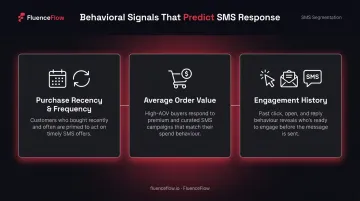
Demographic segments (age, location) are less predictive of SMS response than:
- Purchase recency and frequency
- Average order value
- Engagement history (clicks, opens, past SMS responses)
Balance Promotional Sends
A practical ratio for list health: one to two value-driven messages for every promotional send. Good non-promotional touchpoints include:
- Shipping updates and order confirmations
- Early access to new products
- Loyalty rewards and milestone perks
Subscribers who only receive discount codes start ignoring them. A mix of useful and promotional content keeps engagement up and opt-outs down.
Respect Quiet Hours and Test Timing
Mailchimp enforces region-specific quiet hours automatically, but within permitted windows, the right send time varies by audience. There's no universal answer — test early afternoon against early evening for your specific list and let your click-through rate tell you which performs better.
Know When Mailchimp SMS Has Reached Its Limit
Mailchimp SMS works well for stores with smaller lists and simple campaign needs. But brands generating serious retention revenue — particularly those relying on Shopify behavioral triggers, multi-step automation flows, and per-flow revenue reporting — consistently hit a ceiling the platform can't clear.
FluenceFlow builds these systems for DTC brands as a certified Klaviyo partner — combined email and SMS programs that have generated $7.5M+ in client revenue across 30+ brands, with clients averaging 41% of total store revenue from retention alone.
If the platform is the bottleneck, a free strategy call is the fastest way to find out what your current setup isn't capturing.
Conclusion
SMS marketing with Mailchimp is less a technical challenge than a process one. Follow the application sequence correctly, collect consent the right way, and write messages with a clear reason to act — those three steps determine whether the channel works or stalls.
The bigger discipline is treating your SMS list as a high-trust asset. Subscribers gave you direct access to their phone. That access rewards relevance and punishes frequency abuse quickly — a poorly timed promotional blast loses subscribers you won't recover. Build your list deliberately, send with intention, and each message either earns the next one or ends the relationship.
Frequently Asked Questions
Does Mailchimp do SMS marketing?
Yes. Mailchimp offers SMS as a paid add-on on the Essentials plan or higher, supporting one-time campaigns, automation flows (abandoned cart, welcome sequences), and MMS for US and Canadian programs. A separate application and carrier approval process is required before sending.
How much is Mailchimp SMS marketing?
Mailchimp SMS uses credit-based billing on top of your existing plan. Credits are purchased as a monthly subscription add-on, and consumption varies by message type and country — a standard GSM SMS costs 1 credit in the US, while MMS costs 3 credits (US) or 5 credits (Canada). For current tier pricing, check Mailchimp's SMS pricing page directly, as rates are subject to change.
What Mailchimp plan do you need for SMS marketing?
SMS marketing requires the Essentials plan or higher. The free plan does not include SMS access. MMS messaging and advanced segmentation require the Standard plan or higher.
Can Mailchimp SMS be used for automated flows like abandoned cart?
Yes. Mailchimp supports SMS automation flows including abandoned cart triggers, welcome sequences, and keyword-based triggers through its Marketing Automation Flow builder. Abandoned cart SMS requires double opt-in, which is a separate setup step documented in Mailchimp's help materials.
What countries does Mailchimp SMS support?
Mailchimp SMS currently supports 37 countries, including the US, Canada, UK, Belgium, Australia, and 32 European markets via Branded Sender ID. Each country requires separate sending number registration, with its own application timeline and potential additional cost.
What is the difference between SMS and MMS in Mailchimp?
SMS is a text-only message — up to 160 GSM characters for a single send, billed at 1 credit per segment in the US. MMS allows you to include an image or GIF with up to 1,600 characters, costs 3 credits in the US and 5 in Canada, and is only available for US and Canadian programs on the Standard plan or higher.