Introduction
Campaigns miss their send window less often because of bad creative and more often because approvals stall. The approver is busy, the original email gets buried under 117 messages per day, and nobody wants to be the person who sends a nagging follow-up.
The stakes are real. Adobe's research across 1,600+ marketers found that 89% of content passes through at least three approval stages, and 58% of marketers spend more than 40% of their time managing reviews rather than building campaigns.
A well-crafted approval reminder email moves things forward without damaging the working relationship. This guide covers what makes these emails effective, with best practices and ready-to-use templates for the scenarios where approvals most commonly stall.
Key Takeaways
- Send the first reminder 24–48 hours after the initial request, before the deadline
- Name the asset and deadline in every subject line — vague subjects get ignored
- Keep reminder emails under 150 words with one clear call to action
- Set a reminder cadence at project kickoff so follow-ups aren't a surprise
- Escalate to a call or Slack message after 2–3 unanswered emails
What Is an Approval Reminder Email and When Should You Send One?
An approval reminder email is a follow-up message sent to a stakeholder who hasn't reviewed or signed off on content, a campaign, or a document within the expected window. It's distinct from the original request — its job is to surface a pending action, not introduce it.
Common Scenarios That Trigger One
- Email campaign sign-off before a scheduled Klaviyo send
- Creative asset approval before a product launch
- Promotional calendar confirmation for an upcoming seasonal push
- SMS flow review before activation
Each situation has the same basic problem: someone needs to say "yes" before work can move forward, and that person hasn't responded yet.
When to Send the First Reminder
Timing depends on your hard deadline, but the rule is simple: send the first reminder 24–48 hours after the original request goes unanswered — and before the deadline, never after. Waiting until the deadline has already passed converts a reminder into damage control.
If the deadline is tight (same day or next day), send your first follow-up sooner. Your original request should state the deadline explicitly — that way the reminder reinforces it, rather than having to explain it from scratch.
Key Elements Every Approval Reminder Email Needs
Subject Line Clarity
The subject line determines whether the email gets opened. Vague subjects get deferred; specific ones get acted on.
| Weak | Strong |
|---|---|
| Quick check-in | Action Needed: Approve [Campaign Name] by Friday |
| Following up | Final Reminder: [Campaign Name] Approval Due Today |
| FYI | Approval Needed: Memorial Day Campaign — Deadline Tomorrow |
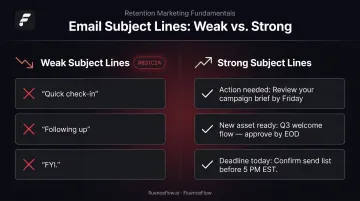
The subject should immediately answer two questions: what needs to happen and by when.
Context Recap Without Over-Explaining
The reminder body should briefly re-state what's being approved, why it matters, and what happens if it isn't reviewed — in 2–3 sentences, not paragraphs. The approver doesn't need the full background again; they need enough context to act without having to dig for it.
One Clear Call to Action
Every approval reminder should ask for exactly one thing. Keep the CTA focused:
- Link directly to the asset, campaign draft, or review platform
- Place the link where it's immediately visible — not buried in a paragraph
- Use action-oriented anchor text ("Review the draft" beats "Click here")
Once the ask is clear, make the deadline just as hard to miss.
Deadline Visibility
Bold the deadline and place it near the top. The approver should understand the urgency without reading the entire email. If they skim it in 10 seconds, the date and action item need to be the two things they retain.
Professional but Direct Tone
Passive phrasing dilutes urgency. Compare:
- ❌ "Just wanted to check in and see if you had a chance to look at this."
- ✅ "We need your sign-off by Thursday to keep this send on schedule."
The second version is courteous and direct. It respects the approver's time while making the stakes clear. Indirect phrasing signals low urgency, and low urgency gets deprioritized.
Best Practices for Writing Approval Reminder Emails
Keep It Short and Skimmable
A randomized study of 7,002 school-board members found that a 49-word professional request generated nearly twice the response rate of a 127-word version. Approval reminder emails should be under 150 words whenever possible.
Use bullet points to summarize:
- What is pending
- Who needs to act
- By when
Establish a Cadence Before the Project Starts
Setting expectations early removes friction. At the start of any campaign cycle, tell approvers: "We'll send a reminder 48 hours before the deadline and again 24 hours out." When reminders arrive as expected, they feel like part of the process — not a criticism of someone's responsiveness.
Personalize to the Approver's Role
A reminder to a founder lands differently than one to a marketing manager. Tailor the "why it matters" to what each approver cares about:
- Founder/CEO: Revenue impact, launch window, customer timing
- Marketing manager: Brand consistency, campaign calendar, go-live date
- Legal/compliance: Risk exposure, review timeline, regulatory deadlines
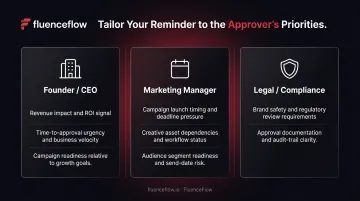
One sentence of role-specific context makes the reminder feel relevant rather than generic.
Limit Frequency Before Escalating
Gong's analysis of over 304,000 B2B emails found that reply yield declines with each successive message. Send no more than 2–3 email reminders before switching channels. A Slack message, brief call, or flagging it in a weekly sync will often get faster results than a fourth email.
Reduce the Approval Bottleneck Structurally
For DTC brands running ongoing email and SMS programs, the approval burden itself is often the real bottleneck — individual reminders are just the symptom. The structural fix is building a review process where approvals happen on a predictable schedule rather than reactively.
FluenceFlow structures client campaigns so brand owners spend 30–45 minutes per week on approvals, covering strategy, copy, design, segmentation, and scheduling in a single brief sign-off rather than scattered reviews across every send.
Approval Reminder Email Templates
Use these templates as a baseline — adjust tone based on your relationship with the approver and how hard the deadline actually is.
Polite First Reminder (24–48 Hours After Initial Request)
Subject: Action Needed: Approve [Campaign Name] by [Date]
Hi [Name],
I know your schedule is full — just flagging that [Campaign Name] is still pending your review. This is our [e.g., Memorial Day promotional email], scheduled to send on [Send Date].
We need your approval by [Deadline Date] to keep the send on track.
[→ Review and Approve Here] (link to draft or review platform)
Let me know if you have any questions.
[Your Name]
Firmer Second Reminder (24 Hours Before Deadline)
Subject: Final Reminder: [Campaign Name] Approval Needed Today
Hi [Name],
[Campaign Name] needs your sign-off today. If we don't receive approval by [Time/Date], the campaign will be delayed and we'll miss the send window.
[→ Approve Now] (link)
[Your Name]
Escalation or Post-Deadline Notice
Subject: [Campaign Name] On Hold — Next Steps Needed
Hi [Name],
The approval window for [Campaign Name] has passed, so we've put the send on hold. This will push the scheduled date to [New Estimated Date] and may affect [revenue window / launch timing].
Two options: we can reschedule the review for [proposed time], or escalate to [alternate decision-maker] to keep things moving.
Which option works for you?
[Your Name]
Common Mistakes That Delay Approvals
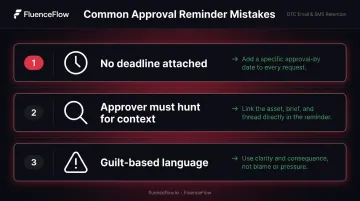
Most approval delays aren't caused by difficult stakeholders — they're caused by reminders that make it too easy to defer. Watch out for these three:
- No deadline attached. "When you get a chance" always loses to whatever else is in the approver's inbox. Give a specific date and time, and make it visible.
- Making the approver hunt for context. If they have to dig up the original brief or locate the asset separately, they'll postpone it. Link directly to everything they need inside the reminder itself.
- Guilt-based or passive-aggressive language. Phrases like "I've already sent this twice" or "per my last email" make future approvals harder. Keep it forward-looking: state the situation, the consequence, and the next step.
Frequently Asked Questions
How do you write a reminder email for approval?
Include a subject line that names the item pending approval, a 2-sentence context recap, the deadline in bold, and one direct CTA — all under 150 words. Everything they need to act should be visible at a glance.
How do you politely ask for approval in an email?
Frame the ask around shared goals rather than your own need for a response. Something like "Wanted to flag this so we can keep the launch on track — your sign-off by [date] keeps everything moving" acknowledges the approver's workload while preserving the urgency.
How do you professionally say "just a reminder"?
Replace it with something more specific: "I wanted to flag that your approval is needed by [date]," or "We're approaching the deadline for [campaign] and need your sign-off to stay on track." These alternatives communicate the same thing with more clarity and less hedging.
How many reminder emails should you send before escalating?
Send no more than 2–3 email reminders before switching to a different channel — a call, Slack message, or flagging it in a scheduled meeting. Beyond three, emails tend to get ignored rather than acted on.
When is the best time to send an approval reminder email?
Send the first reminder 24–48 hours after the original unanswered request, and the second 24 hours before the hard deadline. For recurring campaigns, building reminders into a pre-established cadence is more effective than sending them reactively.