Email automation solves this by sending the right message to the right person at the right time, automatically, based on what customers actually do. Instead of interrupting everyone with generic promotions, automation responds to individual behavior in real time, turning your email program into a revenue engine that works 24/7.
In this guide, you'll learn what email automation is, why it drives measurably better results than manual campaigns, the main types of workflows every DTC brand should run, real examples from brands that get it right, and how to get started without overwhelming your team.
Key Takeaways
- Email automation sends behavior-triggered messages, not blasts on a fixed schedule
- Automated emails generate 22x more revenue per send than promos, with 50%+ open rates
- Core workflows: welcome, abandoned cart, post-purchase, browse abandonment, and re-engagement
- Start with an automation platform (Klaviyo or Omnisend), clean data, and a mapped customer journey
What Is Email Automation?
Email automation is technology that sends personalized emails automatically when triggered by specific customer actions, behaviors, or data conditions. Instead of manually scheduling a campaign and sending it to everyone at once, automated emails respond to what each customer does. Common triggers include subscribing, browsing a product, adding items to cart, making a purchase, or going inactive.
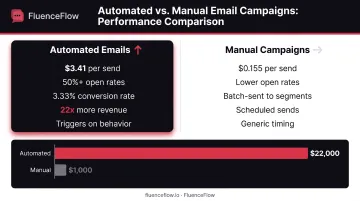
The key difference: Manual campaigns are batch-sent to segments on dates you choose. Automated emails trigger continuously in the background. Each customer enters a workflow when they meet the entry condition, regardless of day or time.
How Automation Actually Works
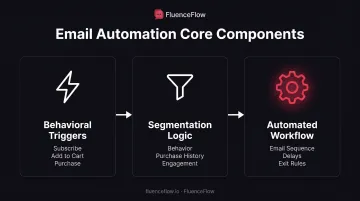
Three components power every automated email flow:
- Behavioral triggers - The customer action that starts the workflow (subscribing, abandoning cart, making a purchase)
- Segmentation logic - Rules that determine who receives which messages based on behavior, purchase history, or engagement level
- The automated workflow - The sequence of emails, delays, and exit conditions that run without manual intervention
Simple example: When someone adds items to their cart but doesn't complete checkout, your platform detects the "Started Checkout" event and sends a reminder email 2 hours later. If they still don't buy, a second email follows 24 hours after that.
The moment they complete the order, they exit cart recovery and enter your post-purchase sequence instead. You set this up once; it runs continuously.
Why Email Automation Matters for Your Business
Efficiency: Your Team Focuses on Strategy, Not Scheduling
Automation handles repetitive tasks 24/7. Once you build a welcome series, it greets every new subscriber immediately, whether they sign up at 2 PM on Tuesday or 11 PM on Saturday. Your team stops manually scheduling sends for every scenario and instead focuses on creative work, testing, and optimization.
Revenue Impact: Automation Outperforms Manual Campaigns
Omnisend's 2025 analysis of 470 million automated emails found automated messages generated $3.41 per send versus $0.155 for campaigns: a 22x difference.
Klaviyo's 2026 benchmarks across 183,000+ customers show flows producing a 13x higher placed-order rate and nearly 18x more revenue per recipient than manual campaigns.
Why the gap? Automated emails hit when customers are already thinking about your brand, right after they browse, abandon a cart, or buy. That relevance drives conversions.
Personalization at Scale
Automation uses real customer data to send the right message at the right moment:
- A first-time subscriber gets a brand introduction
- Someone who viewed a product but didn't buy gets a gentle reminder
- A recent buyer gets a cross-sell tied to what they actually purchased
Each touch feels one-to-one, even when you reach thousands of customers.
Competitive Reality: Customers Expect Timely Communication
McKinsey's research shows 71% of consumers expect personalized interactions, and 76% become frustrated when they don't get them. Brands still relying solely on batch-and-blast campaigns lose customers to competitors who respond intelligently to behavior. If someone abandons a $200 cart and your competitor sends a helpful reminder within hours, you've likely lost that sale, especially if you wait for next week's promo blast.
Types of Email Automation Workflows
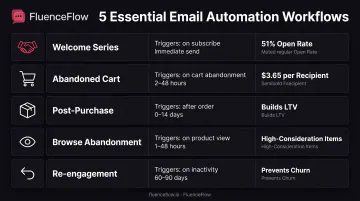
Most ecommerce brands start with five core automated workflows. Each targets a specific moment in the customer journey and runs without manual sends.
Welcome Series
Welcome emails trigger when someone subscribes to your list or creates an account, introducing your brand and setting expectations for future communication.
Why they work: Welcome series have the highest engagement of any automated workflow. Klaviyo's 2025 benchmarks show 51.26% average open rates and 1.97% placed-order rates.
These are your warmest leads. They just raised their hand and asked to hear from you. A strong welcome series makes a first impression that leads to first purchases.
Timing matters: Send the first email immediately. Wait at least one day between subsequent messages. Most brands run 2-4 emails over 5-7 days.
Abandoned Cart Recovery
These emails automatically send when customers add items to cart but don't complete purchase, reminding them of what they left behind.
The opportunity: Baymard Institute's analysis of 50 studies shows 70.22% of shopping carts are abandoned on average.
Klaviyo's benchmark study of 143,000+ cart flows found average open rates of 50.50%, placed-order rates of 3.33%, and $3.65 revenue per recipient. Top performers reach $28.89.
Cart abandonment doesn't always signal lost interest. Sometimes customers get distracted, want to compare prices, or need time to decide. A well-timed reminder recovers purchases that would otherwise disappear.
Post-Purchase Sequences
These automated follow-ups trigger after someone completes an order, including confirmation emails, shipping updates, review requests, and cross-sell recommendations.
Why they matter: Post-purchase emails strengthen customer relationships and increase lifetime value by keeping buyers engaged after the sale. Klaviyo reports post-purchase emails generate open rates nearly 17% above average automations. Use them to build trust, request reviews, and suggest complementary products.
Common sequence:
- Immediate order confirmation
- Shipping notification when the package ships
- Delivery confirmation
- Review request 7-14 days after delivery
- Cross-sell or educational content based on the purchase
Browse Abandonment
These emails target customers who viewed products but didn't add anything to cart, offering gentle nudges or incentives to return.
Best use case: Browse abandonment works especially well for higher-consideration purchases where customers need time to research and compare. Someone viewing a $400 item might not be ready to buy immediately but would appreciate a reminder or additional information.
Timing: Klaviyo recommends waiting at least 1 hour after the browse event before sending. Too soon feels intrusive; waiting 24-48 hours gives customers time to think while keeping your product top-of-mind.
Re-engagement Campaigns
These workflows automatically identify inactive subscribers and attempt to win them back with special offers or content before they permanently churn.
Timing strategy: Catching disengagement early (typically 60-90 days of inactivity for frequent-purchase brands) has higher success rates than waiting until customers are fully churned. For higher-ticket items with longer purchase cycles, you might wait 6-12 months before triggering re-engagement.
Exit condition: If someone doesn't respond after 2-3 re-engagement emails, consider suppressing them from regular campaigns to protect deliverability.
Email Automation Examples That Drive Results
These three flows cover the highest-ROI moments in a customer lifecycle: first impression, almost-purchase, and repeat order. Each one is simple to build and easy to measure.
E-commerce Welcome Series That Converts
A simple 3-email structure works for most stores:
- Email 1 (Immediate): Deliver the promised discount right away, point to bestsellers or a first purchase, and set expectations for how often you'll email.
- Email 2 (2 days later): Showcase bestsellers or top categories. Back claims with reviews, testimonials, or "most-loved" picks.
- Email 3 (5 days later): Share your brand story and what makes you different so the relationship goes beyond the transaction.
Segment by signup source. A blog subscriber needs different messaging than someone who joined at checkout or through a discount popup. FluenceFlow tailors welcome flows to unit economics: more education for premium brands, bestseller focus for large catalogs, and faster conversion paths for consumables.
Abandoned Cart Recovery With Progressive Incentives
Once someone is on your list, the next high-value trigger is the cart they never checked out. A progressive 3-email sequence protects margin while still recovering sales:
- Email 1 (2 hours later): Send a gentle reminder with product images and a simple "You left something behind" message. No discount. Many shoppers got distracted and will finish the purchase without one.
- Email 2 (24 hours later): Build confidence with reviews, product benefits, or FAQs that address common objections. Still no discount; let product value speak first.
- Email 3 (48 hours later): Offer a modest discount (around 10%) as a final nudge for fence-sitters.
Starting without a discount avoids training customers to abandon carts for deals. Serious buyers often convert on the reminder alone. The later offer catches the rest without giving margin away to people who would have bought anyway.
Post-Purchase Cross-Sell Sequence
After the order lands, cross-sells work best when they feel helpful, not rushed.
Wait 7–14 days after delivery so customers can receive and use what they bought. Then use real purchase data, not generic "you might also like" blocks. Bought running shoes? Suggest moisture-wicking socks or a running belt. Bought a coffee maker? Recommend filters, beans, or a milk frother.
Open with "How are you enjoying your [product]?" so the note reads as support. Follow with 2–3 complementary products that improve what they already own.
How to Get Started with Email Automation
Prerequisites
Before building your first workflow, make sure you have:
- An email marketing platform with automation (Klaviyo, Omnisend, ActiveCampaign, or similar tools built for e-commerce)
- Integrated customer data that tracks website events (product views, cart additions, purchases) so you can trigger behavioral emails
- A clear map of your customer journey and the moments when automated emails add value
Planning Process
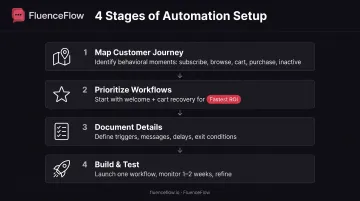
Step 1: Map your customer journey
Identify key behavioral moments:
- When someone subscribes (welcome series)
- When they browse products but don't add to cart (browse abandonment)
- When they add to cart but don't purchase (cart recovery)
- When they complete a purchase (post-purchase sequence)
- When they go inactive (re-engagement)
Step 2: Prioritize 2-3 high-impact workflows to build first
Start with welcome series and cart abandonment. These typically deliver the fastest ROI. Welcome series captures new subscribers at peak engagement, while cart recovery targets customers with demonstrated purchase intent.
Step 3: Document trigger conditions and message content
For each workflow, define:
- Trigger: What starts this workflow?
- Messages: How many emails, what content, what CTAs?
- Delays: How long between each email?
- Exit conditions: When does someone leave this workflow?
Implementation Guidance
Start with one workflow. Build your welcome series completely, test it with a small segment, and monitor performance for 1-2 weeks. Refine it before moving to the next automation.
Test thoroughly. Send test emails to yourself and confirm triggers fire correctly. Verify exit conditions work: customers who purchase should leave cart recovery workflows immediately.
Monitor core metrics:
- Open rate (are subject lines working?)
- Click-through rate (is content engaging?)
- Conversion rate (are people buying?)
- Revenue per recipient (what's the actual financial impact?)
Realistic Expectations
Initial setup takes time. You can build a basic welcome series in 2-4 hours, while more complex workflows may take 1-2 days of setup plus testing. Once running, automations work 24/7 with minimal maintenance beyond periodic optimization.
FluenceFlow typically launches initial flows within two weeks for new clients, with core workflows completed by week three. Results build over time as more customers enter workflows and you gather performance data to optimize messaging, timing, and offers.
Email Automation Best Practices
Timing, segmentation, and exit rules decide whether automation feels helpful or spammy. Use these practices as you build each flow.
Optimize Timing Through Testing
Don't assume universal best practices apply to your audience. Test send delays to find what works for your specific customers.
General starting points:
- Abandoned cart: First email 2-4 hours after abandonment, second email 24-48 hours later (Klaviyo)
- Browse abandonment: Wait at least 1 hour, often best at 24 hours
- Welcome series: First email immediate, subsequent emails 1-2 days apart
- Re-engagement: Depends on purchase cycle; 60-90 days for consumables, 6-12 months for premium items
Then test variations. For your audience, does a 1-hour cart recovery email outperform a 4-hour delay? Does a 3-email welcome series convert better than a 5-email version?
Segment Based on Behavior and Purchase History
Avoid sending the same automated email to everyone. Segment by:
- Purchase history: First-time buyers versus repeat customers
- Product interests: What they've browsed or purchased
- Engagement level: Active clickers versus passive readers
- Customer value: High-AOV buyers versus bargain shoppers
Example: Someone who's purchased three times should receive a different cart recovery message than someone who's never bought. The repeat customer might just need a reminder; the first-timer might need more reassurance or a stronger incentive.
Build In Exit Conditions
Automatically remove people from workflows when they complete the desired action. If someone purchases after receiving your first cart recovery email, stop sending them cart reminders. This prevents you from annoying customers with irrelevant messages and wasting sends.
Essential exit conditions:
- Cart recovery: Exit immediately after purchase
- Browse abandonment: Exit after adding to cart or purchasing
- Welcome series: Exit after first purchase (or move to separate buyer journey)
- Re-engagement: Exit after any engagement or purchase, or suppress after 2-3 attempts
Frequently Asked Questions
What are automated emails?
Automated emails are messages sent automatically by software when triggered by specific customer actions, such as subscribing, browsing products, abandoning a cart, or making a purchase, without requiring manual intervention each time.
How much do automated emails cost?
Most platforms charge $20–100/month for small businesses, scaling by contact list size. Omnisend starts free for 250 contacts, and Klaviyo offers a free tier up to 250 profiles, with paid plans based on audience size.
Can I automate emails in Gmail?
Basic Gmail doesn't support behavioral marketing automation like cart recovery or browse abandonment. Dedicated email marketing platforms (Klaviyo, Omnisend, Mailchimp, Brevo) integrate with Gmail for sending but provide the event tracking, workflow logic, segmentation, and deliverability management required for ecommerce automation.
What's the difference between email automation and regular email campaigns?
Regular campaigns are manually created and sent to segments on specific dates you choose. Automated emails trigger based on individual customer behavior and run continuously in the background, enrolling each customer when they meet the entry condition, regardless of day or time.
How long does it take to set up email automation?
A basic welcome series can be built in 2-4 hours. More complex workflows like abandoned cart (with dynamic product content and conditional logic) may take 1-2 days of initial setup plus testing. Most brands see their first automated workflows live within two weeks of starting.
What metrics should I track for automated emails?
Monitor open rate, click-through rate, conversion rate, and revenue per email. Compare these to your manual campaign benchmarks to demonstrate automation's impact. Most importantly, track revenue per recipient; automated emails should generate significantly more than broadcast campaigns.
Email automation is how modern DTC brands turn one-time visitors into repeat customers. Start with welcome and cart recovery workflows, measure results, and expand from there. The sooner you automate repetitive moments in the customer journey, the sooner you recover revenue left on the table.