Poor deliverability doesn't just cost you one campaign. It compounds over time, damaging customer relationships when subscribers miss order confirmations, back-in-stock alerts, or loyalty rewards. For DTC brands sending thousands of emails monthly, even a 10% drop in inbox placement can mean tens of thousands in lost revenue.
Key Takeaways
- Deliverability is inbox placement, not just whether a server accepts the email
- Inbox placement drives revenue: retail averages 87.7%, while the target is 95%+
- SPF, DKIM, and DMARC authentication are now mandatory for bulk senders to Gmail and Yahoo
- Fixing deliverability takes technical setup plus strategy: reputation, engagement, and list hygiene
What Is Email Deliverability?
Email deliverability is the ability to land emails in subscribers' primary inboxes, not spam folders or the promotions tab. It's measured by inbox placement rate: the percentage of sent emails that actually reach the inbox.
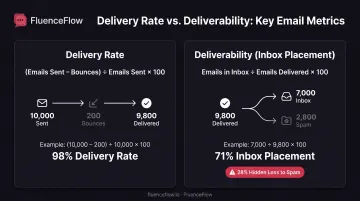
Deliverability differs from delivery rate, which only measures whether the receiving server accepted your email, not where it landed. You can have a 98% delivery rate but only 70% inbox placement, meaning 28% of your emails are going to spam despite being "delivered."
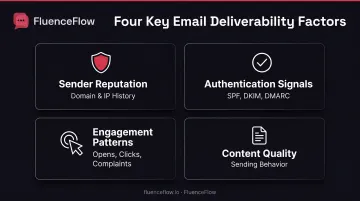
Inbox providers like Gmail, Yahoo, Outlook, and Apple use complex algorithms to decide placement based on:
- Sender reputation (domain and IP history)
- Authentication signals (SPF, DKIM, DMARC)
- Engagement patterns (opens, clicks, complaints)
- Content quality and sending behavior
For DTC e-commerce brands, email deliverability decides whether retention marketing and customer communication ever reach the people who already bought from you. Validity measured retail email in 2022 at 87.7% inbox placement, 2.4% spam, and 9.9% missing. More than 12% of retail emails never reached the inbox.
Why Email Deliverability Matters for E-Commerce Brands
Direct Revenue Impact
Deliverability directly controls how much revenue your email channel generates.
Omnisend found that automated emails generated 37% of email-driven sales from just 2% of email volume. Klaviyo measured abandoned-cart flows at $3.65 revenue per recipient versus $0.11 for campaigns.
When high-value flows land in spam, you lose the most profitable emails first.
FluenceFlow rebuilt deliverability for one DTC brand whose Klaviyo account was generating $0 in email revenue because every message hit spam. Within 44 days, email revenue reached $97,000 per month, contributing more than 30% of total store revenue and generating over $700,000 across 12 months.
The Compounding Effect
Poor deliverability costs immediate sales and erodes long-term customer trust. When subscribers miss key messages, they start to see your brand as unreliable:
- Order confirmations and shipping updates
- Back-in-stock alerts
- Loyalty rewards and win-back offers
Transactional emails carry the purchase-status details customers expect. Promotional flows recover abandoned carts and re-engage lapsed buyers. Both need inbox placement to work.
The "Silent Killer" Problem
Unlike low open or click rates you can spot in your dashboard, deliverability problems often stay hidden until sender reputation is already damaged.
Your ESP may show high delivery rates, so everything looks fine while 20-30% of emails still land in spam. By the time revenue dips, rebuilding domain reputation can take months.
Delivery Rate vs. Deliverability: Understanding the Difference
These two metrics get used interchangeably, and they shouldn't be. One tells you the server accepted the message. The other tells you whether a person ever saw it.
Delivery rate = (emails sent − bounces) ÷ emails sent × 100.
It measures the percentage of emails accepted by receiving mail servers.
Deliverability (inbox placement rate) = emails landing in inbox ÷ emails delivered × 100.
It measures the percentage of delivered emails that reach the inbox, not spam or promotions.
Example: A brand sends 10,000 emails. 200 bounce, so 9,800 are delivered (98% delivery rate).
Only 7,000 land in the inbox; 2,800 go to spam. Inbox placement is 71% even though delivery rate is 98%. You still lost 28% of your audience despite "successful delivery."
Key Factors That Impact Email Deliverability
Six factors decide whether your campaigns land in the inbox or the spam folder. Inbox providers weigh all of them together, so a weak spot in one area can undo strong work in the others.
Sender Reputation
Inbox providers assign reputation scores to your sending domain and IP address based on historical behavior and recipient engagement. Reputation is tracked at both levels:
- Domain reputation: Your brand's sending domain (e.g., yourbrand.com)
- IP reputation: Your ESP's mail server infrastructure
What damages reputation:
- High bounce rates (especially hard bounces to invalid addresses)
- Spam complaints from recipients
- Sending to purchased or scraped lists
- Low engagement (emails unopened, immediately deleted)
- Spam trap hits (sending to honeypot addresses)
- Blocklisting by reputation services
What builds reputation:
- Consistent sending volume and patterns
- High open and click rates
- Low complaint rates (under 0.1%)
- Clean, permission-based lists
- Proper authentication (SPF, DKIM, DMARC)
Microsoft identifies sending IP, domain, authentication, list accuracy, complaint rate, and content as principal reputation factors. Reputation builds gradually through consistent, clean sending. You cannot buy or rush a strong score.
Email Authentication (SPF, DKIM, DMARC)
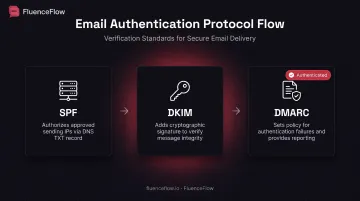
Authentication protocols prove your emails are legitimately from your domain, not spoofed by scammers.
SPF (Sender Policy Framework): Authorizes which IPs and mail servers can send for your domain, published as a DNS TXT record of approved sources.
DKIM (DomainKeys Identified Mail): Adds a cryptographic signature so receiving servers can confirm the message was not altered in transit.
DMARC (Domain-based Message Authentication, Reporting & Conformance): Tells receivers what to do with mail that fails SPF or DKIM (reject, quarantine, or accept) and sends you failure reports.
Gmail and Yahoo now require proper authentication for bulk senders (5,000+ emails per day), and both mandate one-click unsubscribe for marketing mail. Among the top 500 US retail domains, 74% had DMARC records aligned to best practices, with 31% using the strictest reject policy.
Engagement Signals
Inbox providers track how recipients interact with your emails:
Positive signals:
- Opens, clicks, replies, forwards
- Moving emails from promotions to primary inbox
- Adding your address to contacts
Negative signals:
- Deletes without opening
- Spam reports ("mark as spam" or "report phishing")
- Unsubscribes
- Emails left unopened for weeks
High engagement signals to inbox providers that recipients want your emails, improving future deliverability. Consistently low engagement trains filters to route future emails to spam. Gmail requires spam complaint rates below 0.10% and warns never to exceed 0.30%.
Note: Gmail does not track open rates and cannot verify third-party open-rate accuracy, so opens alone don't directly influence Gmail's filtering. Direct feedback, complaints, unsubscribes, and engagement, matters most.
List Quality and Hygiene
Sending to invalid addresses, inactive subscribers, or purchased lists is the fastest way to destroy deliverability.
List hygiene means regular removal of:
- Bounced addresses (especially hard bounces to non-existent mailboxes)
- Unengaged subscribers (no opens or clicks in 90-180 days)
- Spam traps (honeypot addresses that identify poor list practices)
In Klaviyo, a common unengaged segment is subscribers who received at least five emails in the past 90 days with zero opens and zero clicks.
For e-commerce brands, a smaller engaged list outperforms a large inactive one. Purchased lists often hide spam traps that can land you on a blocklist overnight.
Content and Sending Patterns
Spam filters analyze email content for suspicious patterns:
- Excessive promotional language ("FREE!", "Act now!", "Limited time!")
- All-caps subject lines
- Misleading headers or from-names
- Broken HTML or images-only emails
- High link-to-text ratios
Sudden volume spikes also trigger filters. Sending to your full list after months of inactivity can look like a compromised account and push you straight to spam.
Trigger words still matter, but context and sender reputation matter more. A trusted sender can use promotional language that would sink a new domain.
Infrastructure and Technical Setup
Use a reputable Email Service Provider (ESP) with solid sending infrastructure and IP reputation. Your IP setup shapes how much control you have:
- Shared IPs: Lower cost; reputation is pooled, so one bad sender can hurt everyone
- Dedicated IPs: Full control over reputation; need consistent volume to stay warm
Technical requirements:
- Proper DNS records (SPF, DKIM, DMARC, reverse DNS)
- Valid return-path and reply-to addresses
- Working unsubscribe links in every email
- Authenticated DKIM signatures that pass validation
How to Improve Your Email Deliverability
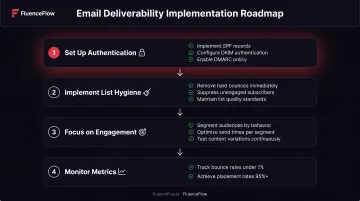
Improving deliverability comes down to authentication, list quality, engagement, and ongoing monitoring. Work these in order: technical setup first, then list and content habits.
Set up authentication first:
- Implement SPF, DKIM, and DMARC records for your sending domain
- ESP partners like Klaviyo provide step-by-step guides
- Use DMARC reporting to monitor authentication pass/fail rates
- Move to
p=quarantineorp=rejectDMARC policies once SPF and DKIM are stable
Implement list hygiene practices:
- Remove hard bounces immediately (same day)
- Suppress unengaged subscribers after 90-180 days of inactivity (send a re-engagement campaign first)
- Use double opt-in for new subscribers (optional but effective)
- Never purchase or scrape email lists
- Monitor for spam traps through reputation services
Focus on engagement:
- Send relevant content to segmented audiences (purchase history, browse behavior, lifecycle stage)
- Optimize send times based on when your audience is active
- Use compelling subject lines and preview text
- Test different content, offers, and formats
Monitor and respond to metrics:
- Keep bounce rates under 1%, spam complaints under 0.1%, and unsubscribes under 0.3%
- Use inbox placement testing tools before sending to your full list
- Investigate and fix issues immediately when metrics decline
- Check Google Postmaster Tools for Gmail-specific reputation data
When technical debt or reputation damage needs hands-on help, FluenceFlow handles diagnostics, authentication fixes, sender-reputation recovery, and infrastructure rebuilding. Clients average 41% of total store revenue from email and SMS when deliverability and strategy work together.
Tools and Resources for Monitoring Deliverability
Pre-send testing tools:
- Inbox placement tests that show where mail lands in Gmail, Yahoo, Outlook, and Apple before a full send
- Seed testing accounts that receive test sends and report folder placement
Monitoring tools:
- Google Postmaster Tools: Gmail spam rate, IP/domain reputation, authentication status, and delivery errors
- Microsoft SNDS: Outlook.com IP-level reputation data
- DMARC monitors: Tools like GlockApps collect aggregate/forensic reports and check SPF, DKIM, and DMARC on a regular cadence (free tier up to ~10,000 messages/month)
- ESP dashboards: Klaviyo, Mailchimp, and other platforms break deliverability metrics out by inbox provider, domain, country, and email client
Seed testing is only a snapshot; it won't mirror real subscriber engagement. Pair seed results with provider telemetry and campaign metrics for a full picture.
Frequently Asked Questions
What is deliverability in email marketing?
Deliverability measures whether emails successfully reach subscribers' inboxes, not spam folders. It's determined by sender reputation, authentication (SPF, DKIM, DMARC), content quality, engagement signals, and list hygiene. Unlike delivery rate, which only confirms server acceptance, deliverability tracks actual inbox placement.
What is a good email deliverability rate?
A good inbox placement rate is 95%+ (meaning 95% or more of sent emails land in the inbox). Rates between 87-95% indicate issues to address, and anything below 87% requires immediate attention. The measured retail average is 87.7%, but top-performing brands consistently achieve 95%+.
What is a good email open rate in 2026?
Average open rates for e-commerce brands range from 15–25%, with Omnisend measuring 26.6% in 2024. Apple's Mail Privacy Protection can inflate reported opens, so prioritize click rates, conversions, and revenue per recipient instead.
How much does it cost to send 1,000 emails?
ESP plans that support 1,000+ sends typically cost $11–$39 per month. Omnisend Standard starts at $11.20/month for 6,000 sends, Mailchimp Essentials at $13/month for 5,000 sends, and Drip at $39/month. Most pricing is based on contact list size, not send volume.