Introduction
When your email gets lost in an overflowing inbox, your text lands in someone's pocket, and they see it within minutes. While businesses juggle WhatsApp, social media, and a dozen messaging platforms, SMS delivers messages to anyone with a phone number, no app installation required.
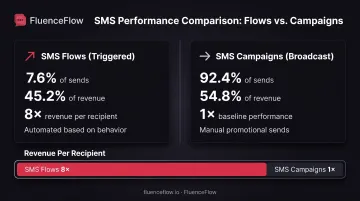
Klaviyo's 2026 benchmarks reveal that SMS campaigns achieve click rates between 8.9-14.5% among brands in the "good" performance tier, while email campaigns average just 1.69%. The gap widens further: SMS flows generated 45.2% of total SMS revenue from only 7.6% of sends, about 8 times the revenue per recipient compared to campaigns.
This guide reveals seven specific, proven ways businesses use SMS to boost revenue, improve customer experience, and streamline operations, without burning out their audience.
Key Takeaways
- SMS flows drive 8x more revenue per recipient than broadcasts, with top performers hitting 2%+ conversion
- SMS two-factor authentication cuts account compromise risk but stays exposed to SIM swap and phishing
- Healthcare SMS reminders cut no-shows by 7-11% across trials covering 158,000+ appointments
- Federal law requires written consent before promotional SMS, with opt-outs honored within 10 business days
1. SMS Marketing Campaigns and Promotions
Why SMS Marketing Works
SMS delivers messages directly to customers' pockets with no app barrier, no algorithm filtering, and immediate visibility. Unlike email, which competes with dozens of other messages, texts appear on the lock screen within seconds of arrival.
Klaviyo's 2026 data shows SMS flows (automated messages triggered by customer behavior) generated 45.2% of SMS revenue from just 7.6% of sends, producing roughly 8x the revenue per recipient compared to broadcast campaigns. Triggered, personalized SMS far outperforms generic promotional blasts.
SMS Marketing Use Cases:
- Flash sales with countdown timers to create urgency
- Exclusive VIP offers for top-spending segments
- Product launch announcements with early access links
- Limited-time promotions tied to holidays or events
- Cart abandonment nudges with direct checkout links
Strategic Segmentation
Top-performing SMS programs don't blast every subscriber. They target specific customer segments based on behavior and value:
- VIP customers: Early access to new products, exclusive discounts, and priority notifications
- Cart abandoners: Personalized reminders with product images and one-click checkout recovery
- Location-based offers: Store-specific promotions for customers near physical locations
- Purchase history segments: Replenishment reminders for consumables, cross-sell offers based on past orders
FluenceFlow builds custom SMS marketing campaigns for DTC e-commerce brands, integrating SMS with email strategies through Klaviyo. Clients average 41% of total store revenue from combined email and SMS, with the agency delivering 10.6x average ROI in the first 90 days across 30+ brands.
Best Practices for SMS Marketing
Compliance and Consent:
- Obtain explicit written consent before sending promotional messages
- Include clear opt-out instructions in every message (STOP, UNSUBSCRIBE)
- Document consent date, source, and disclosure language
- Honor opt-out requests within 10 business days per federal regulations
Message Format and Timing:
- Keep messages under 160 characters when possible (billed per segment; GSM-7: 160 single / 153 concatenated)
- Send during business hours (avoid early morning or late evening)
- Limit promotional messages to 2-4 per month to avoid subscriber fatigue
- Include a clear call-to-action with shortened tracking links
Performance Benchmarks (Klaviyo US SMS):
- "Good" click rates: 8.9-14.5%
- "Great" click rates: 14.6% or higher
- "Good" conversion rates: 1.0-2.0%
- "Great" conversion rates: 2.1% or higher
- "Great" opt-out rates: Under 0.5%
Source: Klaviyo SMS benchmarks, based on US customer data
2. Two-Factor Authentication and Security Verification
What Is SMS-Based 2FA?
Two-factor authentication (2FA) via SMS adds a second verification layer beyond passwords by sending a one-time code to a user's registered phone number. When someone attempts to log in, reset a password, or authorize a transaction, they must enter both their password and the temporary code sent via text.
Common 2FA Use Cases:
- Login verification for online accounts
- Password reset confirmations
- High-value transaction approvals
- Account setting changes (email, phone, payment methods)
- Suspicious activity alerts requiring user confirmation
Security Impact
SMS 2FA reduces unauthorized access compared to passwords alone. Google's 2019 security research showed SMS codes blocked bulk phishing attacks and automated bots.
Still, NIST SP 800-63B-4 restricts PSTN delivery because of known vulnerabilities, and OWASP flags significant risks:
- SS7 protocol interception: Attackers can intercept SMS codes through telecom network vulnerabilities
- SIM swap attacks: Fraudsters convince carriers to transfer your number to their device
- Number porting: Hijackers port numbers to new carriers without authorization
- Phishing: Users can be tricked into sharing codes with attackers
- Lock-screen previews: Codes appear on locked devices where others can read them
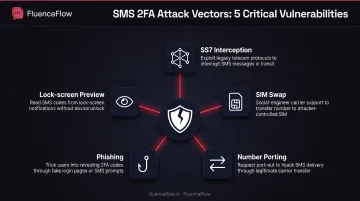
SMS 2FA is stronger than passwords alone, but it is not phishing-resistant. For high-risk apps that handle financial data or sensitive personal information, prefer FIDO/U2F keys or passkeys.
Best Practices
Code Format and Delivery:
- Use 6-digit codes that expire within 10 minutes
- Allow only one-time use per code
- Clearly identify the sender (company name, not a random number)
- Monitor for SIM changes and device swaps before sending codes
User Communication:
- Explain why the code was sent ("requested for login attempt from New York")
- Provide alternative verification methods when SMS fails
- Never ask users to share codes via email or customer service calls
3. Customer Service and Support Communications
Two-Way Support Without Phone Calls
SMS enables real-time customer service conversations without phone holds or email delays. Customers can text questions, receive answers, and resolve issues from anywhere. Your support team manages multiple conversations simultaneously.
Customer Service Use Cases:
- Answering product questions and providing recommendations
- Troubleshooting technical issues with step-by-step guidance
- Handling returns, exchanges, and refund requests
- Escalating complex issues to specialized agents
- Providing order status updates on demand
Benefits for Customers and Teams
Customer Convenience:
- Text during work hours without making calls
- Maintain conversation history in message threads
- Multitask while waiting for responses
- Avoid repeating information across interactions
Those same threads make agents faster on their side.
Support Team Efficiency:
- Handle 3-5 conversations per agent simultaneously
- Reduce average handling time compared to phone support
- Access customer history and previous messages instantly
- Route specialized inquiries to appropriate team members
Integration with Support Systems
SMS customer service works best when integrated with CRM platforms and helpdesk software. Conversations sync automatically, so teams can:
- View full customer interaction history across channels
- Assign conversations to specific agents based on expertise
- Track resolution times and customer satisfaction
- Maintain context when switching between text, email, and phone
Set clear response-time expectations in your first reply, especially outside business hours. That habit keeps SMS support fast without overpromising.
4. Transactional Notifications and Updates
What Are Transactional SMS Messages?
Transactional SMS messages are automated notices triggered by a customer action or account event: order placed, package shipped, password changed. Unlike promotional campaigns, they serve a functional purpose tied to an existing transaction or relationship, so they don’t require prior marketing consent.
Most Common Transactional Messages:
- Order confirmations: receipt right after purchase, with order number
- Shipping notifications: carrier name and tracking link when the order ships
- Delivery updates: status as the package moves through the network
- Payment receipts: charge confirmation and invoice link
- Account alerts: password changes, billing updates, security notices
- Appointment or service reminders: date, time, and what to prepare (if you book jobs or consults)
How Automation Works
Transactional SMS systems trigger automatically through API integrations with your existing business platforms:
- E-commerce platforms (Shopify, WooCommerce): order and shipping updates
- Payment processors (Stripe, Square): payment confirmations
- Booking tools (Calendly, Acuity): appointment confirmations and reminders
- CRM / retention platforms (Klaviyo, HubSpot): post-purchase and account triggers tied to customer behavior
GoDaddy documents how WooCommerce stores integrate Twilio to send SMS automatically when order status changes. On Shopify, the same pattern usually runs through your ESP/SMS stack or a native integration so tracking and delivery texts fire without manual sends.
Examples by Industry
E-commerce:
- "Your order #12345 has shipped via FedEx. Track here: [link]"
- "Your package will arrive today between 2-6 PM"
Post-purchase and account (DTC-friendly patterns):
- "We detected a new login on your account. If this wasn’t you, reset your password here: [link]"
- "Your replenishment order is confirmed. Next shipment: Oct 1"
Service / on-site fulfillment (if you ship people, not just parcels):
- "Your technician John is 10 minutes away. Track arrival: [link]"
- "Service complete. Invoice: [link]. Reply here with questions"
Why Transactional SMS Matters
Automated status texts cut “where is my order?” tickets and give customers updates before they hunt your inbox or help desk. For DTC brands, that reliability is the baseline; promotional and retention SMS work better when shoppers already trust your transactional messages to be useful and on time.
5. Appointment Reminders and Scheduling
Reducing No-Shows Across Industries
Missed appointments cost businesses revenue, waste staff time, and block slots that other customers could have filled. SMS reminders cut no-show rates across healthcare, service industries, professional services, and B2B sales by reaching customers where they're most likely to respond.
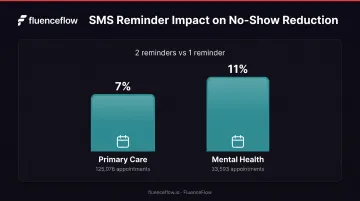
A 2022 randomized trial covering 125,076 primary care visits and 33,593 mental health visits compared one text reminder sent 2 business days before appointments with two reminders sent 3 and 2 business days in advance:
- Primary care: The second reminder reduced no-shows by 7%
- Mental health: The second reminder reduced no-shows by 11%
A 2016 systematic review of 31 studies found that SMS reminders improved attendance compared to no reminders, but performed similarly to phone reminders. SMS was more cost-effective, though, averaging about $0.45 per reminder versus higher phone-based costs.
Best Practices for Appointment Reminders
Timing:
- Send first reminder 24-48 hours before appointment (48-72 hours for complex prep)
- Consider a second reminder on the appointment day for high-value bookings
- Avoid reminders more than 7 days out; they're less effective
Message Content:
- Include appointment date, time, and location
- Provide clear confirmation and cancellation options ("Reply YES to confirm, CANCEL to reschedule")
- Add preparation instructions when relevant (fasting, documents to bring, parking details)
- Include contact information for questions
Example Reminder:
Reminder: Dental cleaning tomorrow at 10 AM with Dr. Lee at 123 Main St. Reply YES to confirm or CANCEL to reschedule. Questions? Call (555) 123-4567
Interactive Confirmation:
- Enable two-way responses for confirmations and cancellations
- Automatically update scheduling systems based on replies
- Send confirmation receipt after customer responds
- Free up canceled slots immediately for other bookings
6. Lead Generation and Opt-In Campaigns
How SMS Opt-In Campaigns Work
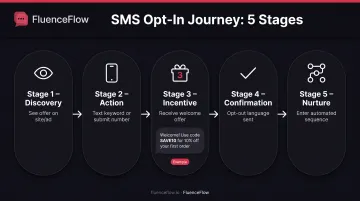
SMS opt-in campaigns grow your owned list by trading clear value for a phone number. A shopper texts a keyword to a short code (e.g., "Text DEAL to 12345") or submits their number on a popup, gets an instant welcome offer, and enters your nurture sequence.
Opt-In Process Flow:
- Shopper sees the offer on a site popup, paid social ad, packaging insert, or post-purchase page
- They text a keyword to a short code or enter their number on a landing page or popup
- You send a welcome message with the promised incentive (discount code, early access, free shipping)
- They get confirmation plus clear opt-out language in the same thread
- They enter an automated welcome/nurture flow with timed follow-ups
Use Cases for SMS Opt-In:
- Welcome discounts and first-order offers tied to popup or keyword signups
- Early access to product drops, limited releases, and restock alerts
- Giveaway or contest entries that feed a compliant SMS list
- VIP or loyalty signup for member-only codes and points updates
Compliance Considerations
Strong opt-in design only works if consent is clean; promotional SMS without proper permission creates legal and deliverability risk. Federal law requires explicit written consent before sending promotional SMS. 47 CFR 64.1200 defines prior express written consent as:
- A signed written agreement (physical or electronic) clearly authorizing delivery of marketing messages
- Explicit statement that signing is not required as a condition of purchase
- Identification of the specific business authorized to send messages
Documentation Requirements:
- Retain phone number, consent date/time, and opt-in source
- Record exact disclosure language shown to the subscriber
- Document campaign purpose and message frequency expectations
- Log confirmation and opt-out events
Opt-Out Rules:
Customers can revoke consent by any reasonable method. Federal regulations specify that replying "STOP," "QUIT," "END," "REVOKE," "OPT OUT," "CANCEL," or "UNSUBSCRIBE" must be honored within 10 business days. One confirmation text is permitted if it only confirms revocation and contains no marketing.
Current Waiver: The FCC extended a waiver until January 31, 2027 for one provision of the consent-revocation rule. Consult legal counsel for your specific compliance requirements.
CTIA guidelines likewise expect consent before texting and clear opt-out mechanisms; build both into every keyword, popup, and welcome message from day one.
7. SMS as Part of an Omnichannel Strategy
Why SMS Shouldn't Work in Isolation
Customers move across your website, email, social, and text throughout a purchase cycle. When SMS runs on its own, you risk message fatigue, conflicting offers, and missed chances to reinforce the same moment across channels.
A 2019 Twilio survey of 2,500 consumers found that 83% preferred email for general business communications, but for urgent messages, texts were more than twice as popular as email.
That split is why each channel needs a clear job:
- SMS: Time-sensitive alerts, flash sales, appointment reminders, delivery updates
- Email: Detailed content, product education, storytelling, fuller offers
- Social: Community engagement, brand personality, user-generated content
- Web/App: Browsing, checkout, account management, support
Integration Strategies
Give each channel a role in the same campaign, not a separate campaign of its own.
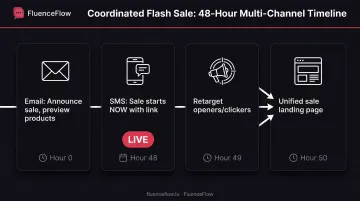
Coordinated flash-sale sequence:
- Email 48 hours out: announce the sale, preview featured products, and build anticipation
- SMS on sale day: "Flash sale starts NOW. 30% off [category]. Shop: [link]"
- Retarget email openers and SMS clickers with ads for the same products
- Send all traffic to one sale landing page with consistent messaging
Shared data keeps those touches from colliding:
- Sync email, SMS, and web behavior in one CRM
- Track cross-channel engagement to spot high-intent customers
- Suppress SMS to anyone who already converted via email
- Follow up email non-openers with a short SMS nudge
A single messaging calendar ties it together. Plan promotions across channels at once, stagger send times (email for detail, SMS for urgency), and keep offers and brand voice aligned so customers never see two conflicting deals in the same week.
Real-World Results
Klaviyo case studies show what happens when brands run email and SMS on one platform:
- Frances Valentine: 21.8x ROI from Klaviyo SMS in 8 weeks
- Force of Nature: 140% year-over-year growth in revenue from Klaviyo flows
FluenceFlow builds the same kind of coordinated email and SMS systems for DTC brands on Klaviyo. Clients average 41% of total store revenue from those combined channels and 10.6x ROI in the first 90 days across 30+ brands.
Important: These figures use platform-specific attribution. They are not controlled tests of SMS+email lift versus email alone.
Getting Started with SMS for Business
Stand up SMS in a sequence that builds trust first: pick a platform that fits your stack, grow a consented list, prove value with transactional messages, then measure what to scale.
Choose the Right Platform
Select an SMS platform that integrates with your existing tech stack:
- DTC / e-commerce brands: Klaviyo, Postscript, or Attentive (native Shopify and WooCommerce integrations)
- Custom or multi-system setups: Twilio when you need API flexibility across tools
- Lighter standalone needs: TextMagic or SimpleTexting for faster setup with simpler CRM requirements
Platform Selection Criteria:
- Native integration with your e-commerce platform or CRM
- Compliance tools (consent management, opt-out handling, documentation)
- Automation capabilities (triggered messages, workflows, segmentation)
- Two-way messaging support for customer service
- Reporting and analytics (delivery, engagement, revenue attribution)
Build Your Subscriber List
Start with proper consent and clear value exchange:
- Add opt-in forms: Website popups, checkout opt-ins, account signup checkboxes
- Promote keyword campaigns: In-store signage, social media ads, email signatures
- Offer immediate value: Discount codes, exclusive content, early access
- Set expectations: Disclose message frequency and content type upfront
- Make opt-out easy: Include STOP instructions in every message
Start with Transactional Messages
Before launching promotional campaigns, implement transactional SMS so customers learn to trust your number:
- Order confirmations and shipping updates
- Appointment reminders and confirmations
- Account security notifications
- Payment receipts and billing alerts
Once transactional messages perform well, layer in targeted promotional campaigns to specific customer segments.
Measure and Optimize
Key Metrics to Track:
- Delivery rate: Percentage of messages successfully delivered to carrier
- Click-through rate: Percentage of recipients clicking links in messages
- Conversion rate: Percentage of recipients completing desired action (purchase, booking, signup)
- Opt-out rate: Percentage of subscribers unsubscribing per campaign
- Revenue attribution: Total revenue generated from SMS campaigns and flows
Optimization Tactics:
- A/B test send times, message length, and call-to-action wording
- Segment audiences based on engagement, purchase history, and behavior
- Reduce frequency if opt-out rates exceed 1-2% per campaign
- Monitor delivery rates and resolve carrier filtering issues
- Track revenue per recipient to identify highest-performing message types
FluenceFlow builds SMS programs for DTC brands: Klaviyo integration, list growth, compliance setup, and performance tracking included. Clients average 41% of total store revenue from combined email and SMS, with first reports in 30 days and weekly updates after that.
Frequently Asked Questions
What are SMS communications?
SMS (Short Message Service) is a text messaging standard that allows 160-character messages between mobile devices using cellular networks, not internet data. Messages are sent through phone numbers rather than usernames or app accounts.
Why use SMS communications?
SMS reaches every mobile phone without requiring app downloads or internet access. Messages appear within minutes of sending, making SMS ideal for time-sensitive notifications, urgent promotions, and transactional updates that demand immediate attention.
Do SMS communications still exist?
Yes. A 2026 GSMA survey of business decision-makers documented 8 million pure-SMS messages sent monthly among surveyed organizations. Messaging apps have grown, but SMS stays widely used because it works on every phone with no app required.
Are SMS communications secure?
SMS is not end-to-end encrypted. OWASP identifies risks such as SS7 interception, SIM swapping, and phishing, so avoid sensitive account details, health information, or long-lived passwords; short-lived verification codes are acceptable under NIST guidelines.
How much does business SMS cost?
Pricing varies by provider and volume. Twilio lists $0.0083 per SMS segment for US long code, toll-free, and short code messaging, before carrier fees. Actual costs depend on destination, message type, and volume discounts.
Do I need special software to send business SMS?
You need an SMS platform or API integration, not special software. Many marketing platforms, including Klaviyo, HubSpot, and Salesforce, include SMS capabilities. Standalone SMS services like Twilio, Postscript, and Attentive integrate with existing e-commerce and CRM systems.