Introduction
Your store already has traffic. You've paid for those visitors through ads, SEO, and content. But most e-commerce brands still send automated emails from copy-pasted templates that ignore their actual business model.
A $45 consumable with 30-day repurchase cycles needs a different automation system than a $500 premium product with a 180-day consideration period. Yet most brands run the same generic welcome series and cart recovery flows and leave repeat revenue on the table.
This guide covers the fundamentals of email automation, the most effective flows for e-commerce, platform options, and how to decide between DIY and agency support. By the end, you'll know how to build an automation system around your unit economics, not industry templates.
Key Takeaways
- Automated flows drive ~41% of email revenue from just 5.3% of sends (18x revenue per recipient vs. campaigns)
- Base automation on your AOV, purchase frequency, and margins, not generic templates
- Most e-commerce brands need 8-12 core flows covering welcome, cart abandonment, post-purchase, and retention
- Strategy and execution drive ROI more than platform features or software choice
- Expect 60-90 days to see meaningful impact as flows mature and lists re-engage
What is Email Marketing Automation?
Email marketing automation is software that sends targeted emails based on triggers like customer actions, timeframes, or data conditions. Instead of manually picking recipients and hitting send, you build flows once, and the system runs them in real time as shoppers interact with your store.
Automation vs. Campaigns
Campaigns are batch-and-blast emails sent to segments on a schedule, like your weekly newsletter or a product launch announcement. You choose the audience, write the message, and send it at a specific time.
Automation flows respond to individual behavior in real-time. When a customer abandons their cart, joins your list, or hasn't purchased in 90 days, the automation triggers immediately and sends a pre-built series tailored to that action.
Klaviyo's 2026 e-commerce benchmark shows flows deliver nearly 18x the revenue per recipient compared to campaigns, despite representing only 5.3% of total email sends.
Three Core Components
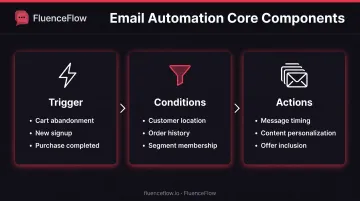
That revenue gap comes from how flows are built. Every automation has three parts:
- Trigger – What starts the automation (cart abandonment, list signup, product view, purchase, time-based event)
- Conditions – Who qualifies (location, order history, product type, engagement level, list segment)
- Actions – The email series that gets sent (number of emails, timing, content, offers)
Why Automation Works
Because each message matches a real action and lands at the right moment, automated emails outperform batch sends by a wide margin. According to Omnisend's 2025 e-commerce report, they drove 52% higher open rates, 332% higher click rates, and 2,361% higher conversion rates than scheduled campaigns in 2024.
Simple Example
Here's how that looks in practice. A shopper adds a $75 skincare set to their cart but leaves without buying:
- Trigger: Cart abandoned
- Condition: Cart value above $50, customer hasn't purchased before
- Actions:
- Email #1 (1 hour): Friendly reminder with product image
- Email #2 (24 hours): Social proof plus limited-stock urgency
- Email #3 (3 days): 10% discount code if cart still abandoned
Types of Email Automation Flows for E-commerce
E-commerce brands typically earn the strongest automated revenue from six lifecycle flows. Each one targets a specific moment, from first signup through repeat purchase.
Welcome Series
Purpose: Build a relationship with new subscribers, set expectations, and drive first purchases.
Structure: 3-5 emails over 7-14 days introducing brand story, best sellers, social proof, and a first-purchase incentive.
Omnisend's 2025 benchmark data shows welcome emails average 35.53% open rates and 2.11% conversion rates, higher than any other flow type.
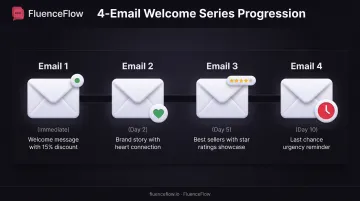
Example sequence:
- Email 1 (immediate): Welcome message with 15% discount code
- Email 2 (Day 2): Brand story and mission
- Email 3 (Day 5): Best sellers and customer reviews
- Email 4 (Day 10): Last chance to use discount
Abandoned Cart Recovery
Purpose: Recover lost sales by reminding customers about items left in their cart.
Baymard Institute's 2025 research finds the average cart abandonment rate is 70.22%. Omnisend's cart abandonment data shows these emails convert at 1.51% per send, with a $168 average order value.
Timing strategy:
- First email (1-4 hours): Simple reminder with cart contents
- Second email (24 hours): Add urgency, scarcity, or social proof
- Third email (48-72 hours): Final incentive if needed (discount or free shipping)
When to use discounts: High-margin brands can afford to offer 10-15% off in the final email. Low-margin brands should rely on urgency and scarcity instead of cutting into profit.
Browse Abandonment
Purpose: Re-engage shoppers who viewed products but never added to cart.
Browse abandonment targets lower-intent visitors than cart abandonment but still captures warm traffic. Omnisend's browse abandonment research shows these emails average 42.16% open rates and 0.59% conversion rates.
Typical approach: Single email 24 hours after browsing session featuring viewed products plus related items.
Best for: Higher-AOV products where consideration time is expected (furniture, electronics, luxury goods).
Post-Purchase Flows
Purpose: Confirm orders, set delivery expectations, request reviews, and drive repeat purchases.
Omnisend's post-purchase analysis found these emails achieve 49.75% open rates and 4.44% click rates, the highest engagement of any flow type.
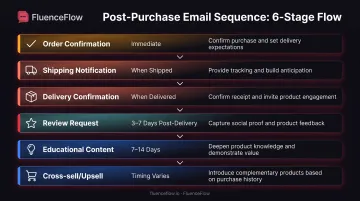
Sequence breakdown:
- Order confirmation (transactional, immediate)
- Shipping notification (transactional, when shipped)
- Delivery confirmation (when delivered)
- Review request (3-7 days post-delivery)
- Educational content (product usage tips, 7-14 days post-delivery)
- Cross-sell/upsell (timing depends on product type)
Post-purchase is where you build customer lifetime value, not just the first sale.
Win-Back and Re-engagement
Purpose: Bring back customers who have gone quiet past your normal repurchase window.
The timing depends on your typical purchase cycle: 30 days for consumables, 90 days for apparel, 180+ days for durables. Omnisend's win-back data shows these emails convert at 0.52% with a $94 average order value.
Progression:
- "We miss you" email with personalized recommendations
- Exclusive "come back" offer (discount or free shipping)
- Final "last chance" message before suppression
Segmentation: VIP customers and high lifetime-value buyers get more touches and better offers than one-time purchasers.
Replenishment Reminders
Purpose: For consumable products, remind customers to reorder based on expected usage timeline.
Setup: Calculate average days between purchases or estimated product lifespan, then trigger email 7-10 days before customers likely run out.
Example: A skincare brand sends reorder reminders 50 days after purchase for products with a 60-day supply. A coffee subscription triggers reminders 25 days after shipment for a 30-day bag.
Top Email Automation Platforms for E-commerce
Klaviyo
Position: Category leader for e-commerce with deep Shopify integration, predictive analytics, and built-in SMS.
Key strengths:
- Deep segmentation and flow-building capabilities
- Strong deliverability and extensive app ecosystem
- Advanced reporting and revenue attribution
- Real-time behavioral triggers (product views, searches, add-to-cart)
Pricing: Plans start with a free tier (250 profiles, 500 emails), with paid plans that scale by contact list size.
Ideal fit: Growing DTC brands doing $100K+/month who want advanced features and can invest in strategy or partner with a Klaviyo specialist.
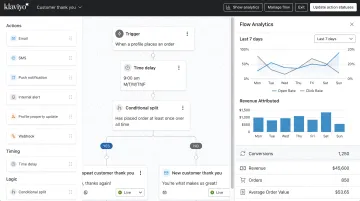
FluenceFlow note: FluenceFlow is a Klaviyo Certified Partner specializing in custom automation flows built around unit economics rather than templates. The agency has generated $7.5M+ in attributed revenue for 30+ DTC brands using Klaviyo's platform.
Omnisend
Position: Affordable all-in-one option with email, SMS, and push notifications.
Key strengths:
- User-friendly interface with pre-built e-commerce automations
- Strong cart abandonment tools and product recommendations
- Good for teams without dedicated email marketers
- Lower learning curve than Klaviyo
Pricing: Standard plans start at $16/month for up to 500 contacts and 6,000 emails. Free tier available (250 contacts, 500 emails).
Ideal fit: Small-to-medium e-commerce brands ($50K-$200K/month) who want solid automation without complexity.
ActiveCampaign
Position: Powerful marketing automation platform with advanced logic and built-in CRM.
Key strengths:
- Advanced automation builder with deep conditional logic
- Lead scoring and complex customer journey mapping
- Strong for hybrid B2C/B2B models
- CRM included in all plans
Pricing: Plans start at $15/month but scale quickly with contact growth.
Ideal fit: Businesses with complex customer journeys or hybrid B2C/B2B models who need advanced automation logic.
Mailchimp
Position: Household name with trade-offs; easy to start but limited automation on lower tiers.
Key strengths:
- Familiar interface and huge integration library
- Great for beginners and content-driven brands
- Works well for newsletters and light e-commerce
Pricing: Essentials plans display $13/month for 12 months (up to 500 contacts, 5,000 sends), but automation features are restricted until higher tiers.
Ideal fit: Early-stage brands testing e-commerce or content creators selling products on the side.
Brevo (formerly Sendinblue)
Position: Budget-friendly automation option with generous free tier.
Key strengths:
- Affordable pricing with solid feature set
- Strong deliverability and reliable performance
- Email + SMS included
- Good automation on paid plans
Pricing: Free tier includes 300 emails/day; paid plans start at $9/month for 5,000 monthly emails with no daily cap.
Ideal fit: Bootstrapped brands or those with tight margins who still want real automation capabilities.
Building Your Email Automation Strategy
Build automation around how your store actually makes money, not a generic flow checklist. Start with unit economics, map flows to real customer moments, then measure and tighten what drives revenue.
Start with Your Unit Economics
Your AOV, purchase frequency, and margins decide which flows to prioritize and how hard you should push offers.
Calculate these metrics first:
- Average order value (AOV)
- Average customer lifetime value (CLV)
- Typical time between purchases
- Profit margin per order
Use this decision framework:
| Business Model | Priority Flows | Offer Strategy |
|---|---|---|
| High AOV + Low Frequency | Welcome series, win-back, educational nurture | Avoid discounts; use urgency, social proof, education |
| Low AOV + High Frequency | Replenishment, retention, post-purchase upsell | Aggressive first-order conversion, loyalty rewards |
| Mid AOV + Mid Frequency | Balance acquisition and retention, cart recovery | Test selective discounts, focus on bestsellers |
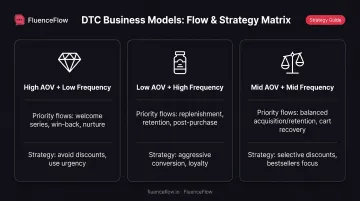
Example: A coffee brand with $45 AOV and 30-day repurchase cycles has more in common with other consumables than with a $500 espresso-machine brand. Both sell "coffee," but the economics (and the right flows) are completely different.
Once you know which model you run, map the moments that move a buyer from first order to repeat purchase.
Map Your Customer Journey
Key decision points to mark:
- First purchase trigger
- Product received
- Consumption/usage period
- Repurchase trigger
- Churn risk point
Each stage needs a flow that nudges customers toward the next desired action.
Example journey map (coffee subscription):
- Subscribe → Welcome series with brewing tips
- First shipment arrives → Delivery confirmation + usage guide
- Week 2 → Engagement check and recipe ideas
- Week 3 → Reorder reminder before they run out
- Day 30, no order → Win-back flow with incentive
Flows only improve if you treat performance as a loop, not a one-time build.
Measure and Iterate
Track these metrics by flow:
- Open rate (are subjects and timing working?)
- Click rate (is the message earning attention?)
- Conversion rate (does the email drive orders?)
- Revenue per recipient
- Flow ROI
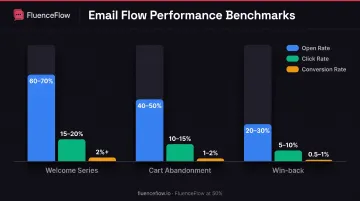
Benchmarks to target:
| Flow Type | Open Rate | Click Rate | Conversion Rate |
|---|---|---|---|
| Welcome series | 60-70% | 15-20% | 2%+ |
| Cart abandonment | 40-50% | 10-15% | 1-2% |
| Win-back | 20-30% | 5-10% | 0.5-1% |
Testing and optimization cadence:
- A/B test subject lines, send times, offer types, and email copy
- Review flow performance monthly
- Refine and update flows quarterly
- Test one variable at a time for clean data
DIY vs. Agency: When to Get Help
DIY vs. agency comes down to revenue, catalog complexity, and how much time your team can put into email. Use the thresholds below to see which path fits right now.
When DIY Makes Sense
Best for these scenarios:
- You're under $50K/month revenue
- Small product catalog (under 20 SKUs)
- Team member with time and interest to learn email marketing
- Comfortable with a 3-6 month ramp-up period
Realistic expectations:
- Plan for 10-15 hours/month to set up and maintain automation
- Expect 3-6 months to see mature results
- Initial flows will be basic; refinement takes time
Resources to help:
- Platform tutorials (Klaviyo, Omnisend, ActiveCampaign)
- Free templates from your ESP
- YouTube guides and email marketing communities
When to Hire an Agency
Best for these scenarios:
- You're doing $50K+/month and growth is outpacing your team
- Complex product catalog or customer journey
- No internal bandwidth or expertise
- Want faster, more strategic results
What agencies bring:
- Strategic planning based on your data
- Custom flow builds (not templates)
- Ongoing optimization and testing
- Deliverability management
- Accountability and performance tracking
FluenceFlow approach:
- Custom email and SMS systems built around your unit economics (not generic templates)
- Custom performance guarantees, month-to-month
- You keep 100% ownership of flows, campaigns, and account assets
- Quick wins in ~30 days; stronger revenue impact over 60-90 days
- Average 10.6x ROI in the first 90 days
Questions to Ask Before Hiring
Evaluate potential agencies on:
- Do they specialize in e-commerce?
- Do they work with your platform (Klaviyo, Omnisend, etc.)?
- Do they offer guarantees or clear success metrics?
- What does onboarding look like?
- How much of your time is required?
- What are monthly costs and contract terms?
Look for transparency: Good agencies will walk you through what's realistic for your revenue level and business model before you commit.
Next step: If you're doing $50K+/month and want to see what's possible with a custom automation system, book a free strategy call with FluenceFlow to discuss your unit economics and growth goals.
Frequently Asked Questions
What is email marketing automation?
Email marketing automation is software that sends targeted, behavior-triggered emails to customers automatically based on actions they take (or don't take), delivering personalized messages at scale without manual effort.
What are the different types of automated email campaigns?
Core types include welcome series, cart abandonment, browse abandonment, post-purchase, win-back, and replenishment emails, each triggered by a specific subscriber action or inaction.
What are the key differences between marketing automation and email marketing?
Email marketing refers to sending emails, either manual campaigns or automated flows. Marketing automation is broader and includes email plus SMS, push notifications, and other channels orchestrated together based on customer behavior across your entire tech stack.
What is the best email marketing automation tool?
For e-commerce brands, Klaviyo is the most powerful and widely used, but Omnisend offers better value for smaller budgets, and ActiveCampaign works best for complex, multi-channel customer journeys. The "best" tool depends on your revenue, product catalog, team resources, and growth goals.
How much do automated emails cost?
Platform fees range from $0 (Brevo free tier) to $15–$45+/month for starting tiers on Klaviyo, Omnisend, or ActiveCampaign, then scale with list size. Agency management typically runs $500–$2,000+/month, or about 2–5% of monthly revenue for managed services.
Is email marketing still worth it in 2026?
Yes. Shopify reports email delivers $36 returned per $1 spent, making it the highest-ROI digital channel. Well-run e-commerce brands still generate 20–40% of total revenue from email, an owned channel you control directly.