Split testing removes guesswork by letting real customer behavior determine what works. Instead of debating opinions or trusting instinct, you show half your audience version A and half version B, then measure which drives better results. For DTC brands running email campaigns, SMS messages, or landing pages, split testing turns subjective design decisions into data-backed improvements that compound over time.
This guide covers what split testing actually is, when to use it, the 6-step process to run reliable tests, and the common mistakes that invalidate results before you even analyze them.
Key Takeaways
- Split testing compares two versions across segments to find which wins with statistical confidence
- Valid tests need one controlled variable, predefined metrics, and adequate sample sizes
- Run the full cycle: hypothesize, vary one element, define metrics, test a full business cycle, then ship winners
- High-impact surfaces: landing pages, email subject lines, SMS copy, product pages, and checkout flows
- Stopping early, changing multiple elements, or skipping significance produces false conclusions
What Is Split Testing?
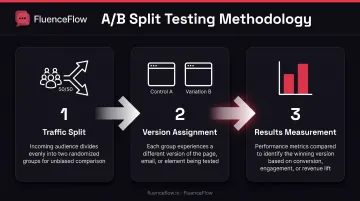
Split testing is a controlled experiment where two versions of a marketing asset are shown to different audience segments to determine which drives better measurable results. Optimizely defines it as comparing two versions to see which performs better, with users randomly assigned to each variant.
The terms "split testing" and "A/B testing" describe the same methodology. "Split" refers to how traffic divides between versions, while "A/B" refers to the control and variation being compared.
How it works in practice:
- 50% of visitors see the control (original version A)
- 50% see the variation (new version B)
- Performance metrics show which version hits the goal more often
- Random assignment eliminates selection bias
Concrete e-commerce example:
An online furniture store tests two product page layouts. Version A places the "Add to Cart" button above product details; Version B places it below the full description.
After 2,800 visitors over 14 days, Version A generates 127 purchases (4.5% conversion) versus Version B’s 98 (3.5%). Moving the button above the fold lifts purchases by 29%.
Published tests show the same pattern. A VWO case study for Bear Mattress found that redesigning the mobile "Frequently bought with mattress" cross-sell section drove a 24.18% uplift in purchases and 16.21% higher revenue over 19 days at 50/50 traffic.
How to Run a Split Test in 6 Steps
A useful split test follows a clear sequence: hypothesize, build one clean variation, size the audience, launch cleanly, wait, then decide from the data. Work through these six steps in order so results are attributable and repeatable.
Step 1: Form a Data-Backed Hypothesis
Valid hypotheses start with user research, analytics data, or customer feedback, not guesses. VWO recommends structuring hypotheses to specify what changes, why it should change, and the expected outcome.
Use this format:
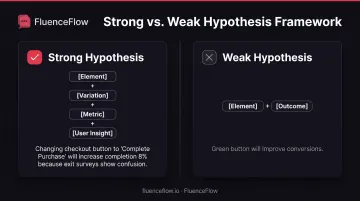
"Changing [element] to [specific variation] will increase [metric] because [reason based on user insight]."
Strong hypothesis examples:
- "Changing the checkout button text from 'Continue' to 'Complete Purchase' will increase checkout completion by 8% because exit surveys show users are confused about whether 'Continue' commits them to the purchase."
- "Adding product reviews above the fold will increase add-to-cart rate by 12% because heatmaps show 67% of visitors scroll to reviews before deciding."
Weak hypothesis examples:
- "Changing the button color to green will improve conversions" (no user insight, arbitrary color choice)
- "Adding more images will help engagement" (vague metric, no specific reasoning)
Klaviyo's testing best practices recommend naming the changed element and expected outcome, and grounding hypotheses in observable customer behavior rather than design preferences.
Step 2: Create Your Test Variations
Change only one variable to isolate what drives results. Testing button color OR button text, not both simultaneously, lets you attribute results to the specific change.
What qualifies as a valid variation:
- Different enough to potentially impact behavior (changing "Buy Now" to "Add to Cart" vs. "Buy Now" to "Purchase Now")
- Not so different it becomes a full redesign (swapping one headline vs. rebuilding the entire page)
- Technically sound on both versions (no broken links, proper mobile display, fast load times)
Klaviyo explicitly warns that testing more than one variable prevents attribution of results. For a send-time test, content and subject lines must remain identical; otherwise you won't know whether performance changed due to timing or messaging.
Example for email campaigns:
- Control: Subject line "Your order has shipped"
- Variation: Subject line "Track your package: Arriving Thursday"
- Changed variable: Subject line specificity and urgency
- Unchanged: Preview text, sender name, email content, send time, audience segment
Step 3: Define Success Metrics and Sample Size
Primary vs. secondary metrics:
- Primary metric: The main goal your test must move (conversion rate, revenue per visitor, email click rate)
- Secondary metrics: Supporting indicators that add context (time on page, bounce rate, cart adds)
Every test needs one clear primary metric. Optimizely requires at least one metric per experiment, and the primary metric determines whether a variation wins or loses with statistical significance.
Sample size calculation:
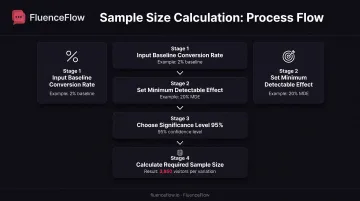
Required sample size depends on three inputs:
- Current baseline conversion rate
- Minimum detectable effect (MDE), the smallest improvement worth detecting
- Statistical significance threshold (typically 95%)
Optimizely's sample size calculator takes these three values and returns the number of visitors needed per variation. There's no universal "1,000 visitors per variation" rule. A page converting at 1% needs far more traffic than one converting at 15% to detect the same percentage improvement.
Low-traffic reality:
If your page gets 500 visitors per month and your calculator says you need 4,000 per variation, the test would take 16 months. In that case, test higher-traffic pages first or accept longer durations.
Step 4: Set Up and Launch the Test
Technical setup requirements:
- Use a split testing platform (Optimizely, VWO) or built-in features in email tools like Klaviyo
- Randomly assign visitors to control or variation
- Ensure consistent assignment; the same user sees the same version across sessions
Optimizely's bucketing system hashes user and experiment IDs into deterministic buckets so returning visitors consistently see their assigned version and never flip between experiences mid-test.
Timing considerations:
Avoid launching during:
- Holiday shopping periods (Black Friday, Christmas)
- Promotional campaigns or sales events
- Website migrations or major launches
- Known traffic anomalies
Klaviyo's 2024 BFCM analysis found that time to purchase was 40% faster during that period than the rest of the year, with discount saturation changing customer behavior. Testing during atypical periods produces results that won't replicate during normal conditions.
Step 5: Let the Test Run to Completion
Stopping tests early, even when one version is "winning," leads to false conclusions. VWO warns that peeking at results and stopping prematurely can detect differences that don't actually exist due to statistical variance.
When a test reaches completion:
- Statistical significance threshold met: Typically 95% confidence level
- Sample size requirement satisfied: Both variations reached the calculated visitor count
- Full business cycles completed: At least one complete 7-day cycle; Optimizely recommends covering full conversion cycles and traffic patterns
CXL recommends 2-4 weeks to cover multiple sales cycles, though duration depends on traffic volume and conversion rate. A high-traffic page may reach statistical significance in days, while low-traffic pages need weeks or months.
Why early stopping fails:
Random variance causes fluctuations. A variation might lead by 20% on day 3 but fall behind by day 14. Without adequate sample size and duration, you're measuring noise rather than signal.
Step 6: Analyze Results and Take Action
Look at statistical significance, not just which number is higher. A variation converting at 4.2% vs. control at 4.0% means nothing if the sample size is too small to confidently attribute the difference to your change rather than chance.
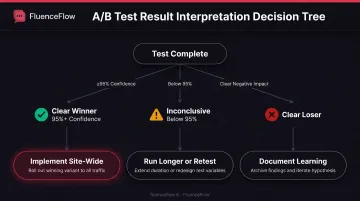
How to interpret results:
- Clear winner (95%+ confidence): Implement the variation site-wide
- Clear loser: Document the learning and archive the variation
- Inconclusive (below 95% confidence): Either run the test longer or iterate the hypothesis and retest
Optimizely's results interpretation guide recommends checking not just the primary metric but also confidence intervals and segment-level performance to ensure the winner holds across important customer groups.
Documentation requirements:
Record every test in a central repository:
- Hypothesis and reasoning
- Control and variation details
- Test dates and duration
- Sample size per variation
- Primary and secondary metrics
- Statistical confidence level
- Decision and implementation status
VWO's insights repository stores screenshots, documents, labels, comments, and page URLs so future teams can build on past tests rather than repeating them.
When Should You Run Split Tests?
Split tests work best on high-traffic pages where you have enough volume to reach statistical significance in a reasonable timeframe, typically 2-4 weeks.
Ideal testing scenarios:
- Homepage hero sections and value propositions
- Landing pages from paid campaigns
- Product page layouts and CTAs
- Checkout flow steps
- Email subject lines and preview text
- SMS message content and send times
When NOT to split test:
- Low-traffic pages: Under 1,000 visitors per month makes significance hard to reach in a useful timeframe
- During major site changes: Redesigns, platform migrations, or structural updates introduce too many variables
- Too many variables at once: Use multivariate testing instead of running 5+ separate A/B tests sequentially
CXL's testing ballpark suggests roughly 350-400 conversions per variation, though this depends on baseline rate and desired improvement.
For email campaigns, platforms like Klaviyo make testing practical even with smaller lists, since email volume is typically higher than web traffic.
What You Need Before Running Split Tests
Three things need to be in place before you launch: enough traffic to reach significance, a measurable conversion goal, and a way to run and read the test.
Sufficient Traffic Volume
Required traffic depends on your current conversion rate and the improvement you want to detect. A page converting at 2% needs far more visitors than one converting at 10% to detect a 15% relative improvement.
Use a sample size calculator with your actual baseline metrics rather than relying on arbitrary minimums. If your calculated requirement is 5,000 visitors per variation but you only get 1,000 per month, the test will take 10 months. By then, seasonality, offers, and site changes will likely have muddied the results.
A Clear Conversion Goal
Vague goals like "improve engagement" fail because they're not measurable. Tests need specific outcomes:
- Increase email signups by 10%
- Boost add-to-cart rate by 15%
- Reduce checkout abandonment from 68% to 60%
- Improve email click-through rate from 3.2% to 4.0%
The primary metric determines statistical significance. Optimizely’s guidance requires defining that metric before launch, not picking it afterward based on which number looks best.
Testing Tools or Platform Access
Common approaches:
| Tool Type | Examples | Best For |
|---|---|---|
| Dedicated platforms | Optimizely, VWO | Website testing with visual editors and statistical engines |
| Email platform testing | Klaviyo, built-in features | Subject lines, send times, email content for campaigns |
| SMS testing | Klaviyo SMS A/B tests | Message content and send-time optimization |
Note: Google Optimize is no longer available; Google discontinued both Optimize and Optimize 360 on September 30, 2023.
For DTC retention programs, Klaviyo’s built-in A/B testing covers email subject lines, content, and send times. Winners can be chosen by open rate, click rate, or placed-order rate. SMS campaigns support the same kind of tests for message content and timing.
FluenceFlow uses these native Klaviyo tests inside email and SMS retention programs for DTC brands, matched to each store’s traffic and goals.
Common Split Testing Mistakes to Avoid
These errors waste traffic and produce results you can’t trust. Steer clear of them:
Stopping tests too early. Random variance creates temporary leaders. VWO calls this "peeking": ending before statistical significance or a solid sample size, which can flag differences that aren’t real.
Testing several variables at once. Changing headline, image, and button color together hides what actually moved the metric. Change one element per test so you can attribute the lift.
Running tests in atypical periods. Black Friday, major holidays, and big promos warp behavior. Klaviyo's BFCM data showed purchase speed 40% faster and heavy discount saturation; holiday winners often fail in January. CXL recommends follow-up tests to confirm those results.
Ignoring segmentation. A variant can win overall and still lose with high-value segments. Predefine segments (new vs. returning, traffic source, device) and give each enough sample size. Don’t mine dozens of post-test cuts for a favorable story; that’s statistical fishing.
Split Testing Best Practices for Reliable Results
Test one variable at a time to clearly attribute results to specific changes. Build knowledge systematically rather than making wholesale redesigns. If you change five elements and conversions improve, you'll never know which four could have been skipped.
Prioritize high-impact pages and elements:
- Homepages and primary landing pages (highest traffic)
- Checkout steps (small lifts drive large revenue gains)
- Email campaigns that drive repeat purchases
- SMS messages with time-sensitive offers
Those last two matter especially in retention marketing. Email and SMS tests compound: a 0.3 percentage point click-rate lift across 50 campaigns a year adds up to real revenue.
Document everything including hypothesis, test setup, duration, results, and learnings. Record:
- Why you ran the test (user insight, analytics finding, customer feedback)
- Exact control and variation details
- Statistical confidence level achieved
- Winning decision and implementation date
- Segment-level observations
Seasonal patterns matter for email and SMS campaigns. Document when tests ran and whether results might be influenced by shopping cycles, promotions, or inventory changes.
Run follow-up tests to validate surprising results. If a variation wins by 30% when you expected 10%, retest to rule out a statistical fluke. One strong result is a signal; a second run is proof.
Frequently Asked Questions
What is a split test?
Split testing is an experimental method where two versions of a webpage, email, or ad are shown to different audience segments to see which performs better. Traffic is randomly divided, and statistical analysis shows which version drives better results for your conversion goal.
How do you run a split test?
Form a data-backed hypothesis, then build a control and one variation with a single changed variable. Define success metrics, calculate sample size, and launch with random traffic allocation. Run until you hit statistical significance and full business cycles, then implement the winner.
Is split testing the same as A/B testing?
Yes. They're the same methodology. "Split testing" stresses how traffic is divided; "A/B testing" stresses the two versions being compared. Optimizely treats the terms as synonyms for the same controlled experiment.
How long should a split test run?
Run until you hit statistical significance (95% confidence) and adequate sample size, typically 1–2 full business cycles or at least 2–4 weeks. Optimizely requires one full seven-day cycle; exact length depends on traffic, baseline conversion rate, and expected lift.
What's the minimum traffic needed for split testing?
It depends on your baseline conversion rate and expected improvement; there's no fixed minimum. Use a sample size calculator with your real metrics. As a ballpark, CXL suggests 350–400 conversions per variation; lower-traffic pages simply need longer runs.
Can you split test email campaigns?
Yes. Email split tests work well for subject lines, preview text, send times, layouts, and CTAs. Most email platforms include built-in A/B testing, and Klaviyo supports email and SMS tests with winners chosen by open rate, click rate, or placed-order rate.