Key Takeaways
- Email blasts send one message to large segments at once; reserve them for broad announcements and time-sensitive offers
- Omnisend's 2025 benchmarks: campaign emails average 30.41% opens, 0.74% CTR, and 0.08% conversion
- Permission-based lists, SPF/DKIM/DMARC auth, mobile-responsive design, and clear CTAs make blasts work
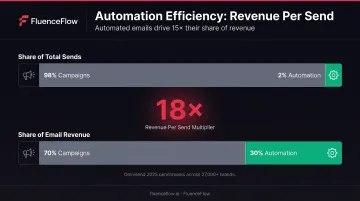
- Automated flows earn ~18x more revenue per send ($3.41 vs. $0.155) than blasts; use each for its job
What Is an Email Blast?
An email blast is a single marketing message delivered to a large portion of your email list at once. Also called mass email, bulk email, or e-blast, these campaigns typically feature broad messaging and limited personalization, sent manually on specific dates rather than triggered by individual customer behavior.
Email blasts differ from segmented campaigns and automated flows:
- Segmented campaigns target a defined subset of subscribers based on purchase history or engagement
- Automated flows send messages triggered by specific actions like cart abandonment
- Email blasts use universal messaging intended for most or all of your list
The tactic has evolved. Once the primary email strategy, blasts now sit alongside behavioral triggers and lifecycle automation in a fuller retention system.
FluenceFlow's work with 30+ DTC brands shows the split clearly: automated flows typically drive 30-60% of email revenue, while campaigns contribute the remaining 40-70%. Both are necessary; relying on only one leaves revenue untapped.
Why the negative connotations? Email blasts became synonymous with spam because marketers historically abused them: purchasing lists, sending irrelevant mass messages, and ignoring subscriber preferences. Kaspersky classified 44.99% of global email traffic as spam in 2025, reinforcing the link between volume and unwanted messages.
Properly executed blasts still work when broad reach is the goal:
- Company-wide announcements
- Flash sales
- New product launches
- Seasonal campaigns
Sent to permission-based lists with compelling content and clear value, they deliver results without damaging your sender reputation.
How to Send an Email Blast the Right Way
Step 1: Build and Maintain a Permission-Based Email List
Purchased email lists destroy deliverability and sender reputation. Reputable email service providers prohibit them for good reason: recipients never agreed to hear from you, ISPs flag your messages as unwanted, and your domain's credibility suffers lasting damage.
Build your list ethically through:
- Website signup forms with clear value propositions
- Checkout opt-ins during purchase completion
- Lead magnets like discount codes or free resources
- Social media conversions directing followers to subscribe
- Pop-ups with zero-party data collection that gather preferences upfront
Double opt-in confirms the address is real and that the owner wants your emails. Litmus research suggests fewer complaints, better delivery, and higher engagement, while single opt-in can grow list size faster. Choose based on whether you prioritize list quality or list volume.
FluenceFlow builds high-converting pop-ups and multi-step forms for clients, typically completing design, implementation, and welcome-flow integration within the first week of engagement. These systems capture both email and SMS subscribers while collecting zero-party data to personalize messaging from day one.
Step 2: Choose an Email Service Provider Built for Scale
Personal email accounts and basic clients cannot handle the technical requirements of legitimate bulk sending. You need a dedicated ESP that manages authentication, monitors deliverability, and provides the segmentation and analytics tools necessary for professional email marketing.
Look for:
- Proven deliverability rates and sender reputation management
- Segmentation capabilities to target specific customer groups
- A/B testing functionality for subject lines, send times, and content
- Detailed analytics tracking opens, clicks, conversions, and revenue
- E-commerce platform integrations with Shopify, WooCommerce, or similar
ESPs handle critical technical requirements like SPF (Sender Policy Framework), DKIM (DomainKeys Identified Mail), and DMARC (Domain-based Message Authentication, Reporting & Conformance) that authenticate your emails and protect your sender reputation. These protocols prove to ISPs that you're authorized to send from your domain and reduce the risk of spoofing.
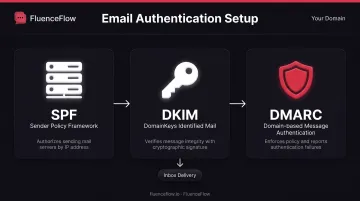
Gmail requires SPF or DKIM for all senders. Senders exceeding 5,000 messages per day to personal Gmail accounts must also implement:
- DMARC and aligned authentication
- TLS encryption
- One-click unsubscribe
Keep your Gmail Postmaster spam rate below 0.10% and never exceed 0.30%.
Choose a provider that scales as your list grows from hundreds to thousands of subscribers without degrading performance. FluenceFlow is a certified Klaviyo partner, leveraging the platform's advanced segmentation, deliverability infrastructure, and e-commerce integrations to build custom retention systems for DTC brands.
Step 3: Segment Your List Even for "Blast" Campaigns
Even broadly targeted campaigns benefit from basic segmentation. Sending the same message to everyone (active customers, dormant subscribers, recent purchasers, and cold prospects) wastes potential and damages engagement metrics.
Core segmentation criteria for e-commerce:
- Engaged vs. inactive subscribers: Separate those who open regularly from chronic non-openers
- Purchase history: Customers have different interests than non-customers
- Geographic location: Time zones and regional preferences matter
- Customer lifecycle stage: First-time buyers need different messaging than VIP repeat customers
Simple segmentation like separating customers from non-customers dramatically improves relevance. A promotion for repeat-purchase rewards means nothing to someone who's never bought from you. A new-customer welcome offer doesn't resonate with your most loyal shoppers.
Create engagement-based segments to tailor frequency and messaging. Highly engaged subscribers can handle more frequent communication; those who rarely open should receive only your most compelling offers to avoid further disengagement.
FluenceFlow customizes segmentation around each brand's unit economics, margins, buying cycle, and customer behavior, not generic templates. This approach helped increase email revenue from 27% to 38% of total store revenue for one clothing brand by ensuring messages reached the right audiences at the right times.
Step 4: Craft Compelling Subject Lines and Preheader Text
Your subject line is the critical first filter. It determines whether your email gets opened or deleted, and it is often the most important sentence in the message.
Effective subject line guidelines:
- Keep it under 60 characters to avoid truncation on mobile
- Lead with clear value or benefit, not generic announcements
- Avoid spam triggers like excessive punctuation (!!!), ALL CAPS, or overuse of "FREE"
- Test different approaches: urgency, curiosity, personalization, or direct value statements
- Be specific rather than vague; "30% off winter boots ends tonight" beats "Don't miss out"
Mailchimp recommends no more than 9 words and 60 characters, plus limiting punctuation to three marks maximum. These are guidelines for clarity, not hard rules for every situation.
Don't overlook preheader text, the snippet that appears next to or below your subject line in most inboxes. It extends the subject line with extra context and persuasion.
Left blank, email clients pull random body copy (often "View this email in your browser"). Write deliberate preheader text that complements the subject line and reinforces your value proposition.
Step 5: Design for Mobile and Include a Clear Call-to-Action
Mobile-responsive design is non-negotiable. Device-level open stats are less reliable since Litmus reported that Apple Mail Privacy Protection obscured 55% of opens in March 2024, but a large share of subscribers still read email on phones.
Mobile optimization essentials:
- Use responsive templates that adapt to screen size
- Keep text large enough to read without zooming (minimum 14px for body copy)
- Design touch-friendly buttons; Apple recommends at least 44x44 pixels for touch targets
- Use alt text for images so your message makes sense even if images don't load
- Test on multiple devices and email clients before sending
The single, clear CTA principle: Don't overwhelm subscribers with multiple competing actions. Litmus notes that many links can dilute your message, though one CTA may not serve every subscriber's interest. The key is intentional design; prioritize your primary conversion goal and make that action unmistakably clear.
CTA best practices:
- Use contrasting button colors that stand out from your template
- Write action-oriented copy: "Shop the Sale," "Claim Your Discount," or "Get Started" rather than generic "Click Here"
- Position your primary CTA above the fold when possible
- Repeat the CTA after your main content for those who scroll
Step 6: Test, Send, and Analyze Performance
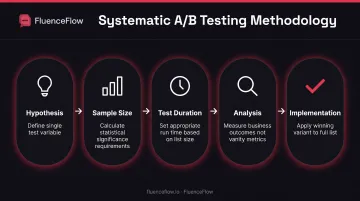
Never send important campaigns without testing first. A/B testing lets you optimize based on data rather than guesswork, but you must test systematically to generate meaningful insights.
A/B testing best practices:
- Test one variable at a time, such as subject line, send time, or CTA copy; never all three at once
- Use large enough sample sizes to reach statistical significance
- Let tests run long enough to collect meaningful data
- Test based on business outcomes (revenue, conversions) not just opens
Mailchimp notes that test duration depends on sample and list size; larger lists can reach significance sooner. Isolate one important variable and preselect the business outcome you're measuring before the test begins.
Key metrics to track:
- Open rate: Share of recipients who opened (distorted by Apple Mail Privacy Protection)
- Click-through rate: Share who clicked at least one link
- Conversion rate: Share who completed the goal action
- Revenue per email: Revenue attributed divided by emails sent
- Unsubscribe rate: Share who opted out after the send
Omnisend's 2025 campaign benchmarks across 27,000+ e-commerce brands found averages of 30.41% opens, 0.74% click-through, 0.08% conversion, 0.20% unsubscribes, and 98.4% delivery. These benchmarks vary significantly by industry, list quality, and campaign purpose; use them as general reference points, not absolute targets.
Optimal send times vary by audience and must be tested. No universal "best day or hour" exists. Start with one campaign per week, monitor performance patterns in your data, and adjust based on when your specific subscribers engage most.
When Should You Send an Email Blast?
Email blasts work best for messages with universal relevance to your entire list or large segments. They're ideal when timing and broad reach matter more than individual personalization.
Use Cases Where Email Blasts Make Sense
Time-sensitive announcements:
- Flash sales with countdown urgency
- Limited inventory alerts for popular products
- Shipping deadline reminders before holidays
- Breaking news affecting your brand or customers
Major product launches:
- New collections appealing to your entire customer base
- Flagship products with broad market appeal
- Significant brand announcements or collaborations
- Seasonal drops with built-in demand
Company updates:
- Rebranding announcements requiring awareness across all customers
- New retail locations or service areas
- Policy changes affecting all subscribers
- Milestone celebrations inviting community participation
When Email Blasts Are NOT Appropriate
Behavioral triggers belong in automated flows, not manual blasts:
- Abandoned cart reminders fire based on individual abandonment timing
- Post-purchase follow-ups depend on when each customer completes an order
- Browse abandonment messages respond to specific product interest
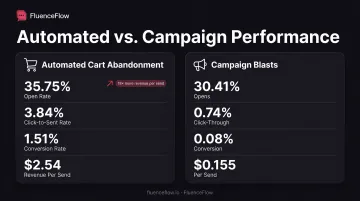
According to Omnisend's 2025 data, abandoned-cart automations earn 35.75% opens, 3.84% click-to-sent, 1.51% conversion, and $2.54 revenue per send. Generic campaign blasts lag at 0.08% conversion and $0.155 per send.
Highly personalized content needs more segmentation than a blast can deliver:
- Product recommendations based on purchase history
- Dynamic content blocks showing different products to different customers
- Messaging tailored by customer lifetime value or tier
Nurture sequences work better through automation:
- Welcome series introducing new subscribers to your brand
- Educational content delivered over time
- Relationship-building emails that guide customers through their journey
What You Need Before Sending an Email Blast
Preparation and infrastructure directly impact deliverability, engagement, and revenue outcomes. Don't send until these elements are in place.
Email Service Provider and Technical Setup
Using personal email accounts or basic clients for bulk sending will get you blacklisted. You need a dedicated ESP with proper technical infrastructure.
Technical requirements include:
- Domain authentication: SPF, DKIM, and DMARC records properly configured in your DNS settings
- Dedicated IP address: Often recommended for high-volume senders (Twilio's 2022 guidance cited 100,000+ emails yearly as a useful threshold, though none is universal)
- Proper email infrastructure: Suppression lists, bounce handling, and complaint monitoring
For Shopify brands, a certified Klaviyo partner can handle platform integrations, tracking setup, and domain authentication. FluenceFlow's Klaviyo certification covers that technical work so sender reputation and deliverability stay protected.
Clean, Engaged Email List
List hygiene protects deliverability. ISPs watch how recipients interact with your emails, and poor engagement signals low-quality sending.
List hygiene practices:
- Remove hard bounces immediately after they occur
- Suppress chronic non-openers (typically inactive 6+ months)
- Honor unsubscribe requests within 10 business days (legally required under CAN-SPAM)
- Monitor engagement metrics continuously
Healthy list indicators:
- Open rates above 20-30% (though Apple Mail Privacy Protection makes this less reliable)
- Click rates above 0.5-1%
- Unsubscribe rates below 0.5%
Before removing inactive subscribers, run re-engagement campaigns offering incentives to return. Mailchimp reports that successful re-engagement typically recovers about 10% of inactive subscribers. Clean your list approximately every 6 months, or every 3 months for stricter quality control.
Compliant Opt-Out Mechanism
Legal compliance protects your business and maintains list quality.
CAN-SPAM Act requirements (United States):
- Clear sender identification in From/Reply-To fields
- Accurate subject lines that reflect email content
- Physical mailing address in every email
- Easy one-click unsubscribe mechanism
- Honor opt-outs within 10 business days
- Penalties up to $53,088 per violating email
GDPR and ePrivacy considerations (European Union):
- EU ePrivacy Directive generally requires prior consent for direct-marketing email to consumers
- Limited exception for existing customers when marketing similar products, if opt-out was offered at collection and in every message
- GDPR provides erasure rights (right to be forgotten) and data portability
- Maximum fine tiers reach €20M or 4% of worldwide annual turnover
Respecting unsubscribes protects sender reputation. Someone who doesn't want your emails will mark them as spam if you keep sending, damaging deliverability for everyone who does want to hear from you.
Quality Content and Design Assets
Strong campaigns need more than technical infrastructure. They also need compelling creative that drives action.
Content requirements:
- Copy that provides genuine value, not just promotional noise
- High-quality product images optimized for email (compressed for fast loading)
- Mobile-responsive templates that render properly across devices
- Clear hierarchy guiding readers toward your CTA
Brand consistency matters: Use established color schemes, fonts, and voice that align with your website and other marketing channels. Inconsistent branding confuses subscribers and erodes trust.
FluenceFlow delivers three custom design directions in the first week of engagement. Designs stay on-brand, with clear hierarchy, prominent CTAs, and creative built around customer benefits.
Defined Success Metrics
Establish benchmarks before sending so you can evaluate performance objectively.
Set realistic goals based on context:
- Mailchimp's December 2023 e-commerce benchmarks: 29.81% open, 1.74% click, 0.19% unsubscribe (Apple MPP caveat applies)
- Omnisend's 2025 campaign benchmarks found 30.41% opens, 0.74% CTR, 0.08% conversion across 27,000+ brands
- Your specific results depend on industry, audience quality, campaign purpose, and list engagement history
What constitutes success for this specific campaign? More revenue than your last promotion? Higher click rates than your average? Define targets upfront, then measure against them.
Common Mistakes When Sending Email Blasts
Sending to Unengaged or Purchased Lists
Sending to subscribers who never opted in or haven't engaged in months damages deliverability. ISPs flag your emails as unwanted when recipients ignore them consistently or mark them as spam.
Monitor complaints, bounces, and reputation continuously. Gmail's thresholds (spam below 0.10%, never above 0.30%) show how little tolerance ISPs have for unwanted mail.
Neglecting Mobile Optimization
Non-responsive design creates poor user experiences: images that don't load, text too small to read without zooming, and CTAs impossible to tap accurately on touchscreens.
Fix the basics:
- Use responsive templates
- Test across devices
- Include descriptive alt text
- Design 44x44-pixel touch targets minimum
Mobile users won't struggle to engage. They'll simply delete your email and move on.
Overloading with Multiple CTAs or Unclear Messaging
When subscribers face too many options or unclear value propositions, they often take no action at all. Prioritize your primary conversion goal and make that action clear.
Secondary links are fine, but your main CTA should dominate visually and conceptually. Don't bury your ask beneath competing messages.
Ignoring Email Analytics and Failing to Test
Skipping performance data means you miss chances to improve. Because Apple Mail Privacy Protection distorts open rates, track metrics that reflect real engagement and business outcomes:
- Clicks and conversions
- Revenue per recipient
- Unsubscribes and spam complaints
Test systematically: one variable at a time, with statistically significant samples, measuring business outcomes rather than vanity metrics. Every campaign should inform your next one.
Alternatives to Basic Email Blasts
Once basic blasts are working, the next gains usually come from systems that send fewer, more relevant messages and earn more revenue per send.
Automated Email Flows
Behavioral triggers reach customers at optimal moments in their journey, delivering relevance that manual blasts can't match.
High-performing automated flows include:
- Welcome series that introduce new subscribers to your brand
- Abandoned cart recovery that recaptures lost sales
- Post-purchase follow-ups that build loyalty and request reviews
- Win-back campaigns that re-engage lapsed customers
- Replenishment reminders for consumable or repeat-purchase products
Omnisend's 2025 data shows automated email earning $3.41 per send versus $0.155 for campaign blasts, roughly 18x more revenue per message. Automation represented just 2% of sends but drove 30% of email-attributed revenue in this cohort.
Done-for-you partners like FluenceFlow build these Klaviyo lifecycle flows around each brand’s unit economics. For many clients, flows generate 30-60% of email revenue and start going live within the first two weeks.
Advanced Segmentation and Personalization
Dynamic content blocks, product recommendations based on browsing and purchase history, and lifecycle-based messaging create more relevant experiences than one-size-fits-all blasts.
Examples of advanced personalization:
- Showing different products based on past purchases or category preferences
- Tailoring messaging based on customer lifetime value or loyalty tier
- Adjusting frequency and content based on engagement patterns
- Serving content based on zero-party data customers volunteer at signup
One FluenceFlow client used occasion-based segmentation ("Upcoming Event," "Your Wedding," "Work/Business," and "Social/Casual") to personalize messaging from the first popup through welcome flows and ongoing campaigns.
Strategic Email & SMS Marketing Programs
Comprehensive retention systems built around your business's unit economics, rather than generic templates, can drive significantly higher revenue than DIY blast campaigns.
A full program typically ties together list growth, automated flows, segmented campaigns, SMS, and ongoing performance management. FluenceFlow clients, for example, average:
- 41% of total store revenue from email and SMS combined
- 10-37% increases in store revenue
- 10.6x average ROI in the first 90 days
That model treats email and SMS as owned channels: you convert traffic you’ve already paid to acquire into repeat purchases and higher customer lifetime value.
Frequently Asked Questions
What is a blast email?
A blast email is a single marketing message sent at once to a large list, usually with broad messaging rather than personalized or behavior-triggered content. It differs from automated flows and from highly segmented campaigns aimed at narrow audience subsets.
Is sending an email blast illegal?
Email blasts are legal in the US when you use permission-based lists and follow the CAN-SPAM Act: accurate headers, a physical address, and an easy unsubscribe. Purchased lists and ignored opt-outs violate the law. In the EU, the ePrivacy Directive generally requires prior consent for consumer direct marketing.
How much does an email blast cost?
Costs vary by provider and list size. Mailchimp and Klaviyo both offer free tiers around 250 contacts and 500 monthly sends. Paid plans often run $10–$20/month for small lists up to several hundred dollars for larger ones, plus any design or copywriting you outsource.
Is email marketing still worth it in 2026?
Yes. Litmus's 2025 survey of nearly 500 marketers found 35% reported $10–$36 back per $1 spent, 30% reported $36–$50, and 5% reported more than $50. Email remains a critical owned channel brands control, unlike social platforms where algorithm shifts can wipe out organic reach overnight.
What are some examples of effective email campaigns?
Strong examples include product launches with exclusive early access, flash sales with countdown timers, and milestone celebrations that build connection beyond the transaction. FluenceFlow client American Grazed Beef used strategic email to drive 48.6% of store revenue, more than $1.5 million attributed.