Opt-in email marketing is the foundation of sustainable email revenue. It's not just a compliance checkbox; it's a profitability driver. Permission-based subscribers engage 3-5 times more than purchased lists, generate dramatically higher revenue per contact, and protect your domain reputation with ISPs. When done right, strategic opt-in placement, compelling value propositions, and relentless optimization turn your traffic into a revenue-generating email list that compounds over time.
Key Takeaways
- Permission-based lists outperform purchased lists on engagement, deliverability, and long-term ROI
- Choose single opt-in for speed or double opt-in for verification and compliance; both work when done right
- Place opt-ins across your site, social channels, and checkout to grow the list without hurting UX
- Match the offer to the product: discounts for consumables, education for premium goods, then test what converts
- A/B testing form design, timing, and copy can double or triple opt-in conversion rates
What Is Email Opt-In Marketing and Why Does It Matter?
Opt-in email marketing means you only send marketing emails to people who explicitly gave you permission to contact them. They submitted a form, checked a box, or clicked a confirmation link. They said yes.
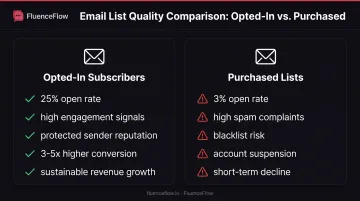
This stands in sharp contrast to purchased lists, where you buy email addresses from a data broker and start sending cold. The difference in results is stark.
Mailchimp prohibits purchased lists outright, citing high bounce rates, spam complaints, and account suspension risk. Validity reports that purchased contacts produce poor open and click rates because recipients never requested your emails.
Why opt-in subscribers perform better:
- Expect your emails because they remember opting in
- Already care about your products or content
- Rarely mark you as spam, which protects sender reputation
- Convert at far higher rates than cold contacts
Opt-in marketing builds trust and long-term customer relationships, not just short-term sales. When someone opts in, they're signaling interest and starting a dialogue. That foundation supports welcome flows, abandoned cart recovery, replenishment campaigns, and ongoing engagement: all the systems that turn one-time buyers into repeat customers.
Email deliverability depends on opt-in quality. ISPs like Gmail and Yahoo monitor engagement signals (opens, clicks, spam complaints) to decide whether your emails land in the inbox or the junk folder.
Gmail's sender guidelines explicitly discourage purchased lists and warn that frequent spam reports reduce domain reputation. Yahoo requires keeping spam complaint rates below 0.30% and emphasizes that unread mail and complaints harm delivery metrics.
Permission protects your revenue. A brand with 10,000 opted-in subscribers and 25% open rates will generate more revenue than one with 50,000 purchased addresses and 3% opens, and the opted-in brand won't risk account suspension or blacklisting.
Types of Email Opt-In: Single vs Double Opt-In
Single Opt-In
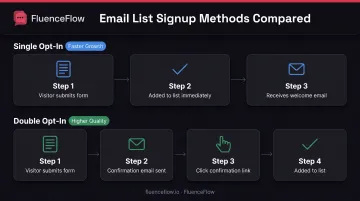
The subscriber fills out your form once, and their address joins your list immediately. No confirmation email, no second step. This approach prioritizes speed and maximizes the number of people who complete signup.
Advantages:
- Captures everyone who submits the form
- Lower friction means higher conversion rates
- Faster list growth, especially for time-sensitive campaigns
Disadvantages:
- More typos and invalid addresses make it onto your list
- Lower intent verification: some people submit without real interest
- Slightly higher spam complaint risk
Double Opt-In
The subscriber submits the form, receives a confirmation email, and must click a link before joining your list. Only verified addresses that took two deliberate actions make it through.
Advantages:
- Stronger proof the subscriber controls the address and wants your emails
- Higher-quality list with better engagement metrics
- Reduced typos, bots, and low-intent signups
Disadvantages:
- Confirmation step creates drop-off: some people never click the link
- Slower list growth in absolute numbers
- Adds one more touchpoint before the subscriber sees your content
Litmus reports that double opt-in lists show higher open, click, and conversion rates, though the research doesn't specify controlled methodology or exact percentages.
Choosing Between Single and Double Opt-In
Use single opt-in when:
- You're a US-based brand prioritizing rapid list growth
- Your signup form already includes bot-prevention measures
- You're confident your audience will engage and won't report spam
- You plan aggressive welcome flows that quickly identify unengaged subscribers
Use double opt-in when:
- You serve EU customers and need explicit GDPR-compliant consent
- List quality and sender reputation are higher priorities than raw growth
- You want clear proof that each subscriber intentionally joined
- You're in a high-complaint vertical (finance, insurance, B2B services)
Confirmation Email Best Practices
If you choose double opt-in, make confirmation frictionless:
- Send immediately: within seconds of form submission while intent is highest
- Use a clear subject line: "Confirm your subscription to [Brand]" beats vague copy
- Make the CTA obvious: a single, prominent "Confirm Subscription" button
- Set a reasonable expiration: Klaviyo's confirmation links remain valid for 72 hours
- Send one reminder: Litmus suggests a follow-up after 24 hours if the subscriber hasn't confirmed
FluenceFlow builds custom popups with bot prevention and optimizes for conversion speed. For US-based DTC brands focused on list growth, the agency typically defaults to single opt-in to keep signup friction low.
Best Practices for Growing Your Opt-In Email List
Set clear expectations upfront. Tell subscribers what they'll receive, how often, and what value they'll get. Don't hide behind vague language like "occasional updates." Be specific: "Get new product launches every Tuesday and exclusive discounts twice a month."
Clear expectations reduce unsubscribes and spam complaints. When someone knows what they signed up for, they're more likely to stay engaged.
Make signup forms simple and friction-free. Omnisend's 2025 study of 1.24 billion popup displays found that forms with two fields converted at 2.2%, while forms with five or more fields converted at just 1.4%. The takeaway: ask for email only, or email plus one additional field maximum.
You can collect preferences, birthdays, and other profile data later through preference centers and progressive forms.
Offer meaningful incentives aligned with your customer segments. Not all incentives work for all brands. The right value proposition depends on your product and unit economics:
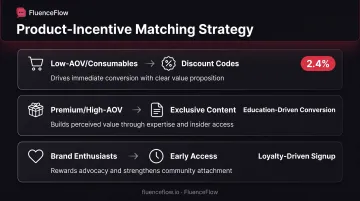
- Discount codes work well for consumables, CPG, and low-AOV brands where price sensitivity drives conversions
- Exclusive content (guides, style advice, how-to videos) resonates with premium brands where education builds trust
- Early access to new launches appeals to brand enthusiasts and loyal customers who value being first
Omnisend's data shows popups offering discounts converted at 2.4% versus 1.7% without, a 41% relative lift. But for high-AOV brands selling $400+ products, discounts rarely close the sale. Buyers need reassurance, social proof, and education instead.
Proven Opt-In Strategies for E-commerce Brands
Website Opt-In Tactics
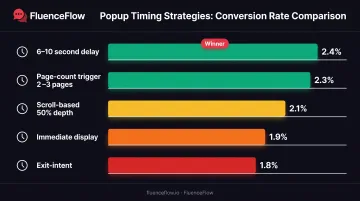
Immediate popups that block content annoy visitors and hurt brand perception. Timing the ask performs better. Omnisend-reported benchmarks show:
- 6-10 second delay: 2.4% conversion rate
- Immediate display: 1.9% conversion rate
- Page-count triggers (after 2-3 page views): 2.3% conversion
- Scroll-based triggers (after 50% scroll): 2.1% conversion
- Exit-intent (when the cursor moves to close the browser): 1.8% conversion
The right trigger still depends on traffic source and on-site behavior. Start with delayed popups, then add behavioral triggers for visitors who browse deeper.
Next, put embedded signup forms where attention already is:
- Homepage hero or above-the-fold section
- Blog sidebars and end-of-article CTAs
- Product pages (especially bestsellers)
- Footer on every page
- Checkout with a clear, unchecked marketing opt-in
Embedded forms convert better beside social proof, such as subscriber counts, short testimonials, or UGC that makes joining feel low-risk.
Gamified opt-ins can lift both engagement and list quality. Preference-based popups collect zero-party data while you offer the incentive. Carroll's Corn used a "YOU'VE GOT 10% OFF" popup that asked visitors to pick a flavor: Sweet Caramel, Cheesy Cheddar, Classic Butter, or Zesty Ranch. Sartoro offered "$102 OFF" and asked shoppers to choose an occasion: Upcoming Event, Your Wedding, Work/Business, or Social/Casual.
You capture the email and the segment signal in one step, which makes the welcome and follow-up flows easier to personalize.
Social Media and Content Marketing
Use Instagram and Facebook to send warm traffic to a dedicated opt-in page, not to run your whole list-growth motion inside the feed:
- Instagram bio link to a signup page with a clear offer
- Stories swipe-up links (10K+ followers) or link stickers
- Facebook page CTAs ("Sign Up," "Learn More") pointed at forms
- Pinned posts for gated content or exclusive offers
Social is a discovery channel. Give people a specific reason to move to email, where you own the relationship and the follow-up.
Gated content makes that reason tangible:
- Downloadable guides (size charts, care instructions, buying guides)
- Exclusive webinars or virtual events
- Early access to launches or limited drops
- VIP or insider communities
Lead with obvious, immediate value. "Complete Guide to Selecting the Right Fit" beats a generic "newsletter" every time.
Post-Purchase and Checkout Optimization
Add a marketing opt-in checkbox at checkout. Keep it unchecked by default; pre-checked boxes create compliance risk (including under GDPR for applicable traffic) and erode trust. Spell out what they get:
- "Yes, send me exclusive discounts and new product launches via email."
- "Join our VIP list for early access and members-only offers."
Keep marketing consent separate from transactional order updates. Buyers expect shipping emails; they should actively choose promos.
Not everyone opts in at checkout. A short post-purchase email can still win the one-time buyer over:
- Thank them for the order
- State what the list is for (offers, tips, new arrivals)
- Tie the ask to a next-order incentive (10% off, free shipping, or a bonus product)
That invitation fits cleanly inside a standard post-purchase sequence, the same place you already drive repeat purchase and onboarding, so list growth reinforces retention instead of competing with it.
How to Optimize Your Opt-In Forms for Maximum Conversions
Opt-in rate is rarely a traffic problem; it's usually a form problem. These four levers are where most brands pick up easy conversion gains without buying more visitors.
A/B test copy, CTAs, and offers
Small wording changes often drive large swings in conversion rates. Test:
- Headline copy: "Get 10% Off" vs. "Join Our VIP List"
- CTA button text: "Sign Up" vs. "Get My Discount" vs. "Unlock Offer"
- Value proposition: Discount vs. free shipping vs. exclusive content
- Form layout: Single-step vs. multi-step
One documented comparison showed a popup producing $17,000 in revenue at a 0.72% submit rate versus $141,000 at a 10.03% submit rate. That 9.31-point gap came from strategic testing, not more traffic. FluenceFlow builds this kind of A/B testing into popup and list-growth work for DTC brands.
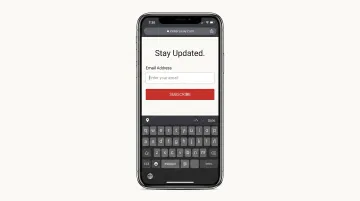
Mobile-responsive form design
- 1-3 input fields maximum
- Single-column layout
- At least 16-pixel font size
- 8-pixel spacing between elements
- 48-pixel touch targets for buttons
Omnisend's data shows popups optimized for both desktop and mobile converted at 2.2%, versus 1.4% for desktop-only forms. If your form isn't built for thumbs first, you're leaving signups on the table.
Social proof beside the form
Social proof reduces hesitation at the moment of signup. Place it next to the form:
- Subscriber counts: "Join 50,000+ subscribers"
- Testimonials: "I save 20% on every order!" – Sarah M.
- Star ratings or reviews highlighting email-exclusive perks
- Trust badges (secure, privacy-protected)
Social proof works best when it's specific and credible. Generic claims without evidence can backfire.
Progressive profiling
Start with just an email address at signup. Over time, collect additional preferences through:
- Preference centers where subscribers choose content types and frequency
- Multi-step forms that spread questions across multiple pages
- Post-purchase surveys embedded in flows
- Behavioral data collection based on browsing and purchase history
FluenceFlow uses multi-step forms and zero-party data collection in its popup strategies, allowing brands to gather segmentation data without overwhelming visitors at first touch.
Common Opt-In Email Mistakes to Avoid
These three opt-in mistakes quietly erode trust, conversion rates, and inbox placement:
- Complicating unsubscribe. Every marketing email needs a clear, one-click unsubscribe link. Forcing logins, multi-page flows, or support tickets drives spam complaints, which hurt deliverability far more than unsubscribes.
- Overloading the opt-in form. Asking for name, phone, birthdate, preferences, and address all at once kills conversion. Omnisend's data shows five or more fields convert at 1.4%, versus 2.2% for two fields. Collect profile data progressively over weeks and months instead.
- Mismatching sends to signup promises. If you promised a welcome discount, deliver it instantly. If you promised weekly content, don't send three emails on day one. Unexpected frequency is the fastest path to unsubscribes and complaints.
Compliance and Legal Requirements for Opt-In Marketing
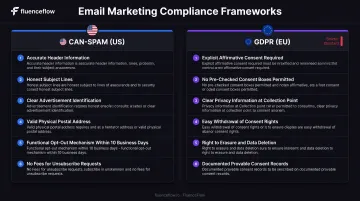
Opt-in only works when collection and sending stay inside the law. US DTC brands must meet CAN-SPAM at minimum, and GDPR applies as soon as you email EU subscribers.
CAN-SPAM Act (US)
The FTC's CAN-SPAM compliance guide requires:
- Accurate sender information: your From, To, Reply-To, and routing information must be truthful
- Honest subject lines: no deceptive headers or misleading subject lines
- Clear identification: recipients must know the message is an ad
- Valid physical address: include your postal address in every email
- Functional opt-out mechanism: must work for at least 30 days; honor requests within 10 business days
- No fees or extra information: unsubscribing requires only the email address
Violations carry penalties up to $53,088 per email. The FTC's 2024 action against Verkada resulted in a $2.95 million CAN-SPAM penalty, the agency's largest at the time, for failures involving more than 30 million emails.
GDPR (EU Subscribers)
If you have EU customers, GDPR consent requirements are stricter than CAN-SPAM:
- Valid consent: freely given, specific, informed, unambiguous, and separate from other terms
- No pre-checked boxes: ICO guidance rejects silence, inactivity, and default opt-ins
- Clear privacy information: disclose purposes, legal basis, retention period, data transfers, and withdrawal rights
- Easy withdrawal: unsubscribing must be as simple as subscribing
- Data deletion rights: subscribers can request erasure when data is no longer needed or processing was unlawful
GDPR doesn't mandate double opt-in, but it requires provable, explicit consent. Double opt-in provides strong evidence of both intent and address control.
Document Your Opt-In Proof
Retain records of who consented, when they opted in, how they joined, what they were shown, and whether consent was withdrawn. This documentation protects your business if a subscriber disputes joining your list or if regulators investigate.
Common fields to store:
- Email address
- Consent timestamp
- Form source (popup, checkout, social campaign)
- Value proposition offered
- Opt-in type (single or double)
- Confirmation date (for double opt-in)
- IP address and user agent (if counsel determines it's appropriate and lawful)
Klaviyo and other ESPs automatically log much of this data. Ensure your records are accessible and retained according to your privacy policy.
Frequently Asked Questions
What does opt-in mean in email marketing?
Opt-in means a subscriber voluntarily provided their email address and gave explicit permission to receive marketing emails. They completed a form, checked a consent box, or clicked a confirmation link to join your list.
Is opt-in required for email marketing?
CAN-SPAM doesn't require opt-in, only opt-out. GDPR does require explicit consent for EU subscribers. Even when not legally required, opt-in remains best practice for deliverability, engagement, and long-term ROI.
How do I get an email opt-in list?
Build your list through website signup forms, exit-intent popups, social media promotions, checkout opt-ins, gated content offers, and in-person collection using QR codes or signup sheets. Never buy lists; purchased addresses violate platform terms and produce poor results.
What is opt-in language in email marketing?
Opt-in language is the clear, specific copy used in signup forms that tells subscribers exactly what they're agreeing to receive. Examples: "Get weekly style tips and exclusive discounts" or "Join for new product launches every Tuesday."
What are some examples of opt-in emails?
Common examples include double opt-in confirmation emails, welcome-series messages after signup, and emails that deliver the promised discount or freebie. Preference-center confirmations also count when subscribers update what they want to receive.
Is email marketing still worth it in 2026?
Yes. Litmus' 2025 State of Email survey found 35% of marketers see $10–$36 ROI per dollar spent and 30% see $36–$50. EMARKETER ranks email first for ROI among measured channels, ahead of websites, SEO, paid search, and social ads.
Ready to turn your traffic into revenue? Strategic opt-in marketing builds a high-quality, engaged subscriber base that drives repeat purchases and long-term profitability. Whether you need custom popups, optimized flows, or a full retention system, the foundation starts with permission-based growth done right.