Results vary dramatically based on strategy. Klaviyo's 2025 benchmark shows welcome flows averaging a 1.97% placed-order rate, while top performers hit 9.89%, a 5x spread that reflects workflow design, personalization depth, and timing precision, not just industry differences.
This guide explains what email automation workflows are, when to deploy them, step-by-step setup instructions, the five essential flows every ecommerce brand needs, and common mistakes that sink performance.
Key Takeaways
- Behavior-triggered workflows drive 30-60% of email revenue with no manual sends
- Welcome, cart, post-purchase, browse, and win-back flows generated 87% of automated orders
- Map logic before building, personalize with behavioral data, and optimize delays continuously
- Avoid over-automation, weak triggers, poor mobile rendering, and missing suppression rules
What Are Email Automation Workflows and Why They Work
Email automation workflows are triggered sequences that send pre-written messages based on specific customer actions, behaviors, time delays, or data conditions. Unlike one-off campaigns, which blast the same message to your entire list at a scheduled time, workflows nurture subscribers automatically over days or weeks.
Each sequence tailors content to where that person sits in the customer journey.
Workflows Scale Personalized Communication
Manual campaigns require you to decide who gets what message and when. Workflows make those decisions automatically using behavioral triggers: someone abandons a cart, browses a product, or hasn't purchased in 60 days, and the system sends the appropriate sequence without your involvement.
Performance difference:
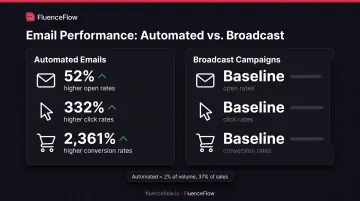
- Automated emails delivered 52% higher open rates and 332% higher click rates than broadcast campaigns in Omnisend's 2025 ecommerce marketing report
- Among email recipients who clicked, 1 in 3 automated-message recipients purchased versus 1 in 18 broadcast recipients
- Automated emails drove 2,361% higher conversion rates despite representing only 2% of total email volume
Why Workflows Outperform Broadcasts
Workflows win because they send messages when subscribers are most engaged: immediately after signup, one hour after cart abandonment, or two days post-purchase, not when it's convenient for your calendar.
That timing advantage compounds with personalization. Workflows can reference the exact product someone viewed, the items left in their cart, or a previous purchase, so each message feels relevant instead of generic.
Lifecycle coverage:
- Awareness stage: Welcome series introduces brand story and drives first purchase
- Consideration stage: Browse-abandonment flows nudge product viewers toward cart adds
- Conversion stage: Cart-recovery sequences address purchase hesitations with urgency and social proof
- Retention stage: Post-purchase flows request reviews and recommend complementary products; win-back campaigns reactivate dormant customers
Three core workflows, welcome, abandoned cart, and browse abandonment, generated 87% of automated orders in Omnisend's analysis. A small set of well-built flows can drive most automated revenue.
Step-by-Step: How to Build an Email Automation Workflow
Step 1: Define Your Workflow Goal and Target Audience
Start with a measurable objective tied to a specific customer segment. Vague goals like "increase engagement" produce vague workflows. Effective goals specify the action, the audience, and the benchmark:
- Increase first-purchase conversions by 25% among new subscribers within 7 days
- Recover 15% of abandoned carts worth $50 or more
- Drive 10% repeat-purchase rate among 30-day post-purchase customers
Segment your audience by:
- Lifecycle stage (new subscriber, first-time buyer, repeat customer)
- Behavior (cart abandoner, product browser, email opener)
- Purchase history (high-AOV customer, frequent buyer, one-time purchaser)
- Engagement level (active clicker, passive opener, disengaged)
The more specific your segment, the more relevant your messaging. A cart-abandonment flow for $400+ carts should emphasize trust signals and education, not discount codes that erode margin. A consumables replenishment flow should trigger based on product-usage timing, not a generic 30-day delay.
Step 2: Map Out Your Workflow Logic on Paper
Sketch the entire workflow structure before opening your email platform. Include every email touchpoint, trigger condition, time delay, and conditional branch. Visual mapping prevents logic errors that won't surface until subscribers hit a broken path.
Plan conditional logic paths:
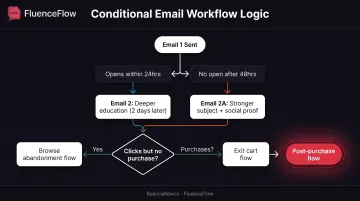
- If subscriber opens Email 1 within 24 hours → send Email 2 with deeper product education after 2 days
- If no open after 48 hours → send Email 2A with a stronger subject line and social proof
- If subscriber clicks but doesn't purchase → add to browse-abandonment flow
- If subscriber purchases → exit cart flow, enter post-purchase flow
Tools like Lucidchart or even pen and paper work. The goal is clarity before complexity.
Step 3: Choose the Right Triggers and Entry Conditions
Triggers determine when someone enters your workflow. The best triggers align with high-intent moments when subscribers are most likely to engage or convert.
Common trigger types:
- Form submission: Newsletter signup, account creation, quiz completion
- Behavioral: Specific page visit, product browse, video watch, cart add
- Transactional: Cart abandonment, purchase completion, order fulfillment
- Date-based: Birthday, anniversary, subscription renewal date
- Engagement-based: Email opened/clicked, 30 days since last open, 60 days since purchase
Klaviyo's abandoned-cart flow analysis of 143,000+ flows found an average 3.33% placed-order rate and $3.65 revenue per recipient, making cart abandonment one of the highest-performing triggers in ecommerce.
Trigger selection mistakes:
- Triggering too early (cart flow at 10 minutes when customers are still shopping)
- Triggering too broadly (welcome flow for every website visitor, not just subscribers)
- Ignoring suppression (sending cart flow to someone who already purchased)
Step 4: Write and Design Your Emails with Personalization
Each email needs a compelling subject line, a clear value proposition, a single focused CTA, and personalization that goes beyond {{ first_name }}.
Personalization opportunities:
- Product recommendations based on browsing or purchase history
- Location-based offers (free shipping in their region, local store hours)
- Behavioral messaging (cart contents, viewed products, previous order)
- Lifecycle stage (first-time buyer welcome vs. VIP customer appreciation)
Mobile optimization is mandatory (more than 60% of email opens happen on mobile):
- Keep subject lines under 50 characters so they don't truncate
- Use large, tappable CTAs (minimum 44x44 pixels)
- Test rendering across iOS Mail, Gmail, Outlook, and Yahoo
- Ensure images load quickly and text remains readable without images
FluenceFlow builds custom email design and mobile testing into its Klaviyo partnership work so workflows render correctly across devices and email clients.
Step 5: Set Strategic Delays Between Emails
Timing prevents subscriber fatigue while maintaining momentum. Delays allow time for engagement with previous emails and respect the customer's decision-making process.
Recommended delay structures by workflow type:
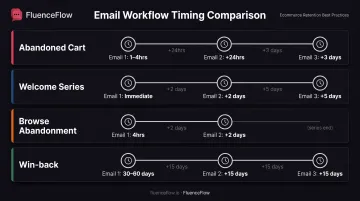
| Workflow | Email 1 | Email 2 | Email 3 |
|---|---|---|---|
| Abandoned cart | 1-4 hours after abandonment | 24 hours after Email 1 | 3 days after Email 1 |
| Welcome series | Immediate upon signup | 2 days after Email 1 | 5 days after Email 1 |
| Browse abandonment | 4 hours after product view | 2 days after Email 1 | — |
| Win-back | 30-60 days inactivity | 15 days after Email 1 | 15 days after Email 2 |
Klaviyo recommends cart emails at 2-4 hours and 20-48 hours after abandonment. Omnisend suggests testing first-order reactivation starting at 30 days and reviewing performance after 2-3 months, as optimal timing varies by product type and typical reorder interval.
Delay mistakes:
- Sending emails back-to-back (overwhelming subscribers, triggering spam filters)
- Using identical delays for all workflows (cart abandonment needs urgency; welcome flows need breathing room)
- Ignoring time zones (sending at 3 AM in the subscriber's location)
Step 6: Test Thoroughly, Launch, and Monitor Performance
Before launching, walk through every workflow path as if you're a subscriber.
Pre-launch testing checklist:
- Verify all links direct to correct pages
- Preview personalization tokens with test profiles (check for missing data fallbacks)
- Test email rendering in Gmail, Outlook, Apple Mail, and mobile clients
- Confirm conditional branches trigger correctly (opened vs. not opened, clicked vs. not clicked)
- Check exit conditions (subscriber purchases, unsubscribes, or reaches end of flow)
Post-launch metrics to monitor:
- Open rate: Indicates subject line effectiveness and send-time optimization
- Click-through rate: Measures content relevance and CTA clarity
- Conversion rate: Tracks placed orders or goal completions
- Revenue per recipient: Shows average value generated per email sent
- Unsubscribe rate and spam complaints: Gmail advises staying below 0.1% spam complaints; exceeding 0.3% may result in blocked sends
Review performance weekly for the first month, then monthly for established flows. FluenceFlow’s cadence mirrors that rhythm: first performance report at day 30, then weekly updates tied to engagement, deliverability, and revenue.
5 Essential Email Workflows Every Ecommerce Brand Needs
These five automated flows are the revenue backbone of most DTC email programs. Build them first, then layer on campaigns and finer segmentation.
Welcome Series Workflow
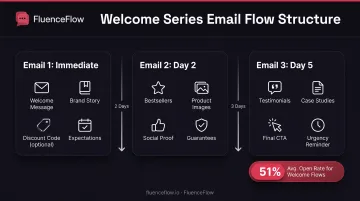
Purpose: Make a strong first impression, introduce your brand story and value proposition, set expectations for future emails, and drive the first purchase. Klaviyo's 2025 benchmark shows welcome flows averaging a 51% open rate, significantly higher than standard campaigns.
3-Email Structure:
Email 1 (Immediate):
- Welcome the subscriber and thank them for joining
- Share your brand story and unique value proposition
- Include a first-purchase discount code if it aligns with your pricing strategy (high-AOV brands may skip this to protect positioning)
- Set expectations: tell them what type of content they'll receive and how often
Email 2 (2 days later):
- Showcase bestsellers or customer favorites
- Include product images, brief descriptions, and social proof (reviews, ratings)
- Highlight any guarantees, free shipping thresholds, or return policies that reduce purchase friction
Email 3 (5 days later):
- Feature customer testimonials, user-generated content, or case studies
- Provide a final CTA to shop or explore specific categories
- Consider a last-chance reminder if you offered a time-limited discount in Email 1
For premium brands with average order values of $400 or more, FluenceFlow emphasizes extended education and trust-building rather than aggressive discounting, as buyers may research across 8-15 touchpoints before purchasing.
Abandoned Cart Recovery Workflow
Goal: Recover lost revenue by reminding shoppers of items left behind and addressing purchase hesitations with urgency, social proof, or incentives. Klaviyo's analysis of 143,000+ cart flows found an average 3.33% placed-order rate and $3.65 revenue per recipient.
3-Email Sequence:
Email 1 (1-4 hours after abandonment):
- Send a friendly reminder with product images and names
- Include direct "Return to Cart" CTA linking to their saved cart
- Keep tone helpful, not pushy: "You left something behind"
Email 2 (24 hours after Email 1):
- Add urgency (limited stock, popular item, price increase coming)
- Include customer reviews or ratings for abandoned products
- Address common objections with FAQ section (shipping costs, return policy, sizing)
Email 3 (3 days after Email 1):
- Offer a time-limited discount (10-15%) or free shipping
- Emphasize this is the final reminder
- Create urgency with countdown timer or "Offer expires in 24 hours"
Strategic considerations:
- Suppress subscribers who purchased between emails
- Don't send cart flows to repeat customers with high lifetime value unless they've abandoned high-AOV carts
- For products with long consideration periods, extend delays and reduce urgency language
Post-Purchase Thank You and Cross-Sell Workflow
Objectives: Confirm purchase, provide order and shipping details, request product review, recommend complementary products, and encourage repeat purchase. Post-purchase emails generate open rates almost 17% above average automated emails, as customers actively want order updates.
Email Sequence:
Email 1 (Immediate after purchase):
- Thank customer and confirm order details
- Provide order number, estimated delivery date, and tracking link
- Set expectations for shipping updates and customer support contact
Email 2 (After delivery, typically 7 days for online orders):
- Request product review with direct link to review form
- Share tips for product use, care instructions, or setup guides
- Offer customer support contact for questions
Email 3 (2 weeks post-purchase):
- Recommend complementary products based on their purchase
- Showcase products frequently bought together
- Offer loyalty program signup or refer-a-friend incentive
For consumable products, FluenceFlow implements replenishment flows timed to when the product actually runs out (not merely according to label recommendations) to drive repeat purchases before customers switch to competitors.
Browse Abandonment Workflow
Purpose: Re-engage visitors who viewed products but didn't add to cart. These subscribers showed interest but need an extra nudge. Klaviyo reports browse-abandonment flows achieving a 0.96% conversion rate, 9.6x higher than average campaigns.
2-Email Workflow:
Email 1 (4 hours after browsing):
- Subject line: "Still interested in [Product Name]?"
- Feature the browsed product with image and description
- Include 2-3 related product recommendations
- Highlight key benefits and social proof (reviews, ratings)
Email 2 (2 days after Email 1):
- Add urgency with "Limited inventory" or "Others are viewing this item"
- Include more detailed product information or customer photos
- Consider a small incentive (5-10% off) if appropriate for your margin
Important: Browse abandonment requires identifying visitors before they leave your site, typically through email signup or account login. Coverage is lower than cart abandonment but conversion rates are strong for captured browsers.
Customer Win-Back (Re-Engagement) Workflow
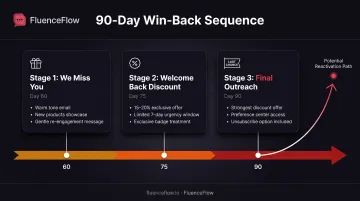
Goal: Reactivate customers who haven't purchased or engaged in 60-90 days before they're lost permanently. Win-back flows protect LTV you've already paid to acquire and usually cost far less than replacing that customer with paid traffic.
3-Email Reactivation Series:
Email 1 (60 days since last purchase/engagement):
- Subject line: "We miss you, [First Name]"
- Remind them of your brand value proposition
- Showcase new products, collections, or updates since their last visit
- Keep tone warm and curious: "What can we do better?"
Email 2 (75 days since last activity):
- Offer a "welcome back" discount (15-20%)
- Emphasize this is exclusive for returning customers
- Create urgency with time limit (valid for 7 days)
Email 3 (90 days since last activity):
- Final outreach with strongest offer or "last chance" messaging
- Include preference center link: "Update your email preferences"
- Provide easy unsubscribe option to maintain list health
Omnisend recommends starting first-order reactivation testing at 30 days for consumable products and reviewing performance after 2-3 months, as optimal timing depends on normal reorder intervals.
Best Practices for Email Automation Workflows
Always Provide Value Before Making Asks
Don't lead every email with a hard sell. The "give before you ask" principle builds trust and engagement before requesting purchases or commitments.
How to balance value and promotion:
- Send 2-3 value emails before any conversion push
- Share how-tos, product care tips, and industry insights
- Feature customer stories, behind-the-scenes content, or lifestyle inspiration
- Offer early product launches, subscriber-only sales, or VIP events
High-AOV brands often need 8-15 touchpoints before a buyer decides. Educational content that shows expertise and answers objections outperforms repeated discount offers that cheapen brand perception.
Personalize Beyond First Names with Behavioral Data
Generic personalization (inserting {{ first_name }}) has minimal impact. Deep personalization uses behavioral and transaction data to tailor key parts of the message.
Behavioral personalization opportunities:
- Recommend products frequently bought with their last purchase
- Prioritize categories they already buy (for example, athletic gear for repeat athletic shoppers)
- Trigger location-based offers: free local pickup, regional inventory alerts, weather-based suggestions
- Match lifecycle stage: education for new buyers, early access for VIPs
- Send when each subscriber is most likely to open
Platforms like Klaviyo use purchase history and browsing data to predict products customers are likely to buy, though exact lift percentages vary by implementation and product catalog.
Use Strategic Suppression and Exit Criteria
Don't send every workflow to every subscriber. Strategic suppression prevents message conflicts, reduces unsubscribes, and improves deliverability.
Essential suppression rules:
- Stop cart abandonment emails once the order is placed
- Exit cart and browse flows when someone enters a post-purchase sequence
- Remove unengaged contacts to limit unsubscribes and spam reports (Klaviyo guidance)
- Cap workflow sends at one email per day unless timing is critical (order confirmation, shipping update)
Clear exit conditions:
- Completes the workflow goal (purchase, review submission)
- Unsubscribes or marks the email as spam
- Ignores 2-3 emails in the sequence
- Enters a higher-priority workflow
These guardrails maintain sender reputation and ensure workflows drive revenue without burning your list.
Common Mistakes to Avoid with Email Automation Workflows
Sending Too Many Emails Too Quickly Without Delays
Bombarding subscribers with back-to-back emails, even valuable content, leads to unsubscribes, spam complaints, and brand fatigue.
The problem: Setting up five workflows without coordination means a new subscriber could receive a welcome email, browse-abandonment message, cart-recovery sequence, and promotional campaign all in the same day.
The fix:
- Minimum 1-2 days between emails for most workflows
- 3-5 days between emails for nurture and educational sequences
- Test different cadences and monitor unsubscribe rates by workflow
- Use global frequency caps to limit total emails per subscriber per week
Gmail advises staying below 0.1% spam complaints; exceeding 0.3% may block sends. Over-emailing is the fastest route to deliverability problems.
Ignoring Mobile Optimization and Email Deliverability
Many workflows use desktop-designed templates with tiny text, non-responsive images, and hard-to-tap CTAs that break on mobile devices.
Mobile optimization requirements:
- Keep subject lines under 50 characters to prevent truncation on small screens
- Use large, tappable buttons for CTAs (minimum 44x44 pixels)
- Design single-column layouts that stack cleanly on mobile
- Test every email on actual iOS and Android devices, not just preview tools
- Ensure images load quickly and text remains legible without images
Deliverability essentials:
- Authenticate your sending domain with SPF, DKIM, and DMARC records
- Monitor spam complaint rates and keep them below 0.1%
- Maintain unsubscribe rates below 0.3% per campaign
- Regularly clean your list by removing unengaged subscribers
- Avoid spam trigger words in subject lines and excessive punctuation
Fixing those fundamentals pays off fast. FluenceFlow recovered one client's Klaviyo account from $0 revenue (emails landing in spam) to $97,000 per month in 44 days by addressing deliverability and list-health issues.
Setting Up Workflows and Never Reviewing Performance
The "set it and forget it" trap: workflows that performed well at launch can decline over time due to changing subscriber preferences, market conditions, creative fatigue, or outdated product offerings.
Why workflows decay:
- Subscribers grow familiar with messaging and stop engaging
- Competitive offers or messaging evolve, making yours less compelling
- Product inventory changes but workflows still reference discontinued items
- Email client algorithms adjust, affecting deliverability
- Customer lifecycle patterns shift but triggers remain static
Recommended optimization cadence:
- Review key metrics (open rate, click rate, conversion rate, revenue per recipient) monthly
- Identify drop-off points: which email in the sequence loses the most subscribers?
- A/B test subject lines, CTAs, personalization, and send times quarterly
- Refresh email creative and copy every 3-6 months
- Update workflows whenever product offerings, pricing, or promotions change
Automated workflows need less day-to-day work than manual campaigns, but they still need a review rhythm. Put a monthly metrics check and a quarterly creative refresh on the calendar so flows keep earning instead of quietly decaying.
Frequently Asked Questions
What is an email automation workflow?
An email automation workflow is a series of pre-written emails that automatically trigger and send based on specific subscriber actions, behaviors, dates, or conditions, without requiring manual sending each time.
What are the 5 essential email flows every ecommerce brand should have?
The five core workflows are: welcome series (for new subscribers), abandoned cart recovery (for incomplete purchases), post-purchase follow-up (for recent buyers), browse abandonment (for product viewers who didn't add to cart), and win-back campaigns (for inactive customers).
What are examples of email automation workflows?
Common examples include welcome series triggered by newsletter signup, abandoned-cart emails sent 1-4 hours after cart abandonment, birthday emails triggered by subscriber birth date, replenishment reminders based on product usage, and re-engagement campaigns triggered after 60-90 days of inactivity.
What is the 3-email rule?
The 3-email rule suggests removing subscribers from a workflow after three consecutive unopened emails, as continued sending to disengaged contacts hurts deliverability and they're statistically unlikely to convert. This is a guideline, not a universal standard; some workflows may warrant longer sequences.
What are the best email automation tools?
Popular options include Klaviyo (strong for ecommerce and Shopify), HubSpot (CRM plus automation), Mailchimp (simple for smaller lists), and ActiveCampaign (advanced conditional logic). Klaviyo partners like FluenceFlow help with platform fit, custom flows, and ongoing optimization.
Is email marketing still worth it in 2026?
Yes. Omnisend's 2025 report estimates $79 returned per $1 spent on email marketing, making it one of the highest-ROI channels. In that same analysis, automated emails were only 2% of volume but drove 37% of email sales.