Introduction: The Personalization Gap in Email Marketing
You send an email. The subject line says "Hi Sarah." The header repeats "Hi Sarah." But the product recommendations inside? Generic bestsellers. The offer? The same 15% discount every subscriber received. Sarah skims it for three seconds and deletes it.
This is the personalization gap. DTC brands collect browsing behavior, purchase history, cart contents, and engagement patterns, then ignore it all and send one-size-fits-all campaigns. The result? Revenue left on the table.
According to a 2025 Litmus study, 46% of consumers unsubscribe because email content feels irrelevant or impersonal.
Dynamic email content closes that gap. It turns the customer data you already own into emails that adapt to each subscriber. Product recommendations, images, offers, and copy shift with behavior, purchase history, and lifecycle stage. This guide covers what dynamic content is, why it matters, how to implement it, and how to avoid common mistakes.
Key Takeaways
- Dynamic email personalizes text, images, products, and offers per subscriber without manual sends
- Abandoned-cart flows average $3.07 revenue per recipient vs. $0.10 for static campaigns (Klaviyo 2025)
- You can launch dynamic email with segmentation, clean data, and ESP logic; no advanced coding
- Highest-ROI use cases: product recommendations, cart/browse abandonment, and lifecycle messaging
- Balance relevance with privacy; stop short of intrusive over-personalization
What is Dynamic Email Content? The Complete Definition
Dynamic email content refers to email elements (text, images, product blocks, CTAs, or entire sections) that automatically change for each recipient based on their profile data, behavior, preferences, or purchase history. Unlike static emails that show the same creative to everyone, dynamic emails adapt at send time.
How it works technically:
- Your ESP applies conditional logic (if/then rules) to email templates
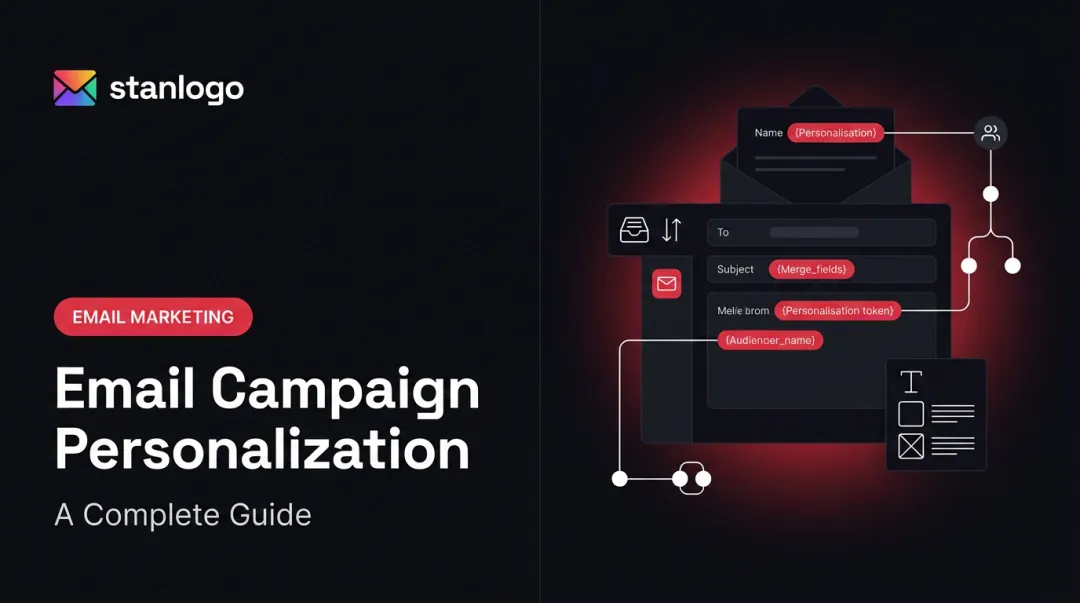
- Merge tags pull data from subscriber profiles or behavioral events
- Content blocks swap based on segmentation rules, browsing history, or cart contents
- The system personalizes each email at send time without manual intervention
The Personalization Spectrum
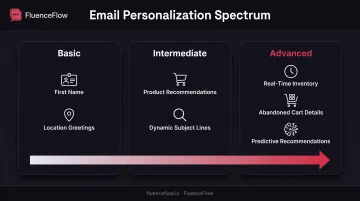
Dynamic content exists on a spectrum:
- Basic: First name personalization, location-based greetings
- Intermediate: Product recommendations based on browsing, dynamic subject lines
- Advanced: Real-time inventory updates, countdown timers, abandoned-cart product grids with size/color details, predictive next-purchase recommendations
Dynamic content is not the same as segmented campaigns or triggered emails.
- Segmented campaigns send different emails to different lists (dynamic content can still run inside those segments)
- Triggered emails fire on timing or behavior, such as a welcome series (dynamic content personalizes what appears within those messages)
You can layer dynamic content into both so every send is tailored at the block level, not just the audience level.
Performance Context for DTC Brands
Klaviyo's 2025 benchmark data analyzing 176,000+ ecommerce brands found that automated flows, which often use dynamic content, generated $3.07 average revenue per recipient versus $0.10 for broadcast campaigns. That comparison is flow vs. campaign, not dynamic vs. static creative alone, but it still shows how behavior-triggered, personalized emails outperform generic blasts.
Why Dynamic Content Matters for DTC Brands
Revenue Impact
Dynamic content directly increases average order value and purchase frequency by showing customers products they're already interested in. When an abandoned-cart email displays the exact items left behind (size, color, and price), conversion rates climb. A post-purchase email that recommends complementary products based on what someone just bought lifts cross-sell rates the same way.
Klaviyo's 2024 abandoned-cart analysis of 143,000+ flows found average placed-order rates of 3.33% and $3.65 revenue per recipient, with top performers hitting $28.89 RPR. Browse-abandonment flows averaged $1.07 RPR.
Revenue is the headline, but dynamic content also tightens how the rest of your retention system runs.
- Reflects browse, purchase, and click history so emails feel intentional, which supports loyalty and lower unsubscribe rates
- Replaces dozens of static variations with one template and conditional logic across segments, categories, and lifecycle stages
- Moves past first-name personalization with recently viewed items, replenishment reminders, and location-based offers
- Puts browsing history, past purchases, and engagement to work as inputs for the next email instead of unused data
Types of Dynamic Email Content You Can Implement
Dynamic email content falls into three practical buckets: what changes inside the email, what behavior triggers it, and which data powers the swap. Most DTC programs mix all three.
Content Categories
These are the building blocks you can swap per recipient inside a single template:
- Dynamic text: First names, locations, dates, purchase anniversaries, loyalty tier
- Dynamic images: Product photos, banners, and hero images that change by segment
- Dynamic product blocks: Recommendations, recently viewed items, "complete the look" suggestions
- Dynamic CTAs: Offers, button copy, urgency messaging
- Conditional sections: Blocks shown or hidden by attributes, loyalty status, or purchase stage
Behavioral Triggers
Trigger-based sends pull live catalog or cart data so the email matches what the shopper just did:
- Browse abandonment: Show exact products viewed on-site
- Cart abandonment: Display items left in cart with size and color details
- Post-purchase follow-ups: Recommend complementary products based on what was bought
- Re-engagement: Surface products from previously browsed categories after inactivity
Data Sources for Personalization
Strong dynamic content depends on clean inputs. These are the data types most Klaviyo-style setups rely on:
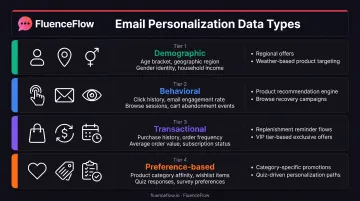
| Data Type | Examples | Use Cases |
|---|---|---|
| Demographic | Age, location, gender | Regional offers, weather-based products |
| Behavioral | Website activity, email engagement, clicks | Product recommendations, browse recovery |
| Transactional | Purchase history, AOV, frequency | Replenishment reminders, VIP offers |
| Preference-based | Stated interests, product categories | Category-specific promotions, quiz-driven paths |
How to Implement Dynamic Email Content: Step-by-Step
1. Audit Your Data Foundation
Before building dynamic emails, assess what customer data you collect and how it's organized:
- Review profile properties in your ESP (name, location, purchase history, engagement level)
- Check event tracking (product views, cart additions, purchases)
- Identify gaps, such as missing product IDs, incomplete purchase history, and outdated segments
- Establish data hygiene rules: how often data refreshes, who owns data quality
Clean data is non-negotiable. Broken merge tags and missing properties will cause blank content blocks or embarrassing errors.
2. Choose Your ESP Capabilities
Not all email platforms offer the same dynamic content features. Klaviyo supports:
- Profile and event-based variables
- Show/hide conditional blocks
- Django-style if/elif/else logic
- Repeating dynamic tables for cart items
- Catalog and behavior-driven product feeds
Other platforms vary in depth:
- Mailchimp: Dynamic Content blocks (Standard plan or higher) and conditional merge tags
- Campaign Monitor: Conditions based on custom fields or list membership
- ActiveCampaign: If/then rules for contact fields, tags, and ecommerce data
3. Plan Your Dynamic Content Strategy
Start with high-impact, low-complexity implementations:
- Weeks 1–2: Product recommendations in post-purchase emails and abandoned-cart product grids
- Weeks 3–4: Browse-abandonment emails with viewed items; dynamic welcome paths by signup source
- Month 2+: VIP conditional sections, location-based offers, and replenishment reminders
4. Build Your First Dynamic Template
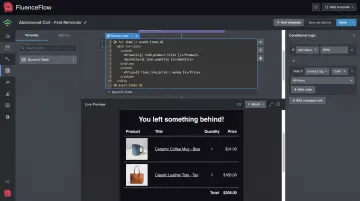
Example: Abandoned-Cart Email in Klaviyo
- Create a cart-abandonment flow triggered by the "Started Checkout" event
- Add a dynamic table block to repeat cart line items
- Insert merge tags:
{{ event.extra.line_items.product.title }},{{ event.extra.line_items.product.price }} - Add a fallback so the block hides or shows a generic CTA if product data is missing
- Test with profiles that have different cart contents, missing data, and empty carts
5. Test Across Segments
Litmus recommends testing every personalized version and its fallback across desktop and mobile clients. Preview how emails render for:
- Customers with complete data
- Profiles missing key properties
- Subscribers with empty event arrays
- Different devices and email clients
6. Measure and Optimize
Track these metrics by segment:
- Open rate by dynamic content variation
- Click rate on dynamic product blocks
- Conversion rate per personalized offer
- Revenue per email for each dynamic template
Iterate based on performance. If "Recently Viewed" blocks underperform "Best Sellers," adjust your recommendation logic.
Dynamic Content Examples for E-commerce Brands
These patterns show how DTC brands personalize email around browsing, purchases, and lifecycle stage. Treat them as starting points for your own flows and campaigns.
Product Recommendation Examples
- Recently Viewed Items: Send a weekly email with products a customer browsed but didn't buy, plus a "Still interested?" CTA
- Complete the Look: After a customer buys a jacket, show matching pants, shirts, or accessories in a post-purchase email
- Based on Purchase History: For consumables, recommend replenishment before they run out using order date + typical usage window
- Category-Specific Promotions: If someone often browses outdoor gear, show hiking boots and camping equipment, not unrelated products
Behavioral Trigger Examples
- Abandoned Cart with Specifics: Show exact cart items (size, color, price) with a "Complete Your Order" link; add a personalized incentive on high-value carts
- Browse Abandonment: 24 hours after a product view, resend that item with reviews, alternatives, and a limited-time offer
- Post-Purchase Sequences: After a coffee maker purchase, send complementary products (beans, filters, cleaning supplies) at 7, 14, and 30 days
Lifecycle Stage Examples
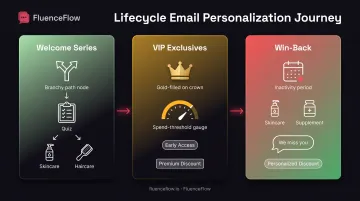
- Welcome Series Paths: Branch new subscribers by quiz answers or first category viewed so skincare fans see moisturizers and haircare buyers see shampoos
- VIP Customer Exclusives: Offer early access, higher discounts, or free shipping only to customers above a spend threshold
- Win-Back Campaigns: For lapsed customers, feature products from past purchase categories with a "We miss you" message and personalized discount
Best Practices and Common Mistakes to Avoid
Best Practices Framework
- Start with clear segmentation. Define segments before you build: VIP vs. first-time buyers, engaged vs. inactive, high AOV vs. low AOV.
- Maintain data quality. Audit profile properties and event tracking monthly. Missing or outdated data breaks personalization.
- Test before scaling. Preview every conditional branch, fallback, and merge tag. Send tests to profiles with varied data.
- Balance automation with authenticity. Dynamic content should feel helpful, not robotic. Use natural language and add real value.
- Respect privacy and preferences. Skip sensitive browsing references and intrusive over-personalization. Offer clear preference controls.
- Put value in every dynamic element. Don't personalize just because you can. Each block should solve a problem or offer something relevant.
Common Mistakes to Avoid
- Over-personalization that feels creepy. Referencing granular browsing behavior without context can backfire.
- Broken merge tags from poor data quality. Empty brackets or "null" text destroys credibility.
- Too much complexity that delays campaigns. Don't let perfect dynamic logic block good campaigns from shipping.
- Dynamic content that doesn't add value. Swapping one generic product image for another isn't personalization.
- Failing to optimize mobile rendering. Dynamic blocks must work on small screens. Test every version.
Getting Expert Help
For DTC brands ready to scale, strong dynamic content still depends on Klaviyo expertise, clean data architecture, and ongoing optimization.
FluenceFlow builds custom email and SMS retention systems for Shopify brands, including behavior-driven flows, segmentation strategy, and performance-guaranteed implementations. If you're doing $50K+/month and want a done-for-you partner who works inside your Klaviyo account (not generic templates), agency support makes sense.
Frequently Asked Questions
What is a dynamic email?
A dynamic email changes content for each recipient based on their data, behavior, or preferences. Conditional logic personalizes text, images, products, and offers at send time, so no two subscribers need to see the same version.
Should I enable dynamic email?
Yes, if you have solid customer data and want stronger email performance. It's especially useful for DTC brands with diverse catalogs, multiple segments, or flows like cart abandonment and browse recovery.
What are examples of dynamic emails?
Common examples include abandoned-cart emails with the exact products left behind, recommendations from browsing history, location-based regional offers, and birthday emails with personalized discounts.
How does dynamic email work in Gmail?
Standard dynamic content, including personalized text, images, and product blocks, works in Gmail through server-side rendering before send. AMP for Email adds forms and carousels, but most dynamic emails don't need AMP.
Is dynamic email AI?
Not by default. Dynamic email runs on conditional logic and segmentation rules. AI can power recommendations or send-time optimization, but most ESPs use if/then conditions on subscriber data, not machine learning.
How does dynamic content work in email platforms?
ESPs apply conditional logic at send time: if a subscriber has attribute X, show content Y. Templates swap variable blocks from profile data, event history, or segment membership so each recipient gets a unique version before delivery.