Introduction
Automated SMS workflows send triggered texts based on specific actions: abandoned carts, completed purchases, list subscriptions, and more, without you sending each one by hand. Twilio reports a 98% SMS open rate, and messages land within minutes. Open rates alone don't generate revenue.
Many DTC brands still treat SMS automation as set-it-and-forget-it. They grab a generic template, copy trigger logic from a blog post, and assume revenue will follow. Then cart-recovery conversion sits around 4%, opt-outs climb each week, and the account risks compliance flags.
According to Postscript's 2026 benchmarks from 17,000+ Shopify stores, abandoned-cart SMS converts at 3.97%–7.84% for most brands, not the inflated 20–30% claims you often see.
This guide walks through the steps to build SMS workflows that hold up in production:
- Choose a platform with real automation depth
- Build compliant opt-in lists
- Design triggers that respect customer behavior
- Write messages that convert
- Avoid mistakes that hurt deliverability and burn your list
Key Takeaways
- SMS workflows automate triggered messages based on customer actions like cart abandonment, purchases, or list signup, with no manual sends required
- Back-in-stock messages deliver the highest measured performance (36.71%-58.70% CTR, 7.18%-13.80% conversion), followed by abandoned-cart recovery
- Launch requires A2P 10DLC registration (10–15 days for US brands), opted-in contacts, and purchased SMS credits
- TCPA violations cost $500 per message (up to $1,500 if willful); written consent and instant opt-out suppression are mandatory
- Federal quiet hours run 8 a.m.–9 p.m. local time; skip limits or compliance and you damage deliverability and drive opt-outs
How to Send Automated SMS Messages Using Workflows
Step 1: Choose Your SMS Platform and Set Up Prerequisites
Start by evaluating platforms built for e-commerce workflow automation. Klaviyo is a strong fit for Shopify brands: it syncs customer activity natively, supports abandoned-cart and back-in-stock flows, and includes consent management plus quiet-hour controls.
Agencies like FluenceFlow build these systems for DTC brands that want done-for-you SMS and email workflows without the trial-and-error.
Other options include:
- Brevo: Event-driven automation with prepaid credits from $0.0109 per message
- HubSpot: SMS actions in Marketing Hub Pro/Enterprise ($75/month for 1,000 segments)
- Mailchimp: Shopify integration with an SMS add-on on Essentials plans and higher
Complete A2P 10DLC registration before you send a single message. US brands must register their business identity and campaign with The Campaign Registry through their messaging platform. Twilio estimates 15 minutes to complete the application and 10-15 days for campaign review. Unregistered traffic gets blocked by carriers.
You'll also need SMS credits based on expected volume. US messages cost about $0.0083 per segment on Twilio, plus carrier fees of $0.0035–$0.005.
Step 2: Build and Segment Your Opted-In Subscriber List
You cannot send marketing SMS without explicit written consent. The TCPA authorizes $500 per violation, and courts can triple that for willful violations. Your opt-in forms must clearly state what subscribers will receive, how often, and include language like "By subscribing, you agree to receive promotional text messages. Consent is not a condition of purchase."
Store phone numbers in E.164 format, a plus sign, country code, and subscriber number (e.g., +14155552671). Validate that all contacts are marked as "subscribed" in your platform before adding them to a workflow.
Segment based on behavior, not guesswork. High-performing segments include:
- Active cart abandoners with items worth recovering
- Back-in-stock waitlist subscribers (these convert at 7.18%-13.80% according to Postscript's 2026 data)
- Recent purchasers for cross-sell or replenishment
- Engaged subscribers who've clicked past SMS messages
- VIP customers based on lifetime value
Segmentation prevents you from blasting irrelevant messages to your entire list, which drives opt-outs and damages sender reputation.
Step 3: Design Your Workflow Trigger and Logic
Select the event that initiates the workflow. Common e-commerce triggers include:
- Abandoned cart: Triggered when a customer adds items but doesn't purchase
- Completed purchase: Sends order confirmation or follow-up sequence
- Back in stock: Notifies customers when a waitlisted product returns
- List subscription: Sends welcome series to new SMS subscribers
- Browse abandonment: Reaches customers who viewed products but didn't add to cart
- Date-based events: Birthdays, anniversaries, or replenishment windows
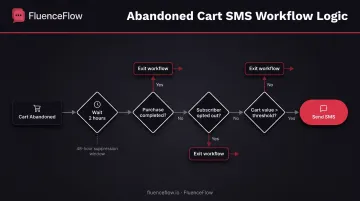
Add conditional logic to prevent over-messaging. For example, wait 2 hours after cart abandonment, suppress if the customer completes the purchase, split based on cart value, or exit the workflow if the subscriber opts out. Carrier guidelines allow one abandonment SMS per event within 48 hours, so configure your workflow accordingly.
Step 4: Create and Activate Your Automated SMS Messages
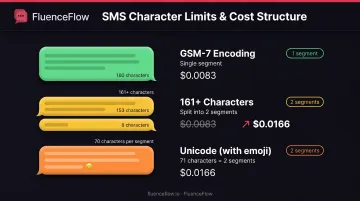
Write concise SMS copy, ideally under 160 characters for one GSM-7 segment. Exceeding 160 characters or using emojis switches to Unicode encoding, which drops the limit to 70 characters per segment. Every extra segment costs more and hurts the customer experience.
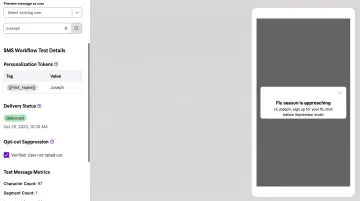
Include personalization tokens (first name, product name, cart value) and required compliance elements: clear sender identification and one-step opt-out language like "Reply STOP to unsubscribe."
Configure quiet hours. Federal TCPA rules permit marketing calls and texts from 8 a.m. to 9 p.m. local time; some states stop at 8 p.m. Most platforms queue messages sent outside permitted hours until the window reopens.
Test your workflow thoroughly. Send test messages to real numbers, verify personalization tokens populate correctly, confirm purchase-suppression logic works, and check that opt-out replies immediately remove contacts from future sends. Once live, monitor delivery rate, click-through rate, conversion rate, and opt-out rate daily for the first week.
When Should You Use Automated SMS Workflows?
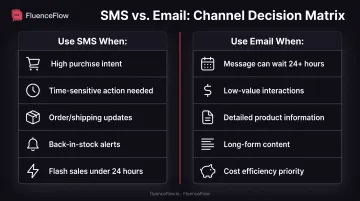
Use SMS workflows for high-intent, time-sensitive customer actions where immediacy creates measurable value. Back-in-stock notifications produce the highest documented performance (36.71%–58.70% CTR and 7.18%–13.80% conversion) because customers explicitly requested the alert.
Abandoned-cart recovery works when cart value justifies the message cost and the shopper has already shown purchase intent.
SMS also beats email when the customer needs to act now:
- Order confirmations, shipping updates, and delivery notices
- Flash sales or drops with a tight window
- Replenishment reminders on consumables
When workflows become inefficient:
- Overly frequent messaging that causes opt-outs (customers rarely tolerate more than 3-4 marketing SMS per week)
- Low-value interactions better suited for email (browsing a $15 product doesn't warrant an SMS)
- Segments with poor phone-number data quality (high bounce rates damage sender reputation)
- Promotional blasts that could run as cheaper email campaigns
If your message can wait 24 hours or doesn't require immediate action, use email instead.
What You Need Before Setting Up SMS Workflows
Platform and Technical Requirements
You need an SMS platform with workflow automation and a native connection to your e-commerce stack or CRM. Common options include:
- Klaviyo: Native Shopify integration; supports abandoned-cart, welcome, back-in-stock, and post-purchase flows
- Brevo: Event-driven automation for teams comfortable configuring triggers and conditions
- HubSpot: Requires Marketing Hub Pro or Enterprise plus the Long Code Add-On
Complete sender registration before launch. US brands must register for A2P 10DLC:
- Brand registration: Legal identity and tax information
- Campaign registration: Messaging purpose, sample messages, opt-in proof, and privacy policy
Twilio estimates 10-15 days for campaign review. Unregistered numbers get filtered by carriers.
Contact List and Data Requirements
Your list must include only opted-in subscribers with explicit SMS consent. Phone numbers must be formatted in E.164 (+14155552671), and contacts must be marked as "Marketing Contacts" or equivalent in your platform.
Clean your data regularly: remove duplicates, suppress disconnected numbers, and exclude contacts who've opted out. Poor list hygiene damages sender reputation and increases the risk of compliance violations.
Compliance and Budget Readiness
TCPA rules require prior express written consent for promotional texts. Violations run $500 each and can triple if willful. Twilio's messaging policy also requires:
- Clear sender identification
- Opt-out language in the first message
- One-step opt-out, with no further texts except the confirmation
Budget for SMS credits on top of platform and registration fees:
- Twilio: ~$0.0083 per US segment, plus $0.0035–$0.005 carrier fees
- Klaviyo: Credits per recipient per segment: 1 (US), 3 (Canada), 5 (UK)
Common Mistakes When Setting Up SMS Workflows
SMS workflows fail fast when consent, frequency, or formatting slip. Avoid these common setup mistakes:
- Sending without proper opt-in consent. Purchased lists, scraped numbers, or vague checkbox language violate TCPA rules and can trigger account suspension, carrier filtering, and penalties of $500 per message.
- Overloading contacts with automated messages. Stacking abandoned cart, browse abandonment, welcome, and promo workflows without coordinating frequency drives fatigue and opt-outs. Audit total message volume per contact across every workflow.
- Ignoring number formatting or unsubscribe language. Improperly formatted numbers fail delivery. Missing "Reply STOP to opt out" violates Twilio's messaging policy and carrier requirements, leading to filtering and compliance flags.
- Exceeding the 160-character limit without tracking segments. A 161-character message splits into two segments and costs twice as much. One emoji can switch encoding to Unicode and drop the segment limit to 70 characters.
Best Practices for SMS Workflow Automation
Keep automated SMS effective and compliant with these practices:
- Personalize with first name, product name, cart value, or past purchase history so each text feels relevant
- Respect quiet hours and timezones: Federal TCPA rules permit texts from 8 a.m. to 9 p.m. local time
- Avoid overnight sends (for example, 2 a.m.); they hurt experience and drive opt-outs even when a platform allows them
- Track delivery rate (stay above 95%), opt-out rate, click-through rate, conversion rate, and revenue per message
- A/B test message content, timing, and offers when metrics slip or plateau
- Set re-enrollment limits so contacts do not re-enter the same workflow repeatedly
- Block duplicate sends from overlapping workflows
- Coordinate SMS with email so channels complement each other on timing, not compete
Frequently Asked Questions
How can I automatically send SMS messages?
You need an SMS platform with workflow automation (like Klaviyo, Brevo, or HubSpot), an opted-in list with proper consent, and workflows that fire when contacts take specific actions or meet set conditions.
Do I need special permission to send automated text messages to customers?
Yes. Get explicit written consent before sending marketing SMS, comply with TCPA regulations, and register for A2P 10DLC when messaging US numbers. Violations can cost $500 per message, tripled for willful cases.
How much does it cost to send automated SMS messages?
US SMS runs about $0.0083 per segment on Twilio, plus $0.0035–$0.005 in carrier fees. Klaviyo uses 1 credit per recipient per segment; 10,000 messages at ~$0.015 each is about $150, before platform subscription fees.
What's the best trigger for SMS workflows in e-commerce?
Back-in-stock alerts lead measured performance (36.71%–58.70% CTR, 7.18%–13.80% conversion), then abandoned-cart recovery (9.53%–17.28% CTR, 3.97%–7.84% conversion). Best triggers still depend on product type, margins, and purchase frequency.
Can I send SMS workflows from my existing email marketing platform?
Many email platforms now include SMS (Klaviyo, Brevo, HubSpot, Mailchimp), but you still need SMS credits, sender registration, and may hit limits dedicated tools avoid. For complex or high-volume programs, a specialized agency like FluenceFlow can get stronger results with less trial-and-error.