Yet many ecommerce brands treat email as an afterthought, sending occasional promotional blasts without a cohesive strategy. The result? They leave substantial revenue on the table. Research shows that automated email flows can generate up to 22x more revenue per send than one-off campaign emails, yet countless stores still haven't built even basic cart-recovery sequences.
This guide covers everything you need to build a high-performing email marketing system: essential automation flows, strategic planning frameworks, optimization tactics, key metrics, and common pitfalls to avoid.
Key Takeaways
- Email and SMS deliver an estimated $79 for every $1 spent, the highest-ROI channels in ecommerce
- Automated behavior-triggered flows generate $3.41 per send versus $0.155 for broadcast campaigns
- Segmenting by purchase behavior and lifecycle stage beats one-size-fits-all blasts on engagement and revenue
- Top programs pair automated lifecycle flows with a steady campaign calendar to capture full retention revenue
What is Email Marketing for Ecommerce?
Ecommerce email marketing uses customer shopping behavior (browsing history, cart activity, purchase patterns) to trigger targeted, automated messages that drive revenue. Unlike general email marketing that relies primarily on scheduled newsletters, ecommerce email responds to how shoppers interact with your store.
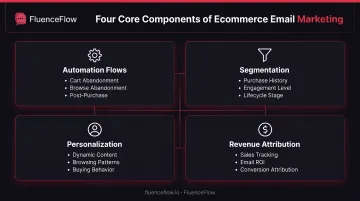
Core components include:
- Automation flows: Behavior-triggered sequences (cart abandonment, browse abandonment, post-purchase)
- Segmentation: Customer groups by purchase history, engagement level, and lifecycle stage
- Personalization: Dynamic content based on browsing and buying patterns
- Revenue attribution: Direct tracking of which emails drive sales
Ecommerce platforms sync customer and product data directly with email service providers. Shopify, WooCommerce, and BigCommerce integrations automatically update customer segments as shoppers browse, add items to cart, and complete purchases. That data enables real-time, behavior-based messaging.
Why Email Marketing Works for Ecommerce Brands
It's an Owned Channel You Control
Unlike social platforms where algorithm changes can tank your organic reach overnight, your email list belongs to you. You decide when to send, what to say, and who receives each message.
Shopify research confirms that stores improve retention by grouping customers according to engagement and purchase behavior, tactics possible only through an owned channel like email.
It Drives Revenue Across the Entire Customer Lifecycle
Email works at every stage:
- Acquisition: Nearly 48% of flow-driven email revenue comes from new buyers, compared to just 16% for campaign emails
- Conversion: Automated emails like abandoned cart and browse abandonment convert at far higher rates than one-off broadcasts
- Retention: Post-purchase sequences, replenishment reminders, and loyalty emails keep customers coming back
- Reactivation: Winback campaigns re-engage lapsed buyers before they switch to competitors
It Delivers Superior ROI Compared to Other Channels
Omnisend estimates that ecommerce merchants see $79 returned for every $1 spent on email, SMS, and push combined. Email forms the foundation of that return.
Contrast that with paid advertising, where customer acquisition costs keep climbing and you pay for every impression. Email lets you market to existing subscribers repeatedly at virtually no marginal cost.
Essential Email Automation Flows Every Ecommerce Store Needs
Automation flows run on autopilot, triggered by specific customer actions. They're the backbone of any high-performing email program. Start with these six: welcome, abandoned cart, post-purchase, browse abandonment, winback, and loyalty/VIP.
Welcome Series
Welcome emails consistently outperform other email types. In 2025, welcome flows averaged 35.53% open rates, 3.94% click-through rates, 2.11% conversion rates, and $6.16 revenue per email. That far exceeds campaign averages of 30.41% opens, 0.74% clicks, 0.08% conversions, and $0.155 per email.
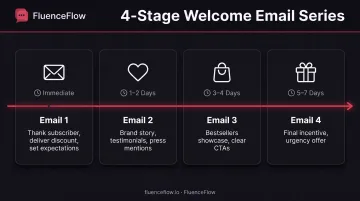
Recommended 3-4 email structure:
- Immediate welcome (sent within minutes): Thank new subscribers, deliver any promised discount, set expectations
- Brand story and social proof (1-2 days later): Share your origin story, customer testimonials, press mentions
- Product showcase (3-4 days later): Highlight bestsellers or category overviews with clear calls-to-action
- Incentive to purchase (5-7 days later): Final nudge with urgency or exclusive offer
Abandoned Cart Recovery
Cart abandonment is one of the highest-ROI fixes in ecommerce email. Baymard Institute's analysis of 50 studies puts the average abandonment rate at 70.22%, meaning seven out of ten shoppers who add items leave without buying.
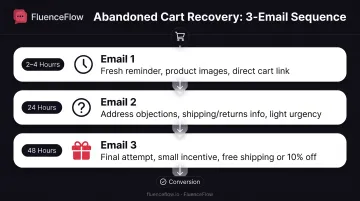
Recommended 3-email sequence (timing aligned with Klaviyo's analysis of thousands of ecommerce customers):
- 2-4 hour reminder: Send while interest is fresh; include product images and a direct cart link
- 24-hour follow-up: Address common objections (shipping costs, return policy); add light urgency ("Still thinking it over?")
- 48-hour final attempt: Consider a small incentive (free shipping, 10% off) for hesitant buyers
Best practices:
- Show product images directly in the email
- Include pricing and clear "Complete Purchase" buttons
- Address common objections before the shopper asks
- Create urgency without sounding pushy
Post-Purchase Follow-Up
Post-purchase emails serve multiple goals: confirm orders, set delivery expectations, collect reviews, and encourage repeat purchases.
Recommended sequence:
- Order confirmation (immediate): Reassure customers with order details and estimated delivery
- Shipping notification (when item ships): Provide tracking information
- Delivery confirmation (when delivered): Confirm receipt, offer support
- Review request: Klaviyo defaults to 7 days after package delivery, not order date, so customers have time to use the product
Weave in cross-sell opportunities naturally by suggesting complementary products, but keep the focus on supporting the customer's current purchase.
Browse Abandonment
Browse abandonment targets shoppers who viewed products but didn't add them to cart. These flows averaged 44.47% opens, 8.53% clicks (the highest of any flow type), 0.59% conversions, and $0.76 per email.
How it works:
- Trigger based on product page views without cart additions
- Send personalized reminders featuring the exact products viewed
- Include customer reviews and key product details
- Add a gentle call-to-action
Send 24-48 hours after the browsing session. That window is long enough for the shopper to have left your site, but short enough that interest hasn't fully faded.
Winback Campaigns
Not every customer who stops buying is lost forever. Reactivation flows averaged 33.11% opens, 1.99% clicks, 0.54% conversions, and $0.51 per email.
Define inactive customers based on your product's natural purchase cycle. Klaviyo recommends determining your normal reorder interval and sending just after that window, rather than applying a universal 60- or 90-day rule. A monthly consumable requires different timing than premium furniture.
Graduated re-engagement sequence:
- "We miss you" message: Friendly check-in with no hard sell
- Special incentive: Offer a discount or exclusive access
- Feedback request: Ask why they haven't purchased; show you care about improvement
- Final offer: Last attempt with your best offer before removing them from active campaigns
Removing truly inactive subscribers maintains list health and protects your sender reputation.
Customer Loyalty & VIP Programs
Email reinforces loyalty programs through points updates, tier upgrades, and exclusive offers for your best customers.
Structure:
- Program welcome: Explain how the loyalty program works and the benefits of participation
- Milestone celebrations: Recognize anniversaries, birthdays, points thresholds
- Exclusive previews: Give top customers early access to new products or sales
- VIP-only offers: Segment your highest-value customers and treat them differently
Treat your best customers differently and you strengthen loyalty while lifting lifetime value.
How to Build an Effective Ecommerce Email Marketing Strategy
Automation flows are essential, but they're only one piece. A complete strategy requires clear goals, list growth, segmentation, personalization, and continuous optimization.
Set Clear Revenue Goals
Establish specific, measurable objectives tied to business outcomes, not just email metrics.
Key goals to target:
- Increase customer lifetime value by X%
- Recover Y% of abandoned carts
- Drive email to represent Z% of total store revenue
Stores working with specialized retention agencies average 41% of total revenue from email and SMS combined. Set targets that match your growth plan and unit economics.
Build and Grow Your Email List
No list, no revenue. List building should be ongoing.
Best practices:
- Strategic signup form placement: Homepage, product pages, checkout (for non-purchasers), blog posts
- Compelling lead magnets: First-purchase discounts (10-15% off), early access to new products, exclusive content or guides
- Exit-intent popups: Capture visitors before they leave; popup signup rates averaged 3.77% in 2025
- Post-purchase opt-ins: Collect emails and SMS consent at checkout
Never buy email lists. Purchased lists produce bounces, spam complaints, unsubscribes, and destroy your sender reputation. ISPs and ESPs flag these behaviors, hurting deliverability for all future emails.
Segment Your Audience
Generic batch-and-blast emails underperform. Segmentation allows you to send relevant messages to specific groups.
Effective segmentation strategies:
- Purchase history: First-time buyers vs. repeat customers vs. VIPs
- Browsing behavior: Viewed specific categories or products
- Engagement level: Highly engaged, moderately engaged, inactive
- Customer lifecycle stage: Prospects, new customers, loyal customers, lapsed customers
- Geographic location: Useful for regional promotions or local events
Shopify customer segments update automatically as customers meet criteria, making ongoing segmentation manageable.
Personalize Your Messaging
Personalization goes far beyond inserting first names.
Advanced tactics:
- Show product recommendations tied to past purchases or browsing
- Swap in dynamic content blocks by customer segment
- Reference real history: "Since you loved [Product A], you'll love [Product B]"
- Trigger sends from specific actions (viewed sale page, downloaded guide)
Basic first-name personalization barely moves the needle. Behavior-based content performs far better when your customer data is clean enough to support it.
Automate and Optimize
Automation scales email marketing by responding to customer actions in real time, without manual sends.
Key automation principles:
- Set up behavior-based triggers that fire when customers take specific actions
- Test continuously through A/B experiments on subject lines, send times, content, and calls-to-action
- Monitor performance metrics to identify what's working and what needs improvement
- Refine segments and messaging based on actual engagement and conversion data
Automation is not "set and forget." Keep running A/B tests on subject lines, timing, and offers against real conversion data.
Best Practices for Ecommerce Email Marketing Success
Master Mobile Optimization
Most customers now read email on smartphones. Poor mobile experiences lead to immediate deletion, unsubscribes, and lost sales.
Technical requirements:
- Responsive design: Emails must adapt to any screen size
- Readable fonts: Minimum 16px body text; Apple recommends 17-22px, Google recommends 18-22px
- Tappable buttons: Minimum 46px square for easy thumb navigation
- Fast-loading images: Compress files to reduce load time on cellular connections
Test every email across multiple devices (iPhone, Android) and email clients (Gmail app, Apple Mail) before sending.
Prioritize Deliverability
Even the best email means nothing if it lands in spam.
Email authentication: Google requires SPF or DKIM for all senders, and SPF, DKIM, and DMARC for bulk senders (5,000+ messages per day to Gmail accounts). These protocols verify that your emails actually come from your domain.
List hygiene practices:
- Remove hard bounces immediately
- Monitor spam complaints closely; Google advises keeping spam below 0.10% and never exceeding 0.30%
- Regularly sunset inactive subscribers who haven't engaged in months
- Track unsubscribe rates as an early warning signal
Your sender reputation directly impacts whether ISPs deliver your emails to inboxes or spam folders.
Maintain Optimal Sending Frequency
There's a balance between staying top-of-mind and causing email fatigue.
Guidelines:
- Engaged subscribers: 2-4 emails per week typically works well for active customers
- Less engaged subscribers: Reduce frequency or create a separate "digest" option
- Watch unsubscribe rates for sudden spikes; they usually mean you're sending too often or the content isn't relevant
- Offer a preference center so subscribers can choose email frequency and content types
Use engagement data to determine optimal frequency for different segments. What works for your VIP customers won't work for less-engaged subscribers.
Focus on Compelling Subject Lines and CTAs
Subject lines determine whether emails get opened. CTAs determine whether opened emails drive action.
Subject line best practices:
- Keep length reasonable (under 50 characters for mobile visibility)
- Create curiosity or urgency without being misleading
- Personalize when relevant (but don't overdo it)
- Test continuously; what works varies by audience
Once someone opens the email, the CTA has to finish the job.
CTA best practices:
- Use clear, action-oriented language ("Shop Now," "Get 15% Off," "Claim Your Discount")
- Make buttons prominent with contrasting colors
- Include one primary CTA per email. Multiple competing CTAs confuse readers
- Match email content to the promise made in the subject line (nothing damages trust faster than clickbait)
Ensure Compliance
Skip these rules and you risk fines, blocked domains, and a damaged sender reputation.
Key regulations:
- CAN-SPAM (US): Requires accurate headers, non-deceptive subjects, clear unsubscribe links, valid physical address, and opt-outs honored within 10 business days
- GDPR/PECR (UK/EU): Requires specific consent for marketing emails (or existing-customer soft opt-in for similar products), opt-out at collection and in every message, identification, and valid contact address
Always honor unsubscribes immediately. It's not just legally required. It protects your sender reputation and keeps your list healthy.
Key Metrics to Track for Ecommerce Email Marketing
Revenue Metrics
Revenue metrics show whether email is actually driving sales, not just opens.
- Revenue per email (RPE): Total attributed revenue divided by emails sent
- Total email-attributed revenue: Revenue credited to email campaigns and flows
- Email revenue as percentage of total store revenue: Shows email's contribution to your business
Automated flows typically generate higher revenue per email than broadcast campaigns. Track each separately to understand where your revenue comes from.
Engagement Metrics
Engagement metrics track whether people open, click, and convert from your emails.
2025 benchmarks by email type:
| Email Type | Open Rate | Click Rate | Conversion | Revenue/Email |
|---|---|---|---|---|
| Campaigns | 30.41% | 0.74% | 0.08% | $0.155 |
| Welcome | 35.53% | 3.94% | 2.11% | $6.16 |
| Abandoned Cart | 37.12% | 4.13% | 1.72% | $3.59 |
| Post-Purchase | 47.70% | 4.12% | 0.93% | $1.75 |
| Browse | 44.47% | 8.53% | 0.59% | $0.76 |
Source: Omnisend 2025 benchmarks
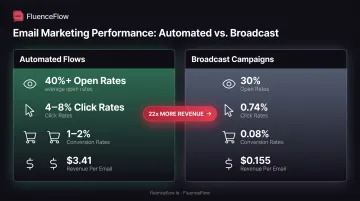
Automated emails consistently outperform broadcast campaigns across every metric. Put optimization time into flows first; they carry most of the revenue per send.
List Health Metrics
List health determines long-term email performance.
- List growth rate: New subscribers minus unsubscribes, as percentage of total list
- Unsubscribe rate: Percentage of recipients who opt out per email (campaigns averaged 0.20%, automated emails 0.59% in 2025)
- Bounce rate: Percentage of emails that couldn't be delivered
- Spam complaint rate: Percentage flagging your emails as spam
Healthy lists grow consistently, maintain low bounce and complaint rates, and show strong engagement. If metrics trend negative, diagnose and fix issues immediately.
Common Mistakes to Avoid in Ecommerce Email Marketing
Sending Generic, One-Size-Fits-All Campaigns
Batch-and-blast emails consistently underperform segmented, personalized messages. When you send the same offer to every subscriber, regardless of purchase history, engagement level, or lifecycle stage, open rates drop and unsubscribes climb.
Segment by behavior and lifecycle stage so each send matches where that subscriber actually is with your brand.
Neglecting Email Automation
Manual email sending wastes time and misses revenue opportunities. Without automated flows, you lose sales every single day:
- Cart abandoners leave without recovery attempts
- New subscribers never receive proper onboarding
- Customers don't get post-purchase follow-up or replenishment reminders
In 2025, automated flows produced 22x more revenue per email than campaigns ($3.41 vs. $0.155). That gap separates programs that drip revenue in the background from ones that depend entirely on manual blasts.
Using Generic Industry Templates Instead of Custom Strategy
Not all ecommerce businesses are the same. A supplement brand with negative margins on first orders operates completely differently from a furniture store with an 8-month buying cycle or a coffee subscription with monthly replenishment.
Your email strategy should reflect your unit economics:
- High-AOV, low-frequency products work best with longer nurture sequences, educational content, and post-purchase cross-sells
- Mid-AOV, mid-frequency catalogs should push bestsellers and high-margin items while turning first-time buyers into repeat customers
- Low-AOV, high-frequency consumables need strong first-order conversion, replenishment timed to real usage, and lapsed-buyer winbacks
Generic "best practices" rarely account for these differences. Build around your margins, buying cycle, and customer behavior instead of a one-size playbook. Agencies like FluenceFlow structure retention this way when brands want that work done for them.
Ignoring Mobile Users
When emails don't display properly on smartphones, customers delete them immediately or unsubscribe.
Common mobile mistakes:
- Tiny, unreadable text
- Non-responsive designs that require zooming and horizontal scrolling
- Slow-loading images that frustrate customers on cellular connections
- Buttons too small to tap accurately
Test every template on a phone before it goes out. If tap targets, type, or load speed fail there, fix them first.
Frequently Asked Questions
What is email marketing in e-commerce?
E-commerce email marketing uses customer shopping data and behavior (browsing, cart activity, purchase history) to send targeted, automated messages that drive purchases, retain customers, and increase lifetime value for online stores.
Is it legal to buy an email list?
While technically legal in some places, buying lists violates anti-spam laws like CAN-SPAM and GDPR, destroys deliverability and sender reputation, and produces terrible engagement since recipients never consented to your emails.
What is the best email marketing platform for e-commerce?
The best platform depends on your store size, e-commerce stack (Shopify, WooCommerce, BigCommerce), and goals. Prioritize deep store integrations, solid automation, and strong deliverability; strategy and setup usually matter more than which tool you pick.
How often should I send marketing emails to my customers?
Optimal frequency depends on product type and customer engagement. For engaged subscribers, 2-4 emails per week is a solid starting range. Watch unsubscribe rates and adjust: consumables often support higher cadence than luxury or high-AOV goods.
What's the difference between broadcast emails and automated emails?
Broadcast emails are one-time sends to your list or segments (promos, product launches). Automated emails trigger on behavior (cart abandonment, welcome series, post-purchase). Automated flows generate higher engagement and revenue: $3.41 per send versus $0.155 for campaigns.
How do I measure the success of my email marketing?
Focus on revenue metrics first: revenue per email, total attributed revenue, and email revenue as a percentage of total store sales. Track engagement metrics (opens, clicks, conversions) alongside revenue to understand performance drivers, but never prioritize vanity metrics over actual business outcomes.