This guide covers the strategic best practices, technical requirements, and optimization frameworks that separate underperforming email programs from those driving measurable revenue in 2026. You'll learn how to build permission-based lists, design for mobile-first engagement, meet evolving deliverability standards, and coordinate email with SMS for maximum retention impact.
Key Takeaways
- Permission, segmentation, and lifecycle triggers deliver measurable ROI beyond batch campaigns alone
- Mobile accounts for over 71% of email opens; responsive design and scannable copy are mandatory
- Gmail and Yahoo authentication rules are delivery requirements, not optional extras
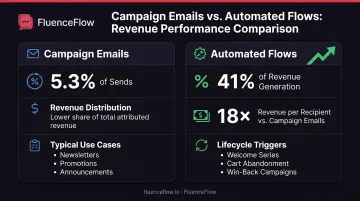
- Automated flows drive ~41% of email revenue from only 5.3% of sends (18x revenue per recipient)
- Test against your engagement data, not industry averages, to compound performance gains
Why Email Marketing Still Matters in 2026
Direct Access and Lifecycle Revenue
Email provides direct, permission-based access to customer inboxes without competing against algorithm-driven social feeds. While organic reach on platforms like Facebook and Instagram depends on unpredictable content distribution, email lands in the inbox of every subscribed customer who hasn't bounced or unsubscribed.
In a 2024 Mailjet survey of more than 2,000 consumers across five countries, 75.4% selected email as their preferred channel for brand promotions, and 74% chose it for transactional communications.
The channel's strength lies in its ability to drive conversions across the entire customer lifecycle:
- Welcome sequences convert new subscribers into first-time buyers
- Abandoned-cart and browse-abandonment flows recover lost revenue
- Post-purchase emails encourage repeat orders and upsells
- Replenishment reminders bring consumable buyers back at predictable intervals
- Win-back campaigns reactivate lapsed customers before they churn permanently
According to Klaviyo's 2026 benchmarks, automated lifecycle flows generated nearly 41% of total email revenue from just 5.3% of sends, with 18x the revenue per recipient compared to one-time campaigns. Flows also attracted 48% of revenue from new buyers, compared to 16% for campaigns. That gap shows how effectively automated flows convert subscribers early in the relationship.
Email Versus Other Channels
When consumers were asked which channel they prefer for marketing messages in Optimove's 2025 survey of 329 US adults with household incomes above $75,000, 59% chose email versus just 18% for social media.
The sample is limited to higher-income households, but it matches a broader pattern. Email gives a focused, one-to-one format people control in their inbox, unlike social feeds that mix brand messages with personal updates and ads.
Email also integrates naturally with SMS, push notifications, and other retention channels. Agencies like FluenceFlow build custom email and SMS systems for DTC brands that coordinate messaging across both channels. Email carries detailed product education and lifecycle content; SMS handles time-sensitive offers and high-urgency reminders. That mix lets brands reach customers through complementary touchpoints without overwhelming any single channel.
Essential Email Marketing Best Practices for 2026
Build Permission-Based Lists Only
Purchased or scraped email lists damage deliverability, violate regulations, and produce almost no meaningful engagement. When you send to contacts who never opted in, inbox providers like Gmail and Yahoo see high spam-complaint rates, low engagement, and frequent bounces. Those signals harm your sender reputation and push future emails into spam folders.
Why explicit opt-in matters:
- You comply with CAN-SPAM, GDPR, and CCPA requirements from the start
- Subscribers expect your emails and are more likely to open and click
- Your list contains real, active addresses rather than outdated or fake contacts
- You avoid spam traps and honeypot addresses that monitor sender behavior
Double opt-in requires subscribers to confirm their email address by clicking a link sent immediately after signup. This extra step keeps typos, malicious submissions, and bot-generated addresses off your list.
M3AAWG sender standards call confirmed opt-in the highest-quality practice. You get a smaller list in exchange for higher quality and stronger long-term performance.
Segment Your Audience Strategically
Batch-and-blast emails send the same message to everyone. That ignores a simple truth: customers sit at different lifecycle stages, care about different products, and engage at different frequencies. In Litmus's 2024 survey of email marketers, more than 90% reported that segmentation improves performance, though the report doesn't quantify a universal lift percentage.
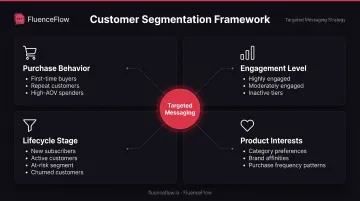
Effective segmentation criteria include:
- Purchase behavior: First-time buyers, repeat customers, high-AOV spenders, customers who purchased specific product categories
- Engagement level: Highly engaged (opened or clicked in the last 30 days), moderately engaged (30-90 days), inactive (90+ days)
- Lifecycle stage: New subscribers, active customers, at-risk customers, lapsed/churned
- Browse and cart activity: Viewed specific products, abandoned cart, abandoned browse
- Product interests and preferences: Collected through zero-party data, signup forms, or past purchase patterns
Klaviyo's 2026 data shows that automated flows, which are inherently segmented by behavior, achieve 5.58% click rates versus 1.69% for campaigns, with 13x the placed-order rate. This gap reinforces the value of targeting messages based on what customers have actually done, not generic assumptions about what they might want.
Personalize Beyond the First Name
Dynamic content and behavioral triggers create personalized experiences that go far deeper than inserting {{first_name}} into the subject line. True personalization uses customer data to customize the entire message: product recommendations, content blocks, images, offers, and send timing, based on individual behavior and preferences.
How to personalize using customer data:
- Show product recommendations based on past purchases, browsing history, or items frequently bought together
- Display dynamic content blocks that change by segment (for example, one hero image for men's products, another for women's)
- Adjust messaging and tone based on lifecycle stage (educational for new subscribers, loyalty-focused for repeat buyers)
- Time sends using predictive engagement windows when individual subscribers are most likely to open
Behavioral triggers automate this personalization at scale. An abandoned-cart email should include the exact product left behind, not a generic "come back" message. A post-purchase email should recommend complementary items based on what the customer just bought, not random bestsellers.
Optimize for Mobile Devices
In Mailjet's 2024 survey, more than 71% of consumers reported checking email primarily on mobile devices, with only about 25% using desktop or webmail. Mobile is already how most subscribers read you.
Mobile-first design principles:
- Responsive templates that adapt layout and font sizes automatically
- Short, scannable subject lines under 50 characters that display fully on mobile screens
- Single-column layouts with clear visual hierarchy
- Large, tappable CTAs (minimum 44x44 pixels) with ample spacing
- Readable font sizes (minimum 14-16px for body text)
- Compressed images that load quickly on cellular connections
Test every email on actual mobile devices and multiple email clients (Gmail app, Apple Mail, Outlook mobile) before sending. Desktop-only QA misses rendering issues that frustrate the majority of your subscribers.
Maintain Consistent Sending Frequency
Sporadic email activity confuses subscribers and damages engagement. If you send three emails one week, then nothing for a month, subscribers forget they signed up and are more likely to mark your next message as spam. Conversely, sending too frequently overwhelms your audience and drives unsubscribes.
Set clear expectations at signup about how often subscribers will hear from you, then honor that cadence. If you promise one email per week, don't suddenly send five. If circumstances require a frequency change, communicate it transparently.
In Optimove's 2025 survey, 70% of respondents unsubscribed from at least three brands in the previous three months because of excessive messaging, and 90% wanted frequency and message-type controls.
Optimal frequency varies by industry, audience, and content value. Test cadences with engaged segments and watch unsubscribe rates, spam complaints, and engagement trends to find your brand's sweet spot.
Focus on Value, Not Just Promotion
Subscribers stay engaged when emails consistently provide value, whether through educational content, entertainment, exclusive insights, or genuinely useful offers. If every email is a sales pitch, fatigue sets in quickly.
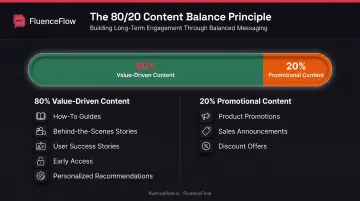
A common framework is the 80/20 rule: 80% of content should educate, inform, or entertain, while 20% directly promotes products. The exact ratio depends on your audience and business model, but the principle holds. Balance promotional messages with content that strengthens the relationship.
Ways to deliver non-promotional value:
- How-to guides and tutorials related to your products
- Behind-the-scenes stories about your brand or production process
- User-generated content and customer success stories
- Early access to content, sales, or product launches (exclusivity itself is value)
- Personalized recommendations that genuinely help customers discover relevant products
This approach reduces unsubscribes and builds long-term customer relationships that drive higher lifetime value than one-off discounts.
Building and Managing Your Email List
Organic list growth starts with a clear value exchange. Subscribers give you their email address because they expect something valuable in return. Website signup forms, pop-ups, exit-intent modals, and checkout opt-ins are common capture mechanisms, but effectiveness depends on the offer and messaging.
List-building strategies:
- Lead magnets: Offer a discount code, free guide, or exclusive content in exchange for an email address
- Pop-ups with intent targeting: Display offers based on behavior (time on site, exit intent, scroll depth)
- Multi-step forms: Collect email first, then ask for SMS or additional preferences in a second step to reduce friction
- Checkout opt-ins: Clearly labeled checkboxes (not pre-ticked) that invite order updates and marketing messages
At signup, set clear expectations. Tell subscribers what type of content they'll receive and how often. "Join our weekly newsletter for product drops, how-tos, and exclusive offers" is more transparent than "Subscribe for updates."
List Hygiene Practices
A clean list improves deliverability and engagement metrics. Regularly review and suppress contacts who haven't engaged in 90-180 days (adjust the window based on your typical purchase cycle). Mailchimp notes that keeping lists clean helps reduce spam-folder placement and protect sender reputation.
Essential hygiene tasks:
- Remove hard bounces immediately (invalid addresses that will never deliver)
- Monitor and suppress soft bounces after multiple consecutive failures
- Segment inactive subscribers and send re-engagement campaigns before removing them permanently
- Honor unsubscribes within 10 business days (CAN-SPAM requirement) and implement one-click unsubscribe for Gmail/Yahoo compliance
- Suppress spam complainers automatically. These contacts damage your reputation if you continue mailing them
Handle unsubscribes gracefully. A simple, friction-free process with an optional feedback form respects the subscriber's choice and protects your sender reputation better than making it difficult to leave.
Email Design and Content Best Practices
Writing Compelling Subject Lines
The subject line determines whether your email gets opened. Mailchimp suggests roughly 9 words, under 60 characters, and no more than 3 punctuation marks, useful starting points, not hard laws. Clarity, relevance, and urgency without spammy hype matter more than any character count.
Subject line guidelines:
- Length: Keep under 50 characters so the full line displays on mobile
- Clarity over cleverness: "20% off running shoes today only" beats "You won't believe this deal"
- Create urgency without hype: "Sale ends tonight" is effective; "OMG HURRY!!!" triggers spam filters
- Personalize when relevant: Use first name or purchase history if it adds value, not just for the sake of it
- A/B test variations: Test one variable at a time (length, tone, emoji, personalization) to learn what resonates
Avoid spam trigger words like "free," "guaranteed," "act now," or excessive punctuation (!!!, $$$). Alone they rarely kill deliverability, but stacked together they form a pattern inbox providers flag.
Structuring Email Content
Subscribers scan emails rather than reading them word-for-word. Clear hierarchy, scannable formatting, and balanced text-to-image ratios make content digestible.
Content structure best practices:
- Inverted pyramid: Lead with the most important information, then add supporting details
- Single clear CTA: One primary action per email reduces decision fatigue (multiple links are fine, but one should be the focus)
- Scannable layout: Use subheadings, short paragraphs, bullet points, and white space
- Text-to-image balance: Aim for roughly 80% text and 20% images; filters vary, but text-heavy emails tend to fare better
Images should include descriptive alt text for accessibility and for subscribers who have images disabled by default. Never rely solely on an image to convey your message or CTA.
CTA Best Practices
Your CTA should be obvious at a glance and tell people exactly what happens next. Clear copy, strong contrast, and a touch-friendly target drive clicks more than any single "best" color or placement.
Effective CTA design:
- Contrasting colors: Choose a button color that stands out from the email background
- Action-oriented copy: "Shop the sale," "Get my discount," "Download the guide" (not "Click here")
- Prominent placement: Above the fold when possible, repeated at the bottom for long emails
- Mobile-friendly sizing: Minimum 44x44 pixels with ample tap-target spacing
- Test variations: Button color, copy, size, and placement all influence click-through rates
Deliverability and Compliance in 2026
Deliverability isn't optional. If your emails don't reach the inbox, nothing else matters. In 2024, Gmail and Yahoo implemented sender requirements that remain in effect and continue shaping best practices in 2026.
Gmail and Yahoo Requirements
All senders must implement:
- SPF or DKIM authentication (preferably both)
- Valid forward and reverse DNS records
- TLS encryption for message transmission
- RFC 5322 formatting and valid Message-ID headers
- Spam complaint rate below 0.10% (Gmail target) and below 0.30% (Yahoo requirement)
Bulk senders (5,000+ messages per day to Gmail):
- SPF and DKIM (both required, not just one)
- DMARC with at least p=none and proper alignment
- One-click unsubscribe (RFC 8058) for marketing/subscribed messages
- Honor unsubscribes within two days
Emails from senders who don't meet these requirements face higher spam-folder placement, throttling, or outright rejection.
Authentication Protocols Explained
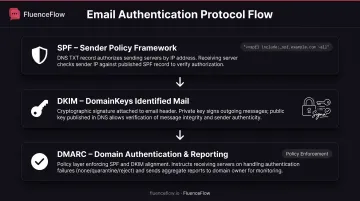
- SPF (Sender Policy Framework): Lists the servers and IP addresses authorized to send email for your domain, published in DNS records
- DKIM (DomainKeys Identified Mail): Attaches a domain-linked digital signature to each message, allowing receivers to verify the sender and detect tampering
- DMARC (Domain-based Message Authentication, Reporting, and Conformance): Evaluates SPF and DKIM alignment, publishes your policy for handling failures, and provides reporting on authentication results
Work with your email platform or IT team to implement all three protocols correctly. Most ESPs, including Klaviyo and Mailchimp, provide setup guides and can handle DKIM signing automatically once you add the required DNS records.
Compliance Requirements
CAN-SPAM (US):
- Accurate headers and subject lines
- Identify the message as advertising
- Include a valid physical postal address
- Provide a clear, functional opt-out mechanism
- Honor opt-outs within 10 business days
GDPR and PECR (UK/EU):
- Specific, freely given, affirmative consent (no pre-ticked boxes)
- Clear identification of the sender
- Easy withdrawal/opt-out in every message
- Soft opt-in applies only to existing customers for similar products/services, with opt-out at collection and in every email
CCPA (California):
- For covered businesses, provide notice at or before data collection, listing categories and purposes plus privacy-policy link
- Support deletion, correction, and opt-out of sale/sharing requests
- CCPA is not a general email opt-in law but governs data handling
Legal compliance alone won't protect inbox placement; engagement metrics matter too. Klaviyo's health bands recommend unsubscribe rates below 0.3%, bounce rates below 1%, and spam complaints below 0.01%. These are platform thresholds, not laws, but they track closely with what inbox providers expect.
Testing, Metrics, and Optimization
A/B testing and data-driven iteration are how strong email programs keep improving. Test one variable at a time (subject line, send time, CTA copy, or image placement) so you can isolate what drives the result.
A/B testing methodology:
- Preselect your success metric: Opens for subject-line tests, clicks for content/CTA tests, revenue or placed orders for commercial outcomes
- Randomly split comparable groups: Most platforms handle this automatically
- Change one variable only: Testing subject line and CTA simultaneously makes results uninterpretable
- Wait for statistical significance: Typically 95% confidence; Mailchimp suggests 1,000-5,000 participants per variant for meaningful data
- Iterate: Apply winners, then test the next variable
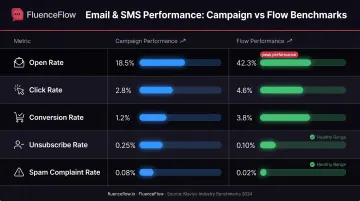
Key Metrics and Benchmarks
| Metric | Benchmark | Source |
|---|---|---|
| Open rate | 30.7% (campaigns); 38% (automated flows) | Omnisend, 2025 |
| Click rate | 1.69% (campaigns); 5.58% (flows) | Klaviyo, 2026 |
| Conversion/placed order | 3.33% average for abandoned cart; 7.69% top 10% | Klaviyo, 2023 data |
| Unsubscribe rate | <0.2% (great); <0.3% (healthy) | Klaviyo, 2025/2026 |
| Spam complaint rate | <0.01% (Klaviyo healthy); <0.10% (Gmail target) | Klaviyo/Google/Yahoo |
Benchmarks provide context, but your brand's performance depends on list quality, audience engagement, product type, and execution. Compare your metrics to your historical performance first, then to industry averages.
Using Metrics to Inform Strategy
- Segment by engagement: Identify highly engaged (opened/clicked in 30 days), moderately engaged (30-90 days), and inactive (90+ days) subscribers, then tailor frequency and content accordingly
- Test send times: Compare days and time windows, measuring opens and clicks within the first 24 hours
- Analyze content preferences: Track which content types, product categories, or subject-line styles drive the highest engagement
- Monitor flow performance individually: Klaviyo's benchmarks show abandoned-cart, welcome, and browse-abandonment flows perform differently. Optimize each based on its specific metrics
Advanced Strategies for Email Marketing Success
Campaigns Versus Flows
Campaigns are one-time sends to a selected audience: product launches, seasonal promotions, newsletters, or announcements. They broadcast timely messages to your entire list or specific segments and drive broad reach.
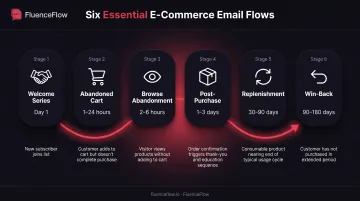
Flows (automations) are triggered sequences that send based on customer behavior or lifecycle events (welcome series, abandoned cart, post-purchase, replenishment, win-back). They deliver personalization and timely relevance at scale.
Klaviyo's 2026 data shows flows produced nearly 41% of email revenue from just 5.3% of sends, with nearly 18x the revenue per recipient of campaigns. Campaigns still matter. They generate 40-70% of total email revenue for most brands. Flows convert at much higher rates because each message is contextually relevant.
Essential E-Commerce Flows
- Welcome series: Introduces new subscribers to your brand, tells your story, and delivers any promised incentive
- Abandoned cart: Reminds shoppers about items left in their cart, often with social proof or urgency messaging
- Browse abandonment: Targets visitors who viewed products but didn't add to cart
- Post-purchase: Thanks customers, provides order updates, requests reviews, or recommends complementary products
- Replenishment: Timed to expected product usage for consumables (30, 60, or 90 days post-purchase)
- Win-back: Re-engages lapsed customers who haven't purchased in 90-180 days with a special offer or reminder
These flows can go live within the first two weeks of setup, with core flows typically completed by week three and remaining flows by week four.
Email and SMS Coordination
SMS complements email by delivering time-sensitive, high-urgency messages that subscribers see almost immediately. The real lift comes from coordinating both channels around each brand's unit economics, not generic templates. Agencies like FluenceFlow build these custom email and SMS systems for DTC brands.
How to coordinate email and SMS:
- Use email for detailed lifecycle content: product education, storytelling, long-form value
- Use SMS for high-urgency, time-sensitive offers: flash sales, abandoned-cart reminders, shipping updates
- Capture both permissions through multi-step forms or checkout opt-ins
- Segment by preference: Some customers prefer SMS, others prefer email. Honor those preferences
- Test coordinated sequences: For example, send an abandoned-cart email at 1 hour, then an SMS reminder at 6 hours if no purchase
Properly executed, email and SMS together can generate 30-45% or more of total store revenue for DTC brands. FluenceFlow reports that clients average 41% of total store revenue from combined email and SMS channels.
Predictive Analytics and Smart Timing
Use customer data and engagement history to send the right message at the right time:
- Predictive send-time optimization: Analyze when individual subscribers typically open emails and schedule sends accordingly
- Product recommendations: Show items based on purchase history, browsing behavior, or collaborative filtering ("customers like you also bought")
- Lifecycle stage modeling: Predict when a customer is likely to churn based on engagement and purchase patterns, then trigger win-back flows proactively
- Dynamic content: Display different hero images, offers, or product blocks based on segment, past behavior, or predicted interests
Common Email Marketing Mistakes to Avoid
Critical errors that damage performance:
- Buying or renting email lists damages sender reputation, violates regulations, and produces almost zero ROI
- Neglecting mobile optimization fails most readers, since more than 71% of opens happen on mobile
- Ignoring metrics and testing means you repeat mistakes and miss optimization opportunities
- Sending too frequently or inconsistently both harm engagement and increase unsubscribes
- Using no-reply addresses blocks replies, damages trust, and may hurt deliverability
- Skipping authentication setup risks spam-folder placement and outright rejection by Gmail and Yahoo
- Failing to segment sends batch emails that ignore subscriber preferences and lifecycle stage
Recovering from Mistakes
When you send an email with an error (broken link, wrong pricing, missing image), acknowledge it quickly with a correction email. Transparency builds trust better than ignoring the mistake.
To re-engage inactive subscribers, send a targeted win-back campaign with a special incentive or a simple ask whether they still want to hear from you. Remove contacts who don't respond after 2–3 attempts to protect your sender reputation.
Frequently Asked Questions
What are the best email marketing practices?
The best practices center on permission, relevance, and value. Build lists through explicit opt-in, segment by behavior and lifecycle stage, personalize with real customer data, and optimize every send for mobile. Keep a consistent cadence, authenticate your domain, and test against engagement metrics.
What is a good opt-out rate for email?
Klaviyo's 2025 guidance treats unsubscribe rates below 0.2% as "great" and below 0.3% as healthy. Rates above 0.5% usually signal frequency, relevance, or content-quality problems driven by send volume, weak value, or mismatched signup expectations.
What are the four P's of email marketing?
There is no universally recognized "4 P's" framework for email marketing. The classic marketing mix (Product, Price, Place, Promotion) applies to strategy broadly, not email alone. Campaign Monitor offers a copywriting version (Promise, Picture, Proof, Push), but that is one vendor's model, not an industry standard.
What are some examples of data-driven marketing strategies in email?
Data-driven strategies use behavior and engagement data to shape content, timing, and targeting. Common tactics include engagement-based segmentation, abandoned-cart triggers tied to checkout behavior, product recommendations from browse and purchase history, A/B tests scored on clicks or revenue, and predictive send-time optimization.
How often should I send marketing emails?
There's no universal cadence; it depends on your industry, audience expectations, and content value. Optimove's 2025 survey found 70% of people unsubscribed from at least three brands in three months due to excessive messaging. Start with the cadence you promised at signup, watch unsubscribes, and test frequencies with engaged segments.
How can I improve my email deliverability in 2026?
Implement SPF, DKIM, and DMARC correctly, scrub inactive contacts and bounces, and keep spam complaints under 0.10% and unsubscribes under 0.3%. Send consistently valuable content, monitor reputation in Google Postmaster Tools, and meet Gmail and Yahoo bulk-sender rules, including one-click unsubscribe.