This guide walks through proven SMS popup examples, design principles that convert, step-by-step creation instructions, and the compliance requirements you can't afford to ignore.
Key Takeaways
- SMS popups that balance value with privacy can become your highest-ROI list growth tactic
- Multi-step flows that collect email first, then offer SMS, cut friction and grow total subscribers
- Scroll-based and exit-intent triggers outperform immediate interruptions
- TCPA compliance requires explicit consent language, frequency disclosure, and clear opt-out instructions in every popup
Why SMS Popups Are Essential for DTC Brands
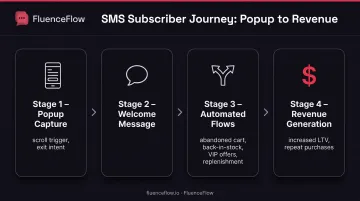
SMS subscribers typically generate higher lifetime value than email-only contacts. Messages arrive instantly and get read within minutes, so you gain a direct line for time-sensitive promotions, flash sales, and cart recovery.
Email can't match that speed. Messages sit in crowded inboxes for hours or days, while texts reach people when they're already on their phones.
SMS popups are the entry point to a multichannel retention system. The phone number you collect becomes a touchpoint for:
- Abandoned cart reminders
- Back-in-stock alerts
- VIP offers
- Replenishment campaigns
For brands running retention programs, SMS adds urgency and immediacy to lifecycle flows that email alone can't deliver. If you're driving traffic to your store but not capturing SMS subscribers, you're leaving revenue on the table.
10 High-Converting SMS Popup Examples
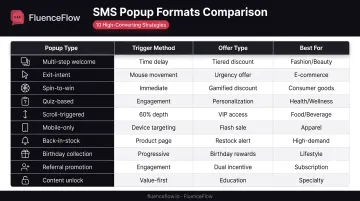
These ten SMS popup formats are the ones DTC brands lean on most, from welcome offers to back-in-stock alerts. Copy the structure, match the trigger to your traffic, and test the offer against your margins.
Example 1: Multi-Step Welcome Offer (Fashion/Beauty Brand)
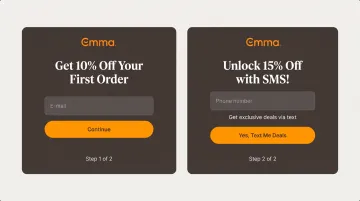
This approach splits the ask into two stages: first, collect the visitor's email with a 10% discount. Then, on the next screen, offer an SMS upgrade for 15% off instead.
Why it works: Raising the offer in steps lowers friction. Visitors who already gave an email have committed; the SMS ask feels like an upgrade, not another hurdle. Mobile-optimized fields and single-column layouts keep the flow smooth on phones.
Example 2: Exit-Intent Cart Abandonment Popup (E-commerce)
Trigger: Appears when the visitor's mouse moves toward the browser's close or back button.
Offer: "Wait! Get 20% off + SMS alerts for your order" with a countdown timer adding urgency.
Exit-intent popups catch high-intent visitors at the moment they're about to leave, making the interruption feel justified rather than intrusive.
Example 3: Spin-to-Win Gamified Popup (DTC Consumer Goods)
Visitors spin a wheel to reveal their discount, typically ranging from 5% to 20%, before entering their phone number.
The psychology: Revealing the value first creates commitment. Once someone sees their prize, they're more likely to finish signup to claim it. The game element also makes the ask feel lighter than a plain discount form.
Example 4: Quiz-Based SMS Collection (Health & Wellness)
This popup asks 3-4 product recommendation questions, then requests an SMS opt-in to deliver personalized results via text.
Dual benefit: You collect zero-party data (preferences, goals, use cases) for later segmentation, and the visitor gets tailored product suggestions. Both sides walk away with something useful.
Example 5: Scroll-Triggered Announcement Popup (Food & Beverage)
Timing: Appears after the visitor scrolls 60% down the page, signaling genuine engagement.
Offer: "Join our VIP text club, first access to new releases + 15% off"
Scroll-depth triggers respect the visitor's experience. If someone has read more than half your page, they're interested. The popup becomes a natural next step rather than an interruption.
Example 6: Mobile-Only Flash Sale Popup (Apparel)
Targeting: Shown exclusively to mobile visitors, reinforcing the SMS-first experience.
Messaging: "Mobile-exclusive: 24-hour flash sale alerts via text"
Device-specific targeting emphasizes convenience. Mobile shoppers already have their phones in hand, so SMS is the path of least resistance, and exclusive mobile framing can lift opt-in rates versus a generic desktop-style ask.
Example 7: Back-in-Stock Alert Popup (High-Demand Products)
Placement: Appears only on out-of-stock product pages.
Value proposition: "Get texted the second this item is back in stock"
This popup solves a real problem. Visitors on an unavailable product page are already frustrated; a text alert gives them a clear next step and a reason to stay in your ecosystem.
Example 8: Birthday/Anniversary Collection Popup (Lifestyle Brand)
A multi-step approach: collect email, then ask for the visitor's birthday, then offer SMS opt-in for "birthday month surprises."
Segmentation value: Birthday data enables high-converting automated campaigns. Customers expect special treatment during their birthday month, and SMS delivery makes the offer feel exclusive and timely.
Example 9: Referral Program Promotion Popup (Subscription Brand)
Dual incentive: "Join our text club + refer friends to earn $20 credits"
Social proof element: "Join 50,000+ insiders getting exclusive deals"
Referral incentives give subscribers an immediate reason to engage beyond their own purchase. Social proof (subscriber count) builds trust and signals popularity.
Example 10: Educational Content Unlock Popup (Specialty Products)
Value-first approach: "Get our free buying guide + SMS tips via text"
Non-discount positioning: Ideal for high-AOV businesses where discounting erodes margins. Instead of cutting price, you offer expertise and authority, positioning your brand as a trusted advisor.
SMS Popup Design Best Practices
Design for mobile first. Most SMS opt-ins happen on mobile devices. Use single-column layouts, touch targets at least 44 pixels, and place buttons in the bottom third of the screen where thumbs naturally rest.
Minimize form fields. Start with the phone number only. If you need email as well, consider a multi-step approach rather than asking for both simultaneously. Every additional field creates friction.
Use high contrast and clear hierarchy. Your CTA button should be unmissable. Aim for at least 4.5:1 color contrast from the background per WCAG standards. Headlines should be large (24-32px) and emphasize the benefit, not the feature.
Match your brand but prioritize clarity. Maintain your color palette and fonts for trust and recognition, but never sacrifice readability for aesthetics. Test on real devices across different screen sizes.
Include trust signals prominently:
- Display a "No spam" promise
- State message frequency clearly: "2-3 texts/week max"
- Show opt-out instructions: "Reply STOP anytime"
Place these above the fold so visitors see them before entering their number.
Lead with benefit-driven copy. Compare "Get 15% off + VIP text alerts" (benefit-focused) with "Sign up for our SMS program" (feature-focused). Always lead with what the subscriber receives, not what you're collecting.
How to Create Your First SMS Popup
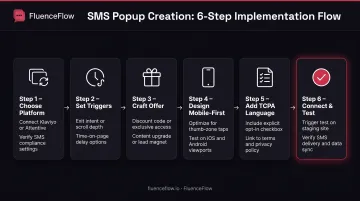
Choose a popup platform with native SMS sync. Use a popup tool that connects directly to your SMS stack (for example Alia, Privy, or your ESP’s built-in forms) or capture inside Klaviyo, Postscript, or Attentive. Skip tools that need custom webhooks so contacts and consent sync cleanly.
Set trigger and timing. Test scroll depth (50–70% is common), time delay (30–60 seconds on desktop, shorter on mobile), or behavioral triggers like exit intent and add-to-cart. Match the trigger to average session length and how shoppers actually engage.
Craft the offer. Pick one value exchange:
- Discount: most common, but it can erode margins
- Early access: strong for high-demand drops
- Exclusive content: fits premium brands
- VIP status: appeals to brand enthusiasts
Tie the offer to positioning and unit economics. High-AOV brands often skip discounts; consumable brands use them to win the first order.
Design mobile-first. Start from your platform’s responsive templates, then apply brand colors and fonts. Keep phone capture to a single field and turn on country-code auto-detection to cut entry errors.
Add TCPA-compliant language. Disclosure should cover:
- Message purpose and program description
- Frequency; be specific ("2-3 msgs/week")
- Opt-out instructions ("Reply STOP")
- Help keyword ("Text HELP for help")
- "Message and data rates may apply"
- Links to privacy policy and terms of service
- Connect SMS and test end-to-end. Enable automatic contact sync, then run signup on multiple devices and browsers. Confirm the welcome text sends quickly and new contacts land with the right tags in your SMS platform.
Advanced Optimization Strategies
Start with multi-step progressive disclosure. Platforms like Klaviyo and Attentive recommend collecting email first (lower barrier), then offering an SMS upgrade with an additional incentive, such as 5% more off. Once someone has given their email, asking for SMS feels less intrusive.
Trigger popups at high-intent moments. Match the offer to what the visitor is doing:
- Cart abandonment: 20% discount + SMS order updates
- Product page views: Restock alert signup
- Checkout page: Order tracking via text
Context-specific offers convert better than generic "join our list" requests.
Test gamification for higher engagement. Attentive reports that gamified formats lift opt-ins by revealing value before asking for a phone number. That small bit of effort from the visitor raises completion rates.
Run A/B tests one variable at a time. Isolate offer amount, timing, copy, or design. Run each test long enough for statistical significance, and prioritize high-impact variables (offer value, timing) before design tweaks like button color or font.
Calculate sample sizes from your baseline conversion rate and the minimum effect you want to detect. Optimizely and similar tools include calculators; a universal visitor minimum does not apply to every test.
Compliance Requirements for SMS Popups
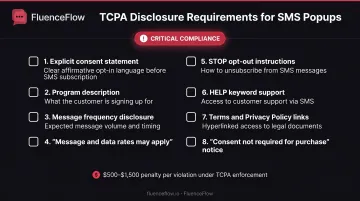
Understand TCPA explicit consent requirements. Every SMS popup must include clear, conspicuous language stating that the subscriber agrees to receive marketing texts. According to FCC guidance, commercial texts require written consent. Minimum language: "By entering your number, you agree to receive marketing texts from [Company Name]."
Display required disclosure elements:
- Program description (what they'll receive)
- Message frequency (use realistic estimates: "2-3 msgs/week," not "varies")
- Message and data rates may apply
- Opt-out instructions: "Reply STOP to opt out"
- Help keyword: "Reply HELP for help"
- Links to Terms of Service and Privacy Policy
- Notice about automated messages (if using autodialer)
- "Consent is not a condition of purchase" statement
Klaviyo and similar platforms provide disclosure templates, but ensure your specific language matches your program and complies with current regulations.
Implement double opt-in or verified opt-in. While single opt-in is legal, sending a confirmation text ("Reply YES to confirm") or using an onsite verification code reduces compliance risk. Double opt-in confirms subscriber intent and improves list quality by filtering out accidental signups or fake numbers.
Maintain compliant records and honor opt-outs. Keep timestamped records of consent, including IP address, page URL, and the exact language shown at signup. Process STOP requests immediately, within hours, not days.
As of April 2025, FCC rules require opt-out requests to be honored as soon as practicable and within 10 business days. Never re-add opted-out numbers without fresh explicit consent.
Understand the enforcement risk. TCPA statutory damages start at $500 per violation. Courts may increase this up to three times ($1,500) for willful or knowing violations. At those amounts, a single non-compliant campaign can create substantial legal exposure.
Frequently Asked Questions
What does it mean when SMS pops up?
An SMS popup is a website overlay that collects phone numbers for text message marketing. It typically appears after visitors scroll, spend time on a page, or take actions like adding items to cart.
What's the difference between single-step and multi-step SMS popups?
Single-step popups ask for a phone number immediately. Multi-step popups collect email first, then SMS on a second screen, which lowers friction and often improves total opt-ins.
When should the SMS popup appear on my website?
Wait until visitors have scrolled partway down the page or spent 30–60 seconds browsing. Immediate popups raise bounce rates by interrupting before anyone has engaged; use scroll-depth or time-based triggers instead.
Do I need legal compliance language in my SMS popup?
Yes. TCPA requires clear consent language covering message frequency, STOP to opt out, HELP for support, and message/data rate disclosures. Violations can cost $500 each, or up to $1,500 if willful.
Can I collect both email and SMS in the same popup?
Yes, but multi-step usually converts better than asking for both at once. Email first, then SMS, reduces friction and lifts completion rates.
Ready to build an SMS popup that drives real revenue? Start with one of the examples above, apply the design and compliance practices, and test systematically. Done well, SMS popups turn anonymous traffic into engaged customers and rank among your highest-ROI retention tactics.