Not all popups are created equal. Some are designed to build your email list, others focus on recovering abandoned carts, and still others announce limited-time promotions or gather customer feedback. E-commerce brands pay to drive traffic, but global conversion rates average just 2-3%, meaning most visitors leave without converting. Popups provide a second chance to capture value before that traffic disappears.
This guide explains the main types of popups, when to use each one, and how to choose the right format for your e-commerce business.
Key Takeaways
- Well-timed popups drive email signups, cart recovery, and sales without relying on paid traffic
- Effectiveness hinges on matching format, trigger, and goal, not on using more popups
- Scroll-triggered popups convert at 5.37%, beating exit-intent at 3.94% and immediate entry offers
- Strategic popups can hit 10%+ conversion rates and lift DTC revenue from owned traffic
- Match popup type to visitor stage: new visitors need trust-building, returning visitors respond to direct offers
What Are Popups?
Popups are overlay messages that appear on top of website content to prompt a specific user action. Common goals include:
- Growing an email or SMS list
- Offering a discount or incentive
- Pushing a visitor to complete a purchase
Modern popups are behavior-driven and targeted, not the intrusive "spray and pray" overlays that plagued the early internet.
Unlike static elements such as embedded forms, popups are temporary overlays triggered by user behavior. Typical triggers include:
- Exit intent
- Scroll depth
- Time spent on the page
That targeting lets e-commerce brands serve the right message at the right moment instead of interrupting every visitor on arrival.
Effective popups earn the interruption: they stay visible enough to get noticed, stay respectful of the experience, and trade real value for the visitor's information or action.
Why Popups Matter for E-commerce
E-commerce brands spend heavily on Facebook ads, Google search, and influencer partnerships to drive traffic. Yet average cart abandonment rates sit at 70.22%, and most first-time visitors leave without converting. Popups provide a second chance to capture value before that paid traffic walks away.
Well-designed popups convert visitors into owned marketing channels:
- Turn anonymous traffic into email and SMS lists you own and can remarket
- Email-signup popups convert at 4.82% on average across analyses of roughly 1 billion displays
- FluenceFlow clients average 10.6x ROI in the first 90 days from retention systems built on those lists
- Email and SMS drive 41% of total store revenue on average for those brands
Popups also support goals beyond list growth:
- Cut cart abandonment with last-chance incentives at exit
- Push limited-time offers that prompt an immediate purchase
- Segment visitors by preference or on-site behavior
- Collect zero-party data for personalized follow-up campaigns
Built around your margins, buying cycle, and customer behavior, not a generic template, they function as conversion and data-collection systems, not just overlays.
Types of Popups
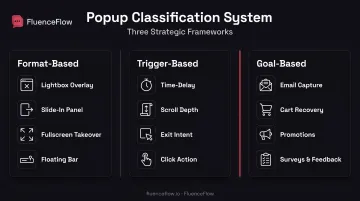
Popups can be categorized by format (how they display), trigger (when they appear), and goal (what action they drive). Understanding these distinctions helps you choose the right combination for your business objectives and audience.
Format-Based Types
Lightbox/Modal Popups
Centered overlays that dim the background and demand attention. Lightbox popups are ideal for high-priority offers like first-purchase discounts or exclusive lead magnets. They interrupt the browsing experience intentionally, so use them when the offer value justifies the disruption.
Fullscreen Welcome Mats
Take over the entire screen, making them impossible to miss. Best for major announcements, rebranding messages, or high-value offers on dedicated landing pages. Because they block all content, reserve them for moments when capturing attention matters more than uninterrupted browsing.
Slide-In Popups
Appear from the corner of the screen, typically bottom-right, without obscuring content. Slide-ins are less intrusive than lightboxes, making them ideal for blog content and educational pages. They work well when paired with scroll triggers.
Floating Bar Popups
Sticky banners that remain at the top or bottom of the page as visitors scroll. Perfect for persistent announcements like free shipping thresholds, ongoing sales, or countdown timers. Because they don't block content, floating bars can stay visible throughout the session without frustrating users.
Trigger-Based Types
Time-Delayed Popups
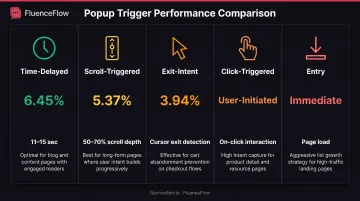
Appear after a visitor has been on the page for a set duration, such as 15 or 30 seconds. Research shows that 11-15 second delays convert at 6.45%, allowing visitors to engage with content before being interrupted. Time delays work well when you want to avoid annoying first impressions.
Scroll-Triggered Popups
Display after a visitor scrolls a certain percentage down the page, signaling genuine engagement. Scroll-triggered popups convert at 5.37%, outperforming exit-intent (3.94%) in one large dataset. They're ideal for blog posts, product pages, and long-form content where deeper engagement signals buying intent.
Click-Triggered Popups
Activated when a user clicks a specific link, button, or call-to-action. Often used for content upgrades, additional product information, or opt-in incentives that don't interrupt browsing unless the visitor explicitly requests more.
Entry Popups
Appear immediately on page load. Use these sparingly and only with mobile-friendly formats, as Google penalizes intrusive interstitials that cover content on arrival. If you do use entry popups, make them easily dismissible and test their impact on bounce rates.
Exit-Intent Popups
Triggered when a visitor shows abandonment behavior, such as moving the cursor toward the browser exit button (desktop) or rapid upward scrolling (mobile). Exit-intent popups are highly effective for cart recovery and last-chance offers because they target visitors who are already leaving.
Goal-Based Types
Email Opt-In Popups
Designed to grow your email list by offering a lead magnet, such as a discount code or downloadable guide, in exchange for an email address. The most common popup type for e-commerce brands, often paired with welcome flows for immediate follow-up.
Cart Abandonment Popups
Target shoppers who are leaving with items in their cart, offering last-chance incentives like free shipping or a limited-time discount. Exit-intent triggers work best here, catching visitors before they close the tab.
Promotional/Sales Popups
Announce limited-time offers, flash sales, or seasonal promotions. Use countdown timers and urgency-driven copy to create fear of missing out. Floating bars and lightbox formats both work well, depending on how aggressively you want to drive immediate action.
Survey/Feedback Popups
Collect customer insights, preferences, or satisfaction scores to improve marketing and product decisions. These can appear post-purchase, after a certain number of visits, or when a visitor shows exit intent. Keep surveys short: one or two questions maximum.
Social Proof Popups
Display recent purchases, customer reviews, or live visitor counts to build trust and encourage conversions. These often appear as small slide-ins rather than full overlays, providing reassurance without interrupting the browsing experience.
Product Recommendation Popups
Suggest related or complementary products based on browsing behavior or cart contents. Effective for increasing average order value, especially when triggered by exit intent on product pages or after adding an item to cart.
How to Choose the Right Popup Type
Start with your primary business goal. Are you building your email list from scratch? Recovering abandoned carts? Driving immediate sales through a flash promotion? Your goal determines which popup format, trigger, and messaging fit best.
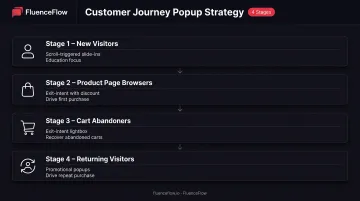
Match the popup to the visitor's stage in the customer journey:
- New visitors: Use scroll-triggered slide-ins on blog or product pages that educate and build trust without hard pressure
- Product page browsers: Exit-intent offers with discounts or free shipping reduce purchase friction
- Cart abandoners: High-intent prospects respond best to exit-intent lightbox popups as a final nudge
- Returning visitors: Direct promotional popups or restock alerts work well once they know your brand
Consider page context and user intent. Blog readers respond well to scroll-triggered popups after engaging with educational content. Visitors on checkout pages rarely convert on new popups, so suppress campaigns there.
Homepage visitors may tolerate entry popups if the offer is strong. On mobile, avoid intrusive formats that risk Google penalties for content-obscuring interstitials.
Plan your popup sequence strategically:
- Cap frequency so the same visitor does not see multiple popups in one session
- Avoid stacking a cart popup right after someone dismisses an email opt-in
- Run one campaign per visitor per session
- Suppress popups for users who already converted
Match tactics to unit economics, not generic templates. High-AOV, low-frequency brands need education and longer decision-cycle nurturing. Low-AOV, high-frequency consumable brands usually win with stronger first-order incentives and replenishment-oriented flows.
FluenceFlow builds popup campaigns around those economics and ties them into welcome and lifecycle flows, so list growth supports retention instead of sitting in isolation.
Popup Best Practices
Strong popups lead with value, respect the visit, and hand new subscribers straight into your email flows. Use these practices to keep conversion high without tanking UX or SEO.
Lead with the benefit. Say what the visitor gets (15% off, a free buying guide, early access), not what you want. "Get 15% off your first order" beats "Sign up for our newsletter" because value comes first.
Design mobile-first. More than half of e-commerce traffic is mobile, and Google penalizes intrusive mobile interstitials that block content on arrival. Keep popups responsive, with large tap targets and an obvious close control.
Research shows mobile users struggle with small hit areas and often hit Back to dismiss overlays. Make dismissal obvious and compatible with that behavior.
Stay on brand. Popups should feel like part of your site, not a third-party ad. Popups with images convert at 5.71% versus 3.98% without, when the image is relevant and high quality. Match fonts, colors, and tone to your identity.
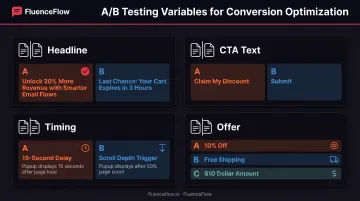
A/B test the levers that move opt-ins:
- Headline: benefit-driven vs. urgency-driven copy
- CTA text: "Claim My Discount" often beats "Submit"
- Timing: 15-second delay vs. scroll depth
- Offer: 10% off vs. free shipping vs. a dollar amount
Protect the experience. Make the close button obvious. Honor "do not show again," and never require an email (or any action) only to dismiss. Support Escape to close for keyboard users per W3C modal dialog guidance.
Connect capture to lifecycle. Sync popups to your ESP (Klaviyo on Shopify is the usual stack) so new subscribers enter a welcome flow immediately. FluenceFlow builds popup-to-Klaviyo handoffs this way so contacts start nurture sequences right away instead of sitting in a disconnected form.
Frequently Asked Questions
What are the different types of popups?
Popups are categorized by format (lightbox, slide-in, fullscreen, floating bar), trigger (exit-intent, scroll, time-delay, click), and goal (email capture, cart recovery, promotion, survey). Match the combination to your goal and how visitors behave on the page.
What are some examples of popups?
Common examples include exit-intent discount offers, email opt-ins with a free guide, cart-recovery incentives, scroll-triggered newsletter signups, and sale announcements with countdown timers.
What is a popup format?
Popup format refers to the visual presentation and placement style: centered lightbox overlays that dim the background, corner slide-ins that don't obstruct content, or full-screen welcome mats that take over the entire viewport.
How do I choose the right popup type for my website?
Start with your conversion goal (list growth, cart recovery, promotion), match the trigger to visitor behavior patterns (scroll engagement, exit intent, time delay), and test different formats to see what resonates with your specific audience and page context.
Do popups work for e-commerce stores?
Yes. Used with clear targeting, they recover abandoned carts, grow email lists, and can clear 10%+ conversion on well-matched offers. Platform data shows scroll-triggered popups convert at 5.37%.
Are popups bad for SEO?
Popups themselves don't hurt SEO, but intrusive interstitials on mobile that block content immediately on page load can be penalized by Google. Behavior-triggered popups that are easily dismissible and don't obscure content are SEO-safe.